TX Presents SX OS v2.9.2 Beta - With Improved Stealth Mode and More!

Another day, another SX OS update! Today, Team-Xecuter released their SX OS v2.9.2 beta.
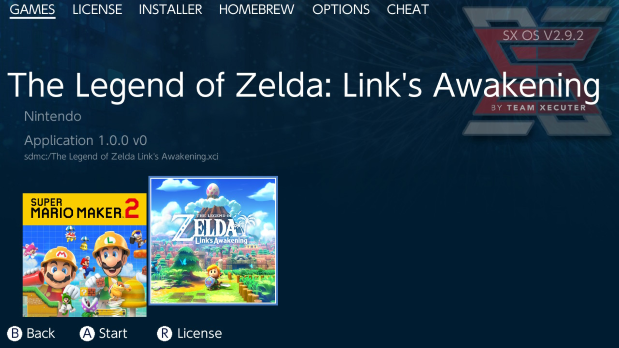
SX292.png

Good news, we been informed that TX has finally released v2.9.2 and it contains some new features, and also it looks this will soon be their 'STABLE' release and they report they are hard at work on SX OS v3.0.0 so we have alot to look forward to enjoy soon! Oh'yeah, it also fully supports the latest Nintendo Switch firmware v9.0.1 of course :)
  • Local Multiplayer over the internet (LAN play) is working again.
    Somewhere down the line we introduced a regression in functionality causing local multiplayer emulation to be broken and/or out of sync with the current lan-play implementation. This has been addressed and should work correctly again.
  • Extended scope of Stealth Mode
    Recently it has come to our attention that there was claims floating around about stealth mode being broken on SX OS v2.9+. We investigated these claims and are happy to let you know this is completely wrong. Stealth Mode behaved exactly the same like it always did. Nonetheless, we took this feedback/rumour as an opportunity to further tighten down on the stealthiness. From now you cannot start the eShop application if you have stealth mode enabled. Furthermore all error reporting and telemetry has been neutered. That means errors that are generated while using SX OS that might get you "flagged" won't be queued up for delivery when you boot into OFW anymore either!
  • Improved XCI game compatibility
    In our last update we already addressed some compatibility issues with re-packed XCI images, yet some XCI files were still not playable. We investigated this issue and as it turns out there are certain tools around (older versions of 'NSC Builder' for example) that generate bogus metadata for the (encrypted) 'Gamecard Info' that is part of the XCI header. Our gamecart emulation now detects these bad images and fixes them. If you want your XCI images to be future proof; please be careful with whatever post-processing you apply to XCI files though, we can't clean up after other people's mistakes indefinitely!
  • Rebooting SX OS
    If you select "restart" now from the power options menu you will actually reboot into SX OS. There is no need to replug your SX Pro dongle or send a payload from your computer when doing so. Additionally, if an error occurs you can also reboot into SX OS by simply pressing the power button. Neat!
SX292-1.png

They report this will be their final v2.x release as they are moving forward to a big v3.0 release with it having many suggestions they have received over the last few months from their valued SX OS users, so in the meantime grab their v2.9.2 release from their website.

—< Team-Xecuter - Rocking the Switch in 2019 and beyond! >—

:arrow: Source: MaxConsole
 
Yes, see the Tinfoil website. Blawar made everyone use Mercury because he didn't figure out how to expand the RAM limit for applets. And surprise, it's an nx-hbloader fork with missing license and copyright notice!
The guy makes good apps. It's just a shame he does stupid shit like this.
 
  • Like
Reactions: hippy dave
Nice update, but I was really hoping for faster USB scanning. Maybe they could implement some sort of db that will only scan for changes.
 
One more question: Which version of choidujour is recommenced with the latest SX OS 2.9.2 to update to 9.0.1?
 
For now the only issue is you can't install lock screen themes, because it crash in boot screen, the reboot features work 9/10 times (i reboot a lot because i install various themes and first need to power off and then i reboot to check evrything it's working).
 
There would be a dream if sxos integrated a media player/center in their sxos like kodi or something similar. But I guess it's just a dream of nostalgic, like the original xbox back in the day. That was freaking awesome the complete homebrew console
 
Rebooting SX OS
If you select "restart" now from the power options menu you will actually reboot into SX OS. There is no need to replug your SX Pro dongle or send a payload from your computer when doing so. Additionally, if an error occurs you can also reboot into SX OS by simply pressing the power button. Neat!

Lets get it straight, is this the same implementation as the Atmosphere one? Does this means if you now restart your console (both Atmosphere and SX OS) you will avoid booting to OFW and avoid burning fuses? And about crashes, I never experienced and seen crashes on the Switch, are there crashes that can reboot you directly to OFW (normally) without any popups/error messages..... is that avoided?
 
You're not supposed to be going online on cfw in the first place. What you said makes no sense.
Don’t be stupid if I am running my own retail back ups with the required certificates dumped in xci format then yes you can, because yes it makes perfect sense and tbh if I want to use my own xci dumped backups online I should be able too without problems. What your saying is retarded, your trying to say a broken stealth mode that breaks xci emulation when you turn it off for software to freeze is ok??? What planet are you on! It’s obviously not normal stop defending TX and trying to make out it’s normal procedure, it’s not! Try it for yourself you don’t have to go directly online just too test this issue out, just turn off stealth mode and try to start the actual xci Mario Maker 2 game, it freezes on the title screen.. and so does super smash bros and that’s not normal.

Edit: also please don’t tell me what I shouldn’t be doing when I have been playing online gaming xci backups for over 2 years now! I know what I am doing
 
Last edited by Reecey,
Don’t be stupid if I am running my own retail back ups with the required certificates dumped in xci format then yes you can, because yes it makes perfect sense and tbh if I want to use my own xci dumped backups online I should be able too without problems. What your saying is retarded, your trying to say a broken stealth mode that breaks xci emulation when you turn it off for software to freeze is ok??? What planet are you on! It’s obviously not normal stop defending TX and trying to make out it’s normal procedure, it’s not! Try it for yourself you don’t have to go directly online just too test this out, just turn off stealth mode and try to start the actual xci Mario Maker 2 game, it freezes on the title screen.. and so does super smash bros.
Your attitude sucks.

Using your official game cart on OFW is a work around for a bug you're running into. What's so hard about dealing with this situation in a civilized fashion?
 
Your attitude sucks.

Using your official game cart on OFW is a work around for a bug you're running into. What's so hard about dealing with this situation in a civilized fashion?
It’s not that I have had several comments telling me I shouldn’t be doing it I have been going online with my xci dumped backups for over 2 years now with the required certificates and it’s obviously breaking xci emulation when you turn stealth mode off I’m just saying it’s an issue and needs addressing I don’t need telling I shouldn’t be doing it also I do use emunand under hidden partition my ofw is on firmware 4.1.0 so I cannot go online. I’m sorry if I sound a bit out of line I don’t mean too but I have told TX about this issue since beta 2.9.0 came out so it should of been fixed they just ignored it.

Edit: anyway before you start riding your team xecuter high horse I have spent hours of my own time helping others with your sxos related issues so please show me a tad bit of gratitude please. As well as “a lot of money” spent on team xecuter products just remember that!
 
Last edited by Reecey,
Funny thing that some people had access to a way of loading xcis 2 years ago.

Sx OS was released june 2018. No other way of loading xci files is known by the public. First xci backups didn't use their own certificate in sx os. That's a feature that came with v1.1
 
Last edited by xabier,
Funny thung that some people had acces to a way of loading xcis 2 years ago.

Sx OS was released june 2018. No other way of loading xci files is known by the public. First xci backups didn't use their own certificate in sx is.
Yes they did if they were properly dumped.
 
I still think modding the switch's firmware this early in its life is stupid wait until its stopped production not when nintendo keep patching it.
 
Tested! After uninstalling Auto rcm it boots in Sx Os after restart and after turning off and on again, atleast for me
before i update i would like to know something about the rebboting Feature. Can i turn it of? if no how kan i boot now into the original Firmware?
 

Site & Scene News

Popular threads in this forum