Homebrew Official Retroarch WiiU (wip.)

  • Thread starter Thread starter aliaspider
  • Start date Start date
  • Views Views 2,686,631
  • Replies Replies 15,196
  • Likes Likes 93
  • Like
Reactions: Walo
Thank you @worm28

I have a last problem. When i try to load a rom from the playlist it tell me "could not load from playlist".

My roms are located to the sd card and here is the code in the playlist.ipl :

sd:\roms\neogeoroms\2020bb.zip
2020 Super Baseball (set 1)
DETECT
DETECT
DETECT

What is wrong in this code ?
That won't work as the path has to be with / instead of \ :)
For further understanding look at the guide: https://gbatemp.net/threads/lordelans-retroarch-guide-clean-games-collection-faq.468193

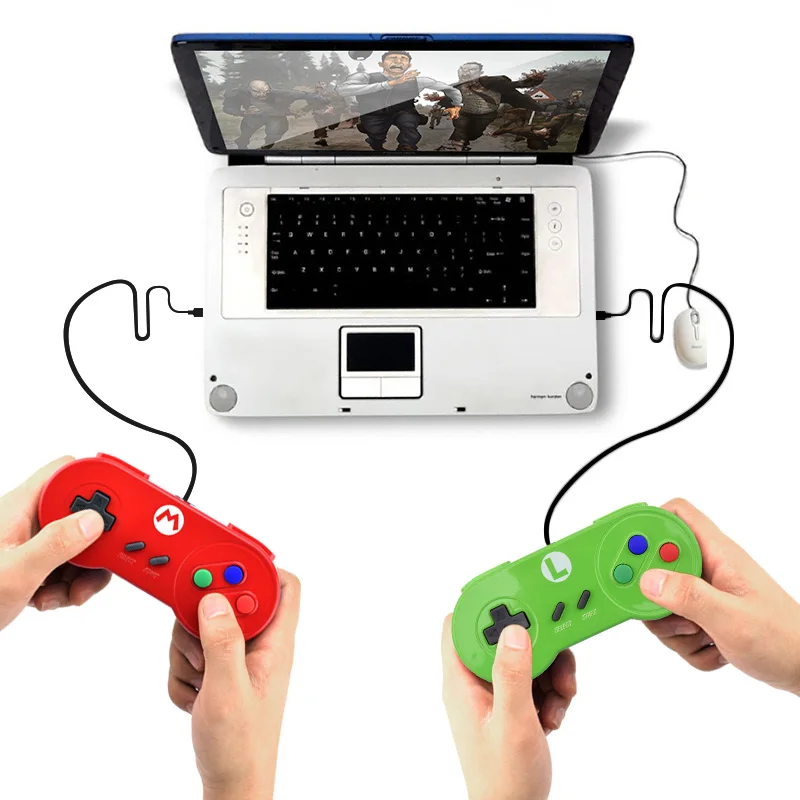
By the way, what do you guys think now that we have HID support? Would these work?

Data-Frog-Special-Custom-For-Nintendo-SNES-USB-Controller-Glossy-Shell-Gaming-Joystick-Gamepads-For-Windows.jpg


https://www.aliexpress.com/item/Dat...ick-Gamepads-For-Windows/32798223929.html?s=p

Also another question:
I have the GC USB Adapter connected to the two front USB ports (yes, it really takes up two ports).
Could I use a USB hub only for the front to use the GC USB Adapter and another two USB gamepads (like those I linked above) or does the GC USB Adapter have to be plugged in directly?
Would an active USB hub help? Anyone tried anything like that already?

--------------------- MERGED ---------------------------

FB Alpha v0.2.97.30
Yes, just navigate to: Settings>User Interface>Menu>Menu Icon Theme. Then press Right on the D-Pad to cycle through Themes :)

ploggy, I hope you don't mind that I added those to my guide's FAQ as well. :)
https://gbatemp.net/threads/lordelans-retroarch-guide-clean-games-collection-faq.468193
 
  • Like
Reactions: ploggy
By the way, what do you guys think now that we have HID support? Would these work?

Data-Frog-Special-Custom-For-Nintendo-SNES-USB-Controller-Glossy-Shell-Gaming-Joystick-Gamepads-For-Windows.jpg


https://www.aliexpress.com/item/Dat...ick-Gamepads-For-Windows/32798223929.html?s=p

They advertise Windows/Mac compatibility, so it's got a very high likelihood of working with the network client at a minimum. The question is HID vs. XInput; but since they say it runs on Macs without extra drivers I'd assume they're HIDs (or possibly DInputs, not sure if that'd work). That said, they're almost certainly HIDs which means they'll probably work with a config file.
 
They advertise Windows/Mac compatibility, so it's got a very high likelihood of working with the network client at a minimum. The question is HID vs. XInput; but since they say it runs on Macs without extra drivers I'd assume they're HIDs (or possibly DInputs, not sure if that'd work). That said, they're almost certainly HIDs which means they'll probably work with a config file.
Alright that's what I was hoping to hear.
But as you're mentioning it ... the network client doesn't work with RetroArch since it's HID to VPAD only and RetroArch can't be launched after HID to VPAD or am I confused?
 
They advertise Windows/Mac compatibility, so it's got a very high likelihood of working with the network client at a minimum. The question is HID vs. XInput; but since they say it runs on Macs without extra drivers I'd assume they're HIDs (or possibly DInputs, not sure if that'd work). That said, they're almost certainly HIDs which means they'll probably work with a config file.
so how is the rest of the cores going? still giving you trouble?
 
  • Like
Reactions: cucholix
Also another question:
I have the GC USB Adapter connected to the two front USB ports (yes, it really takes up two ports).
Could I use a USB hub only for the front to use the GC USB Adapter and another two USB gamepads (like those I linked above) or does the GC USB Adapter have to be plugged in directly?
Would an active USB hub help? Anyone tried anything like that already?
grey plug in the gc adapter is only used for rumble feature, it just draw more power from Wii U's usb slot, so yes you can connect it to a hub as it doesn't carry any data. I have it unpluged, the wavebirds don't have rumble built in anyway :lol:
 
Last edited by cucholix,
grey plug in the gc adapter is only used for rumble feature, it just draw more power from Wii U's usb slot, so yes you can connect it to a hub as it doesn't carry any data. I have it unpluged, the wavebirds don't have rumble built in anyway :lol:
Oh great to hear that! Thank you very much for that info! :)
 
  • Like
Reactions: cucholix
Alright that's what I was hoping to hear.
But as you're mentioning it ... the network client doesn't work with RetroArch since it's HID to VPAD only and RetroArch can't be launched after HID to VPAD or am I confused?
AFAIK the RetroArch HID support is through the controller_patcher engine. You can see it as an integrated HID to VPAD, and iirc it has all the same features: including the network client.
so how is the rest of the cores going? still giving you trouble?
Haven't done much since my Gamepad has gone missing and I was too stupid to play with meta.XML while I still could. Since I can't test anything, there really isn't much I can do in terms of debugging those cores.
 
AFAIK the RetroArch HID support is through the controller_patcher engine. You can see it as an integrated HID to VPAD, and iirc it has all the same features: including the network client.

Wait ... that means I could even use my Switch Pro Controller for RetroArch already as Maschell teased it on Twitter?
Definitely gotta look into this. Thanks again!
 
Haven't done much since my Gamepad has gone missing and I was too stupid to play with meta.XML while I still could. Since I can't test anything, there really isn't much I can do in terms of debugging those cores.
You can navigate hbl using a Wiimote too :3
I just hope you manage to upload your cores to github so future releases use them.
 
Last edited by cucholix,
You can navigate hbl using a Wiimote too :3
I just hope you manage to upload your cores to github so future releases use them.
You can also use a Wii U Pro Controller :D
And a Wiimote with a CC/CCP, :P
Pressing X with any of these changes the TV output image to that of the Gamepad for easy selection.
What I'm not sure though is how can you enter the HBL apps with only a CCP or a Wii U pro Controller, does the HBL support Wiimote IR pointing?
 
You can also use a Wii U Pro Controller :D
And a Wiimote with a CC/CCP, :P
Pressing X with any of these changes the TV output image to that of the Gamepad for easy selection.
What I'm not sure though is how can you enter the HBL apps with only a CCP or a Wii U pro Controller, does the HBL support Wiimote IR pointing?
HBL only support IR pointing and touchscreen to select apps, so it's not possible launch an app with CC Pro/Wii U Pro Controller.

EXCEPT by using this HBL build by @CreeperMario
 
Last edited by cucholix,
AFAIK the RetroArch HID support is through the controller_patcher engine. You can see it as an integrated HID to VPAD, and iirc it has all the same features: including the network client.

Haven't done much since my Gamepad has gone missing and I was too stupid to play with meta.XML while I still could. Since I can't test anything, there really isn't much I can do in terms of debugging those cores.

What're you gonna do, so that's it then? There's no way it can be replaced.... :(
 
HBL only support IR pointing and touchscreen to select apps, so it's not possible launch an app with CC Pro/Wii U Pro Controller.

EXCEPT by using this HBL build by @CreeperMario
Praise the dev for that xD
I forgot to update mine some time ago, will do so today when updating Luma, HBL and bootstrap for the 3DS as well.

--------------------- MERGED ---------------------------

What're you gonna do, so that's it then? There's no way it can be replaced.... :(
It won't all go to waste, he did manage to compile quite a bunch of them which are working.
He could very well make the pull request to add the changes for those cores to the official repository for the ones he did manage to get in there :P.
 
Praise the dev for that xD
I forgot to update mine some time ago, will do so today when updating Luma, HBL and bootstrap for the 3DS as well.

--------------------- MERGED ---------------------------


It won't all go to waste, he did manage to compile quite a bunch of them which are working.
He could very well make the pull request to add the changes for those cores to the official repository for the ones he did manage to get in there :P.

That's all well and good, but what of the future? Without a gamepad, it will be stagnant after a certain point.
 
You can navigate hbl using a Wiimote too :3
I just hope you manage to upload your cores to github so future releases use them.

I couldn't even load HBL - both browserhax and Haxchi popped up a message asking me to connect a Gamepad in order to continue. I knew I'd be fine once I got it loaded, but since I didn't do meta.XML tweaks while I could, I was (and still am) kinda screwed.

That's all well and good, but what of the future? Without a gamepad, it will be stagnant after a certain point.

Missing as in I've lost it, not missing as in never to be seen again. Don't worry about it.
 
I tried this for the first time, loading the retroarch elf from the latest nightly, and I just got a black screen :(

also whats a good way to edit the cfg file? Everything's all bunched together in notepad.

All I want to do is see if this supports RetroAchievements yet.
 
Last edited by TrainerAbu,
I couldn't even load HBL - both browserhax and Haxchi popped up a message asking me to connect a Gamepad in order to continue. I knew I'd be fine once I got it loaded, but since I didn't do meta.XML tweaks while I could, I was (and still am) kinda screwed.


Missing as in I've lost it, not missing as in never to be seen again. Don't worry about it.
Just lend a Gamepad from a friend or what's the problem?
 

Site & Scene News

Popular threads in this forum