Gaming Fate/Extra CCC Translation Project

  • Thread starter Thread starter Erestil
  • Start date Start date
  • Views Views 72,997
  • Replies Replies 79
  • Likes Likes 1
Hopefully the text will work correctly when inserted but obviously I haven't tested and it'll be interesting to see if there's any line limits in place.

I did noticed though that I kinda managed to break the name entry, not a major problem but it looks a bit silly.
It would also be really cool to be able to have more than 4 letters for name since it limits latin/roman naming

cccname0.jpg
 
Hopefully the text will work correctly when inserted but obviously I haven't tested and it'll be interesting to see if there's any line limits in place.

I did noticed though that I kinda managed to break the name entry, not a major problem but it looks a bit silly.
It would also be really cool to be able to have more than 4 letters for name since it limits latin/roman naming

Yep, the character naming screen will need some touch up, not sure how at the moment but we'll see. As well as name length.

Right now, I'm trying to figure out the CPK settings that the game will accept. It seems it's picky and if the CPK isn't rebuilt a certain way, it gets stuck on the loading screen after choosing your class. CPKs take forever to build, so it's taking me a little while.

As for line length limits, I've gotta test that out, too. The game does have manual line breaks (0x0A) but definitely will want to test for any limits.
 
Sol Trigger had a system where if you when over 31 characters the 32nd would be lost and a new line would automatically be started,
so I was thinking that similar might apply in this case. Should be possible to solve though if that is the case.

Edit: on a side note the menu headings and character names appear to be images not font, possibly an issue if for a full translation attempt
 
It appears that the modifications you made to the EBOOT only effect the double-byte characters in the font (well, at least as far as the spacing goes). See the below screenshot:
2iu883o.jpg


Anyway, I've been trying to figure out how to get rid of the mono-spacing but maintain the original width of the font characters. If you look on page 2, I posted a screenshot with the game using the font from the official NA release of Fate/Extra. It would be preferential if it could look like that, minus the mono-spacing.
 
Does the spacing work with Full Width like this?
Obviously the byte length will be higher though, if you have a text file I can test with I'll look into the spacing,
never would have guessed they would be different. As for changing the width it shouldn't be a problem
 
Does the spacing work with Full Width like this?
Obviously the byte length will be higher though, if you have a text file I can test with I'll look into the spacing
Easiest way to change any text is to have JPCSP decrypt the install file. And then use QuickBMS + the CPK Unpack script to unpack the files. The first dialog text in the game is located in field_map_071.pak

There isn't any compression, just search that file for the following text string:
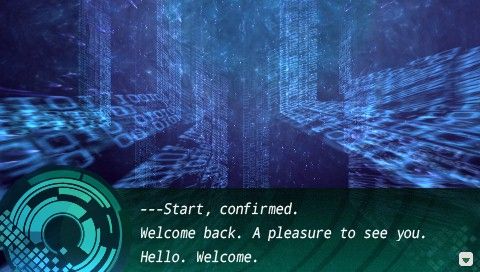
―――スタート、確認しました。
お帰りなさいませ。
ようこそ。こんにちは。うェるカム。

And then you use CRI Packed File Maker to re-create the CPK.
Data-align: 2048
File mode: Filename
Try Compression

That will work for the prologue, but the game will get stuck on the loading screen after class selection. Still, you'll be able to test that dialog above.

I haven't tried the full width English. But yes, I believe the edits that you made fixed the spacing for all full width characters.
 
  • Like
Reactions: JamRules
I got the CPK repack to go past the loading screen. Apparently, this game doesn't like Try Compression being used on the CPK. Another game that I've been working on doesn't care, so I didn't think about it before. The new CPK ends up being about 500MB larger, but so far it doesn't seem to screw anything up.

There does appear to be auto new line. From what I can tell, it is 40 bytes per line. So, if we can get the half width English spacing fixed, that's 40 characters per line or 120 characters per dialog box (well, maybe less because of the PSP screen size).

The full width English spacing issue is fixed. Using JamRules EBOOT modifications, I made a few changes so that 1) the character width isn't scrunched, it's the original size and 2) changed the tile size from 8 pixels to 9 pixels, so that they aren't too close together. The only problem is that lowercase characters that drop below the line get 1-2 pixels cut off, so I'm trying to figure out how to fix that.

There is 2 problems with using full width English, though. 1) It will take up double the space in the files, compared to half width and 2) We will be limited to 20 characters per line. Unless the auto new line isn't calculated by total number of bytes but instead by total number of characters. I've got to test that.
 
  • Like
Reactions: JamRules
Last night I was looking into the name entry, it wasn't too difficult to get it to accept more chars and it seems to load and save fine,
the big problem is each name is next to each other in ram and has 12 bytes space. The names read until null so at the moment they're overflowing into each other.

name_00.png
 
Looking good, JamRules!

I fixed (or it seems like I fixed) the spacing issue with the half width English.

Basically, all I should have to do now is make the edits in the EBOOT. It works when I make the changes to the memory viewer in PPSSPP.

What I did was I made the game treat single byte the same as double byte. So it now reads the single byte text 2 bytes at a time instead of 1. And because it's now running through the exact same assembly that the double byte was, the spacing is now fixed for the half width, too! :)

NPJH50505_00006_zps40f9281e.jpg
 
  • Like
Reactions: JamRules
Very nice, fixed font should really help a proper translation. Is the topic creator Erestil still planning to do a translation?
 
Not sure, he might. cj_iwakura might want to, also? And the person here has been translating the script as they play the game.

Now that the font is good to go, I'll start working on dumping the text/inserting the text.

Oh and by the way, the EBOOT modifications that I made breaks the double byte, but that really shouldn't matter for a translation.
 
Oh and by the way, the EBOOT modifications that I made breaks the double byte, but that really shouldn't matter for a translation.

Names are stored in double byte so that could be a problem but I'm looking into a way to make the alphabet use half width
 
Names are stored in double byte so that could be a problem but I'm looking into a way to make the alphabet use half width
It could be a potential problem. Not sure how hard it will be for this game, but some games have it in the EBOOT and it can be as simple as changing the full width to half width like you would any generic text in the game. Could end up being way harder than that, though.
 
I'm trying to track down where the text is but your suggest might work,and it looks like
ideally the spacing will need to be done for half width only to the prevent breaking
 
I've gotten the font from the official NA release of Fate/Extra into the game:
NPJH50505_00007_zps476a647a.jpg


As you can see though, the single byte space character is 14 pixels wide. The original font had this same problem, so it isn't the font from the first game that is doing it. I'm trying to see if I can get it down to 8 pixels wide. It would look better, that way.
 
Fantastic work. I'm an editor, but I work with a translator who I'm confident could help. So yeah, if you need help, count me in.
 
Sounds good, once I get the text dumper/inserter done, I might make a new thread over in the hacking and homebrew forum for the project.

At the moment, though, I am trying to shrink the space character.

EDIT

Blegh.... Tested on a real PSP and one of the changes to the EBOOT seems to have broken the game (black screen after PSP logo). This will slow things down a bit...
 
Blegh.... Tested on a real PSP and one of the changes to the EBOOT seems to have broken the game (black screen after PSP logo). This will slow things down a bit...
Back when I was messing around with this, I had this problem where the ISO built with the uncompressed CPK would work just fine when I tested it on PPSSPP, but blackscreen on load on an actual PSP. Maybe it's related?

Of course, my methods were kind of sloppy so there's a chance some other change snuck in there and broke it, but I'm pretty sure that was it.
 
Back when I was messing around with this, I had this problem where the ISO built with the uncompressed CPK would work just fine when I tested it on PPSSPP, but blackscreen on load on an actual PSP. Maybe it's related?

Of course, my methods were kind of sloppy so there's a chance some other change snuck in there and broke it, but I'm pretty sure that was it.

You are correct.

It may be because it's not just a normal CPK, but also the install file. I've got a friend giving me some help, I'll update later if we get it working.

EDIT

Meanwhile, I managed to fix the space character:

BEFORE:
NPJH50505_00007_zps476a647a.jpg


After:
NPJH50505_00008_zpsa0b2944a.jpg


:D
 

Site & Scene News

Popular threads in this forum