How to *actually* get the automatic GBC/GBA coloring for classic Gameboy games on 3DS VC (cia)

It took me a while to figure out how to actually get this working, when I tried it for SML3 Wario Land, since the fan colorization is not perfect, and the auto coloring has some charm to it and is really decent!
At first I ever only found people saying it's not possible, or you'd need to put color codes manually from a list into a menu in New Super Ultimate VC Injector for 3DS, however the order is not necessarily correct for some games, and when setting colors correctly for major graphics, can make others look (completely) broken.

So what you have to actually do is way more simple and works:
Chose RetroArch Gambatte injection method instead of direct GB VC, then in "edit content options" (very bottom), there you go to "edit core-specific options" (bottom right), and on the first tab "Gambatte: GB Colorization" chose "auto" instead of "disabled".

Anything else you can edit to your liking, just not other color/palette options, I guess!
If screenshots are still needed, I can provide them, however I think this explains it well enough :)
 
Last edited by Phantron,
Just for the record, your tutorial is saying to not use the VC emulator and instead use the retroarch emulator. Which is what everybody else has also been saying when they say the colorization isn't perfect when using the VC emulator.

I believe you meant how to get the correct colorization for games added to the home menu via standalone installation / forwarder?
 
  • Like
Reactions: G25900
There is 0 auto coloring for classic GB games in VC, you only have the palette options with the button combinations, of course you could use a completely seperate emulator, but then you can't have the games as standalone VC channels

wario-land-super-mario-land-3-game-boy-wide.png

Wario-Land-Super-Mario-Land-3-E-2022-10-26-08.28.39.jpg


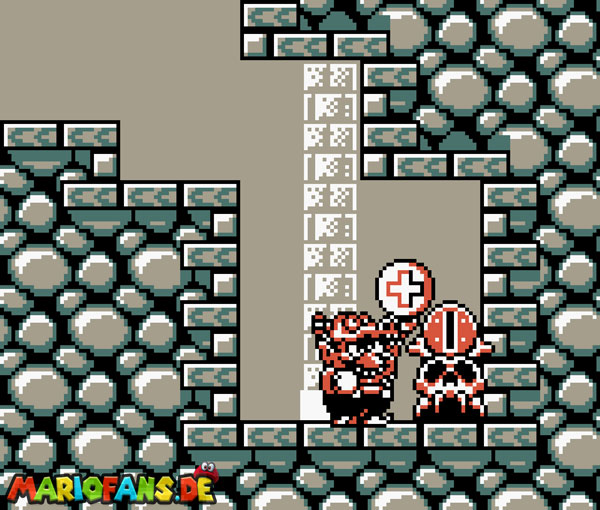
In vanilla VC for SML3 Wario Land, everything is grey
In GBC/GBA coloring, majority of graphics are sepia or similar, most characters/enemies and objects are orange, hearts are blinking in red, dropped single coins are yellow, Lava area (Stove Canyon) and levels are mostly red, the Ice area (Sherbet Land) is mostly light-blue, and so on

I couldn't find this solution I posted here, before anywhere, so it's there now :)
 
Last edited by Phantron,
Again, I'm not saying it doesn't work, I'm only saying that the way you did it is by not using the Virtual Console (the official Nintendo emulator) and instead using the RetroArch emulator.

What you did is simply to bundle the Rom and retroarch in a single program similar to what Nintendo does, but just not with Nintendo's emulator.
 
  • Like
Reactions: G25900
Again, I'm not saying it doesn't work, I'm only saying that the way you did it is by not using the Virtual Console (the official Nintendo emulator) and instead using the RetroArch emulator.

What you did is simply to bundle the Rom and retroarch in a single program similar to what Nintendo does, but just not with Nintendo's emulator.
GBA VC isn't even really emulation on 3DS, it's basically native, which is why so many people prefer it. The reason this post is pretty misleading is because emulating GBA games is totally different than running them natively.
 
  • Like
Reactions: Alxandr13
GBA VC isn't even really emulation on 3DS, it's basically native, which is why so many people prefer it. The reason this post is pretty misleading is because emulating GBA games is totally different than running them natively.
even without the technical side of things a big giveaway is the massive difference in how both run as there have been a good chunk of gba emulators on the 3DS none were very close to being as good as you'd expect.

GPSP's core in RA is close but doesn't quite hit the mark, but yeah like you said the native hardware that results in consistently good performance is why most prefer it, though you sacrifice emulator exclusive stuff which i personally don't mind
 

Site & Scene News

Popular threads in this forum