


So, I wanted to try the 'two global palettes' option on GB VC (Injection method: GB Virtual Console with linking), specifically with Pokemon Kanto Expansion Pak.
I tried applying the global palettes as seen below:

Both palettes were made with colors native to GBC (to the best of my understanding).
The default one I made with these colors from a Pokemon Puzzle Challenge Palette from Lospec


The alternative one is the Pastel Mix that you get by hitting down on GBC startup.

Testing them both inside NSUI, the palettes seem fine.
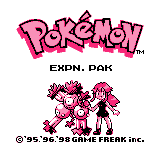
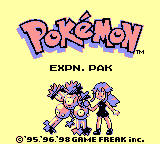
However, after exporting and installing the CIA file to my 2ds xl, they came out looking like this:


It seems that only 1 or 2 color are getting replaced.
Has anyone had this problem before?
Does anyone know why they're coming out like this or how the palettes can get applied properly?
Thanks
I tried applying the global palettes as seen below:
Both palettes were made with colors native to GBC (to the best of my understanding).
The default one I made with these colors from a Pokemon Puzzle Challenge Palette from Lospec
The alternative one is the Pastel Mix that you get by hitting down on GBC startup.
Testing them both inside NSUI, the palettes seem fine.
- Default Palette
- Alternative Palette
However, after exporting and installing the CIA file to my 2ds xl, they came out looking like this:
- Default Palette
- Alternative Palette
It seems that only 1 or 2 color are getting replaced.
Has anyone had this problem before?
Does anyone know why they're coming out like this or how the palettes can get applied properly?
Thanks


