How to fix games not showing up on USBLOADERGX (Tutorial)
Go to your WBFS Folder, and open any game of choice.

Inside of that game folder, change the name from anything else, to just the Raw id. No brackets, nada, nothing.
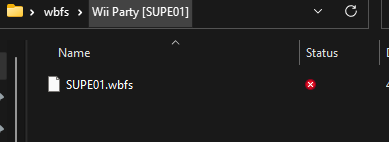
If it still doesn't work, go into hard drive settings, press the first option, and it should show your usb drive, change the install directories to Gamename [GAMEID] or if you have a WBFS Formatted Drive, change the directory to none. If it still doesn't show up, go to features, scroll down, and press Reset All Cached Titles, this will reset the cache so the newer game appears, just like wiiflow does.
Inside of that game folder, change the name from anything else, to just the Raw id. No brackets, nada, nothing.
If it still doesn't work, go into hard drive settings, press the first option, and it should show your usb drive, change the install directories to Gamename [GAMEID] or if you have a WBFS Formatted Drive, change the directory to none. If it still doesn't show up, go to features, scroll down, and press Reset All Cached Titles, this will reset the cache so the newer game appears, just like wiiflow does.