Today I am rising out of the dead to announce a new project I've been working on for about a month now: introducing FriishProduce.
What is this?
FriishProduce is an automated WAD injector which allows for ROM/SWF replacement and customization in certain Wii VC channels. What's unique about it compared to other injectors? By handling many steps directly from the program's code, it bypasses several third-party assets & apps which may otherwise be required in Wii VC injection (such as Wii Common Key, and most of HowardC's tools). Some examples:
WAD/U8 handling using libWiiSharp
VC ROM injection through hex writing and/or file replacement - bye-bye AutoInjectuwad
Automatic banner/icon editing using VCBrlyt
Generates custom savedata image using original WAD's source TPL/WTE(s) - good riddance VCIconGen
Automatically edits savedata text where available using hex writing - Sayonara VCSaveInject
Additional content/emulator options for each platform where supported
Replace WAD contents with forwarder to auto-load specific emulator core and ROM
This was actually based off of an earlier project that I worked on back in 2020, until it was left abandoned and eventually wiped after my hard drive failed. I started work on a preliminary revision of FriishProduce for around three weeks before my then-seven-month-old drive also ended up failing, after which I coded the current version in about a week or so.
Download these files, then register them using regsvr32.
Additionally, you will also need WAD files to be added to the applications's bases folder.
When first opening FriishProduce, select a platform, then go to the next page, click the "+" button and search for a WAD. If it is supported by the current version of the database, then the WAD file will be copied to the bases folder.
NES/Famicom
Kirby's Adventure (USA; EUR; JPN; KOR) - ROM CHR size: 32 x 8 KB; ROM PRG size: 32 x 16 KB
Ninja Gaiden (EUR/PAL60) - ROM CHR size: 16 x 8 KB; ROM PRG size: 8 x 16 KB
Super Mario Bros. 3 (USA; EUR; JPN; KOR) - ROM CHR size: 16 x 8 KB; ROM PRG size: 16 x 16 KB
Your ROM size must not exceed the total of the base ROM embedded within the WAD.
SNES/Super Famicom
Donkey Kong Country 2/Super Donkey Kong 2 (USA; EUR; JPN; KOR) - original ROM size: 4 MB
Mario's Super Picross (EUR/PAL60) - original ROM size: 1 MB; can support ROMs at least 4 MB
Nintendo 64
Bomberman Hero (USA; EUR; JPN)
Custom Robo V2 (JPN)
F-Zero X (USA; EUR; JPN)
The Legend of Zelda: Ocarina of Time (USA; EUR; JPN)
Mario Golf (USA; EUR; JPN)
Mario Kart 64 (USA; EUR; JPN; KOR)
Mario Party 2 (USA; EUR)
Ogre Battle 64: Person of Lordly Caliber (USA; EUR/PAL60)
Sin and Punishment (USA; EUR/PAL60; JPN)
Star Fox 64/Lylat Wars (USA; EUR; JPN; KOR)
Super Mario 64 (USA; EUR; JPN)
Yoshi's Story (USA; EUR; JPN)
Your ROM size must not exceed the total of the base ROM embedded within the WAD.
Master System
Phantasy Star (USA; EUR) - emulator revision: v3
Sonic the Hedgehog (USA; EUR; JPN) - emulator revision: v2
Mega Drive/Genesis
Comix Zone (USA; EUR; JPN) - emulator revision: v1
Pulseman (USA; EUR) - emulator revision: v3
Sonic the Hedgehog 3 (USA; EUR; JPN) - emulator revision: v2
Shockwave/Adobe Flash
Flash Placeholder (USA; EUR) / Back to Nature (EUR)
If you are using the Flash Placeholder, search for it at the MarioCube website > WADs > Flash Injects, then download the WAD corresponding to your Wii's region.
See the Wiki for a more detailed explanation on setup & usage. TL;DR:
Select a target platform, then browse for a ROM, and select a base WAD.
Optionally, you can also browse for a *.bps/*.ips to be patched to the ROM before injection.
(Optional) Toggle the "Customize" checkbox, then fill in the relevant fields with the game's title, a shortened version thereof if needed, its release year and the number of players.
An image of the title screen is also recommended, but may not be needed if you are injecting a non-cosmetic ROM hack (e.g. a randomizer, TAS hack, etc.). Left click on the image field to browse for a new file, and right/middle click to remove it.
Enter a title ID and change any content options to your liking.
Save the WAD and you're done!
Make sure you have a (v)Wii NAND backup in case anything goes wrong!
This program uses the following third-party components and apps:
libWiiSharp (orig. author: Leathl), forked by WiiDatabase.
Forwarder DOL generated from ModMii Classic (application author: XFlak) (file renamed as "forwarder.dol")
I would also like to thank the following people:
SuperrSonic for reverse-engineering much of Wii software and official emulator code, and in particular, his fork of RetroArch Wii.
SaulFabre for archiving several tools and aiding in research & documentation.
Larsenv for his astounding work in the Wii homebrew community, and for originally disclosing a method for Flash WAD injection (GBAtemp thread).
And of course, the team at the 0RANGECHiCKEN release group, including lolsjoel, and the late G0dLiKe, without whose work this project would not have been possible.
This application is distributed and licensed under the GNU General Public License v3.0.
Today I am rising out of the dead to announce a new project I've been working on for about a month now: introducing FriishProduce.
What is this?
FriishProduce is an automated WAD injector which allows for ROM/SWF replacement and customization in certain Wii VC channels. What's unique about it compared to other injectors? By handling many steps directly from the program's code, it bypasses several third-party assets & apps which may otherwise be required in Wii VC injection (such as Wii Common Key, and most of HowardC's tools). Some examples:
WAD/U8 handling using libWiiSharp
VC ROM injection through hex writing and/or file replacement - bye-bye AutoInjectuwad
Automatic banner/icon editing using VCBrlyt
Generates custom savedata image using original WAD's source TPL/WTE(s) - good riddance VCIconGen
Automatically edits savedata text where available using hex writing - Sayonara VCSaveInject
Additional content/emulator options for each platform where supported
Replace WAD contents with forwarder to auto-load specific emulator core and ROM
This was actually based off of an earlier project that I worked on back in 2020, until it was left abandoned and eventually wiped after my hard drive failed. I started work on a preliminary revision of FriishProduce for around three weeks before my then-seven-month-old drive also ended up failing, after which I coded the current version in about a week or so.
Download these files, then register them using regsvr32.
Additionally, you will also need WAD files to be added to the applications's bases folder.
When first opening FriishProduce, select a platform, then go to the next page, click the "+" button and search for a WAD. If it is supported by the current version of the database, then the WAD file will be copied to the bases folder.
NES/Famicom
Kirby's Adventure (USA; EUR; JPN; KOR) - ROM CHR size: 32 x 8 KB; ROM PRG size: 32 x 16 KB
Ninja Gaiden (EUR/PAL60) - ROM CHR size: 16 x 8 KB; ROM PRG size: 8 x 16 KB
Super Mario Bros. 3 (USA; EUR; JPN; KOR) - ROM CHR size: 16 x 8 KB; ROM PRG size: 16 x 16 KB
Your ROM size must not exceed the total of the base ROM embedded within the WAD.
SNES/Super Famicom
Donkey Kong Country 2/Super Donkey Kong 2 (USA; EUR; JPN; KOR) - original ROM size: 4 MB
Mario's Super Picross (EUR/PAL60) - original ROM size: 1 MB; can support ROMs at least 4 MB
Nintendo 64
Bomberman Hero (USA; EUR; JPN)
Custom Robo V2 (JPN)
F-Zero X (USA; EUR; JPN)
The Legend of Zelda: Ocarina of Time (USA; EUR; JPN)
Mario Golf (USA; EUR; JPN)
Mario Kart 64 (USA; EUR; JPN; KOR)
Mario Party 2 (USA; EUR)
Ogre Battle 64: Person of Lordly Caliber (USA; EUR/PAL60)
Sin and Punishment (USA; EUR/PAL60; JPN)
Star Fox 64/Lylat Wars (USA; EUR; JPN; KOR)
Super Mario 64 (USA; EUR; JPN)
Yoshi's Story (USA; EUR; JPN)
Your ROM size must not exceed the total of the base ROM embedded within the WAD.
Master System
Phantasy Star (USA; EUR) - emulator revision: v3
Sonic the Hedgehog (USA; EUR; JPN) - emulator revision: v2
Mega Drive/Genesis
Comix Zone (USA; EUR; JPN) - emulator revision: v1
Pulseman (USA; EUR) - emulator revision: v3
Sonic the Hedgehog 3 (USA; EUR; JPN) - emulator revision: v2
Shockwave/Adobe Flash
Flash Placeholder (USA; EUR) / Back to Nature (EUR)
If you are using the Flash Placeholder, search for it at the MarioCube website > WADs > Flash Injects, then download the WAD corresponding to your Wii's region.
See the Wiki for a more detailed explanation on setup & usage. TL;DR:
Select a target platform, then browse for a ROM, and select a base WAD.
Optionally, you can also browse for a *.bps/*.ips to be patched to the ROM before injection.
(Optional) Toggle the "Customize" checkbox, then fill in the relevant fields with the game's title, a shortened version thereof if needed, its release year and the number of players.
An image of the title screen is also recommended, but may not be needed if you are injecting a non-cosmetic ROM hack (e.g. a randomizer, TAS hack, etc.). Left click on the image field to browse for a new file, and right/middle click to remove it.
Enter a title ID and change any content options to your liking.
Save the WAD and you're done!
Make sure you have a (v)Wii NAND backup in case anything goes wrong!
This program uses the following third-party components and apps:
libWiiSharp (orig. author: Leathl), forked by WiiDatabase.
Forwarder DOL generated from ModMii Classic (application author: XFlak) (file renamed as "forwarder.dol")
I would also like to thank the following people:
SuperrSonic for reverse-engineering much of Wii software and official emulator code, and in particular, his fork of RetroArch Wii.
SaulFabre for archiving several tools and aiding in research & documentation.
Larsenv for his astounding work in the Wii homebrew community, and for originally disclosing a method for Flash WAD injection (GBAtemp thread).
And of course, the team at the 0RANGECHiCKEN release group, including lolsjoel, and the late G0dLiKe, without whose work this project would not have been possible.
This application is distributed and licensed under the GNU General Public License v3.0.
I gotta say, im absolutely excited that a new Injection tool for the Wii is finally being made for the modern-day convivence! Thank you for all the effort youve put into this!
I'd like to ask one question for this though, that being; Could Sonic 3D Blast be a base option in a future update? Reason i bring that game up specifically is because its 4MB's, and (to my knowledge) its the largest Genesis game on WiiVC, itd be greatly helpful for injecting more games into, in my opinion. Id also like to point out that for the Supported Bases list that, like NES & N64, Genesis (and possibly Master System) games cannot go over their Base Wad's original file size limit.
Edit: Im now experiencing a problem with games being stretched into widescreen for seemingly no reason. I have no idea if its due to one of the settings within the program, or if its something with the Base Wad. Every game ive tested (aside from one SNES game) has been affected by this issue, and im very confused as to how its happening.
I'd like to ask one question for this though, that being; Could Sonic 3D Blast be a base option in a future update? Reason i bring that game up specifically is because its 4MB's, and (to my knowledge) its the largest Genesis game on WiiVC, itd be greatly helpful for injecting more games into, in my opinion.
Edit: Im now experiencing a problem with games being stretched into widescreen for seemingly no reason. I have no idea if its due to one of the settings within the program, or if its something with the Base Wad. Every game ive tested (aside from one SNES game) has been affected by this issue, and im very confused as to how its happening.
Id also like to point out that for the Supported Bases list that, like NES & N64, Genesis (and possibly Master System) games cannot go over their Base Wad's original file size limit.
Totally wrong, i injected some large games on base WADs with small roms and they still work fine.
On VC games which use roms as-is (raw format), you can inject roms of ANY size while it doesn't overpass the size limit set by the VC emulator.
For take an idea:
NES/Famicom VC - the WAD's original ROM sets the max size of the ROM you can use
SNES/Super Famicom VC - max ROM size: 4 MB (4096 kB)
Nintendo 64 VC - max ROM size: 32 MB (32768 kB)
NeoGeo VC - max ROM size: 52000000 bytes (49.5911 MB / 50781.25 kB) for rev1 WADs, 56000000 bytes / 54687.5 kB / 53.4058 MB for rev2 WADs, 61.210.688 bytes (58.3751 MB) / 62.259.264 bytes (59.3751 MB) for rev3 WADs
Sega Master System VC - max ROM size: 0,5 MB 512 kB
Sega Genesis / Sega Mega Drive VC - max ROM size: 5,25 MB (5376 kB)
PC Engine/TurboGrafx-16 HuCARD VC - max ROM size: 2,5 MB (2560 kB)
PC Engine CD/TurboGrafx-16 CD VC - max ROM size: none? (cause i injected many TG16 CD games of any size and they all booted fine)
Great to hear that Sonic 3D Blast will be added in the next update!
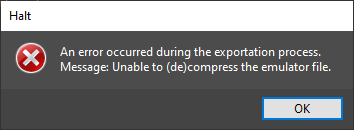
Though on the topic of "now we're addressing some issues related to Sega Genesis / Sega Mega Drive VC injection", id like to also point out a problem with SMS (Master System) Injection i've been facing through my testing. It seems like whenever i make an inject, the next time i try to make one it throws this specific error at me;
Like with the Widescreen Stretching issue, i have no idea what this is caused by.
(Also, i know you said "Sega Genesis / Sega Mega Drive VC injection", but i believe since the Emulator's backends are similar, this issue should also be taken into consideration for possible future updates if there's no solution for this already)
Great to hear that Sonic 3D Blast will be added in the next update!
Though on the topic of "now we're addressing some issues related to Sega Genesis / Sega Mega Drive VC injection", id like to also point out a problem with SMS (Master System) Injection i've been facing through my testing. It seems like whenever i make an inject, the next time i try to make one it throws this specific error at me;
This was solved in the code, current version used LZSS for that but since it doesn't support LZ77 0x11 compression (which all newer main.dol file uses), we replaced it with WWCXTool for the next version.
Also, we fixed also some things on both Sega Master System and Sega Genesis VC injection, so for the next update it should be fixed.
Totally wrong, i injected some large games on base WADs with small roms and they still work fine.
On VC games which use roms as-is (raw format), you can inject roms of ANY size while it doesn't overpass the size limit set by the VC emulator.
For take an idea:
NES/Famicom VC - the WAD's original ROM sets the max size of the ROM you can use
SNES/Super Famicom VC - max ROM size: 4 MB (4096 kB)
Nintendo 64 VC - max ROM size: 32 MB (32768 kB)
NeoGeo VC - max ROM size: 52000000 bytes (49.5911 MB / 50781.25 kB) for rev1 WADs, 56000000 bytes / 54687.5 kB / 53.4058 MB for rev2 WADs, 61.210.688 bytes (58.3751 MB) / 62.259.264 bytes (59.3751 MB) for rev3 WADs
Sega Master System VC - max ROM size: 0,5 MB 512 kB
Sega Genesis / Sega Mega Drive VC - max ROM size: 5,25 MB (5376 kB)
PC Engine/TurboGrafx-16 HuCARD VC - max ROM size: 2,5 MB (2560 kB)
PC Engine CD/TurboGrafx-16 CD VC - max ROM size: none? (cause i injected many TG16 CD games of any size and they all booted fine)
Huh, that's absolutely strange. I could've sworn that would've been the case, since when i tried inputting a 4MB title into the Program (using the Sonic 3 Base), it gave me this error upon attempting to export the inject.
(To be more specific, the rom was 4,096 MB's, which is below the intended amount you gave for the Genesis Label)
Huh, that's absolutely strange. I could've sworn that would've been the case, since when i tried inputting a 4MB title into the Program (using the Sonic 3 Base), it gave me this error upon attempting to export the inject. View attachment 376786
(To be more specific, the rom was 4,096 MB's, which is below the intended amount you gave for the Genesis Label)
currently the current version doesn't support these filesize limits i said, these will be avaliable in the next version.
By now, on 0.20, it will be the last version with the condition of that your rom mustn't overpass limit of the original rom file on the WAD.
Today I am rising out of the dead to announce a new project I've been working on for about a month now: introducing FriishProduce.
What is this?
FriishProduce is an automated WAD injector which allows for ROM/SWF replacement and customization in certain Wii VC channels. What's unique about it compared to other injectors? By handling many steps directly from the program's code, it bypasses several third-party assets & apps which may otherwise be required in Wii VC injection (such as Wii Common Key, and most of HowardC's tools). Some examples:
WAD/U8 handling using libWiiSharp
VC ROM injection through hex writing and/or file replacement - bye-bye AutoInjectuwad
Automatic banner/icon editing using VCBrlyt
Generates custom savedata image using original WAD's source TPL/WTE(s) - good riddance VCIconGen
Automatically edits savedata text where available using hex writing - Sayonara VCSaveInject
Additional content/emulator options for each platform where supported
Replace WAD contents with forwarder to auto-load specific emulator core and ROM
This was actually based off of an earlier project that I worked on back in 2020, until it was left abandoned and eventually wiped after my hard drive failed. I started work on a preliminary revision of FriishProduce for around three weeks before my then-seven-month-old drive also ended up failing, after which I coded the current version in about a week or so.
Download these files, then register them using regsvr32.
Additionally, you will also need WAD files to be added to the applications's bases folder.
When first opening FriishProduce, select a platform, then go to the next page, click the "+" button and search for a WAD. If it is supported by the current version of the database, then the WAD file will be copied to the bases folder.
NES/Famicom
Kirby's Adventure (USA; EUR; JPN; KOR) - ROM CHR size: 32 x 8 KB; ROM PRG size: 32 x 16 KB
Ninja Gaiden (EUR/PAL60) - ROM CHR size: 16 x 8 KB; ROM PRG size: 8 x 16 KB
Super Mario Bros. 3 (USA; EUR; JPN; KOR) - ROM CHR size: 16 x 8 KB; ROM PRG size: 16 x 16 KB
Your ROM size must not exceed the total of the base ROM embedded within the WAD.
SNES/Super Famicom
Donkey Kong Country 2/Super Donkey Kong 2 (USA; EUR; JPN; KOR) - original ROM size: 4 MB
Mario's Super Picross (EUR/PAL60) - original ROM size: 1 MB; can support ROMs at least 4 MB
Nintendo 64
Bomberman Hero (USA; EUR; JPN)
Custom Robo V2 (JPN)
F-Zero X (USA; EUR; JPN)
The Legend of Zelda: Ocarina of Time (USA; EUR; JPN)
Mario Golf (USA; EUR; JPN)
Mario Kart 64 (USA; EUR; JPN; KOR)
Mario Party 2 (USA; EUR)
Ogre Battle 64: Person of Lordly Caliber (USA; EUR/PAL60)
Sin and Punishment (USA; EUR/PAL60; JPN)
Star Fox 64/Lylat Wars (USA; EUR; JPN; KOR)
Super Mario 64 (USA; EUR; JPN)
Yoshi's Story (USA; EUR; JPN)
Your ROM size must not exceed the total of the base ROM embedded within the WAD.
Master System
Phantasy Star (USA; EUR) - emulator revision: v3
Sonic the Hedgehog (USA; EUR; JPN) - emulator revision: v2
Mega Drive/Genesis
Comix Zone (USA; EUR; JPN) - emulator revision: v1
Pulseman (USA; EUR) - emulator revision: v3
Sonic the Hedgehog 3 (USA; EUR; JPN) - emulator revision: v2
Shockwave/Adobe Flash
Flash Placeholder (USA; EUR) / Back to Nature (EUR)
If you are using the Flash Placeholder, search for it at the MarioCube website > WADs > Flash Injects, then download the WAD corresponding to your Wii's region.
See the Wiki for a more detailed explanation on setup & usage. TL;DR:
Select a target platform, then browse for a ROM, and select a base WAD.
Optionally, you can also browse for a *.bps/*.ips to be patched to the ROM before injection.
(Optional) Toggle the "Customize" checkbox, then fill in the relevant fields with the game's title, a shortened version thereof if needed, its release year and the number of players.
An image of the title screen is also recommended, but may not be needed if you are injecting a non-cosmetic ROM hack (e.g. a randomizer, TAS hack, etc.). Left click on the image field to browse for a new file, and right/middle click to remove it.
Enter a title ID and change any content options to your liking.
Save the WAD and you're done!
Make sure you have a (v)Wii NAND backup in case anything goes wrong!
This program uses the following third-party components and apps:
libWiiSharp (orig. author: Leathl), forked by WiiDatabase.
Forwarder DOL generated from ModMii Classic (application author: XFlak) (file renamed as "forwarder.dol")
I would also like to thank the following people:
SuperrSonic for reverse-engineering much of Wii software and official emulator code, and in particular, his fork of RetroArch Wii.
SaulFabre for archiving several tools and aiding in research & documentation.
Larsenv for his astounding work in the Wii homebrew community, and for originally disclosing a method for Flash WAD injection (GBAtemp thread).
And of course, the team at the 0RANGECHiCKEN release group, including lolsjoel, and the late G0dLiKe, without whose work this project would not have been possible.
This application is distributed and licensed under the GNU General Public License v3.0.
As confirmed by Saul and @NecroNova , the Genesis injection surely has Issues using current 0.20.
In fact, in my testing, both Sonic 3 and Comix Zone have 0% compatibility using USA base wads. These are the only wads i have ever used besides Sonic 3D Blast, with 130+ positive results the old fashioned way.
But, using Pulseman, which i did not know was a viable option before, has worked on 90% of what i tested, including some EA games with sound. Although, using (Pulseman) as base wad, will always display a border during gameplay.
I have not tested anything other than Genesis at this point to give results.
I've heard about these issues with Gen/MD and discussed it with Saul, who said it has something to do with the file order entered in ccfarc (his PR here), and that the application does not add any files that are 0 bytes (specifically, the edited emanual.arc, so I replaced it with a dummy 16byte file). However, I'm not sure if this has solved the problem since with my testing Sonic 3 will always load a black screen no matter what I tried, while Comix Zone only works on-and-off depending on changes I did to the code.
I'm currently working on a possible fix which should be rolled out in the next version.
I've heard about these issues with Gen/MD and discussed it with Saul, who said it has something to do with the file order entered in ccfarc (his PR here), and that the application does not add any files that are 0 bytes (specifically, the edited emanual.arc, so I replaced it with a dummy 16byte file). However, I'm not sure if this has solved the problem since with my testing Sonic 3 will always load a black screen no matter what I tried, while Comix Zone only works on-and-off depending on changes I did to the code.
I'm currently working on a possible fix which should be rolled out in the next version.
OK, @CatmanFan.
I compiled your code until your latest changes of yesterday, and i saw that your fix for Flash broke again Genesis.
If u checked my PR u rejected https://github.com/CatmanFan/FriishProduce/pull/24, i was trying hard for finally get this fix working but without breaking other VC console injection codes, such Genesis.
U could adapt again my PR for put a permanent fix for both Genesis/MD and Flash.
Post automatically merged:
@CatmanFan found the issue, i will push a commit later when i fix it. (PS: thanks for making me your collaborator for FriishProduce)
Post automatically merged:
@CatmanFan saw the cause of the issue but dont know how to fix it by myself, could u do it? I sent info on my Discord server.
I worked extensively with saulfabreg on this release to try and remove most bugs that have been addressed, as well as adding new features (see changelog).
NEO-GEO (with ROM injection method courtesy of sr_corsario), and MSX have been added and happen to be working so far based on our final tests
Non-native console support via emulator forwarders (GBA, PSX) may most likely be included in the next release(s).
Great contribution!, although I already got used to doing everything manually, but this can be very useful for people who are new to the world of injecting wads on Wii.
NBA Hangtime will load and play with a minor graphical glitch and some slowdown (comparable to using Wii64 Rice) using Mario Golf as the base .wad, NBA Showtime will seemingly load fine but hang right before any gameplay. I would highly recommend you guys try out injecting roms into Mario Golf as the base, it has a very nice compatibility that even Sin and Punishment doesn't have.
NBA Hangtime will load and play with a minor graphical glitch and some slowdown (comparable to using Wii64 Rice) using Mario Golf as the base .wad, NBA Showtime will seemingly load fine but hang right before any gameplay. I would highly recommend you guys try out injecting roms into Mario Golf as the base, it has a very nice compatibility that even Sin and Punishment doesn't have.
Thanks for posting this. A compatibility chart would be very useful if we all could contribute. I have done hundreds of injects but haven't kept track of which base i used. But now with FriishProduce making simple work of what took much more tedious time, i think a solid legitimate list could be achieved rather quickly. Only question is who could volunteer to maintain the master list?
Thanks for posting this. A compatibility chart would be very useful if we all could contribute. I have done hundreds of injects but haven't kept track of which base i used. But now with FriishProduce making simple work of what took much more tedious time, i think a solid legitimate list could be achieved rather quickly. Only question is who could volunteer to maintain the master list?
Thanks for posting this. A compatibility chart would be very useful if we all could contribute. I have done hundreds of injects but haven't kept track of which base i used. But now with FriishProduce making simple work of what took much more tedious time, i think a solid legitimate list could be achieved rather quickly. Only question is who could volunteer to maintain the master list?
Through making many injects of the same game using various base wads I've actually discovered that a lot of the virtual console emulations are just mildly iterated versions of the last one, sin and punishment being the most "updated" of the virtual console N64 emulator and super mario 64 being the most primitive. So really there isn't that much need to actually test all the base wads, if a game doesn't work in sin and punishment for example, it won't work on star fox 64, f-zero x, super mario 64 or legend of zelda because they all use more or less the same "base" emulator with differing configurations, whereas mario golf and bomberman hero for example use almost a completely different configuration and is worth trying separately.
It also means there's no actual reason to use the earlier base wads for injections unless there's some niche use case where sound or graphics only seem right using an earlier version, Mace the dark age is a good example of this, being a game that works in many different wads but only sounding correct in a few. So injection compatibility can be quickly expedited by using Mario Golf, Sin and Punishment, and maybe Bomberman Hero or Ogre Battle, I haven't actually checked too much on those last two but I know they have unique enough configurations.
That's just my observation though, maybe somebody else with a lot of knowledge can chime in. I was only able to observe this effect through this tool which makes making many injections of the same game with different base wads dead easy.
EDIT: it's also not really worth trying out games that run full speed and properly on Not64 or WII64, it's really best to stick to games that either don't work at all in those emulators or don't look correct
It’s about that time of year again where I check in with the community to see if we can get the front page aligned with what people are interested in knowing and what...
WiiCompiled is a new project that lets PC gamers play Mario Kart Wii natively on PC without emulation. Using static recompliation to convert the code into native PC...
Images for the rumoured Zelda-themed limited edition Switch 2 for The Legend of Zelda's 40th Anniversary have started to leak online.
The leak shows only the...
After being announced last year, the fan-made remake Gamma Emerald has finally gotten its first early access release. A complete rebuild of fan-favourite Pokemon...
The long awaited Grand Theft Auto VI Extended Look gameplay trailer has finally dropped on YouTube. As you all know, it had dropped 6 hours earlier on Netflix, and...
Though we knew all the way back in May that this was coming, the exact numbers remained a mystery for prospective Nintendo gamers in the UK. If you happen to have...
Thanks to the recent decomplication efforts; The Minish Cap 3DS brings the Game Boy Advance classic Zelda title to your 3DS.
The port takes full advantage of the 3DS...
In the wake of Sony's shift to a digital-only ecosystem within the next year, Xbox have today announced a surprising scheme. Aiming to offer physical buyers the same...
GBAtemp is and always has been an independent community. Since 2002 our staff have voluntarily kept the site running, added new forums, features, provided constant...
To celebrate its 25th anniversary, XBOX has launched pre-orders for the XBOX 25th Anniversary Collection. For the occasion, the trailer below was aired.
This...
It’s about that time of year again where I check in with the community to see if we can get the front page aligned with what people are interested in knowing and what...
After being announced last week, the first of two broadcasts is set to go live later today with a stark focus on The Legend of Zelda and its 40th anniversary...
In the wake of Sony's shift to a digital-only ecosystem within the next year, Xbox have today announced a surprising scheme. Aiming to offer physical buyers the same...
Though we knew all the way back in May that this was coming, the exact numbers remained a mystery for prospective Nintendo gamers in the UK. If you happen to have...
Images for the rumoured Zelda-themed limited edition Switch 2 for The Legend of Zelda's 40th Anniversary have started to leak online.
The leak shows only the...
The long awaited Grand Theft Auto VI Extended Look gameplay trailer has finally dropped on YouTube. As you all know, it had dropped 6 hours earlier on Netflix, and...
It is with a heavy heart that I announce the departure of our beloved Chary from the position of Chief Editor. Chary took over early 2021 and has done a wonderful job...
After being announced last year, the fan-made remake Gamma Emerald has finally gotten its first early access release. A complete rebuild of fan-favourite Pokemon...
Thanks to the recent decomplication efforts; The Minish Cap 3DS brings the Game Boy Advance classic Zelda title to your 3DS.
The port takes full advantage of the 3DS...
GBAtemp is and always has been an independent community. Since 2002 our staff have voluntarily kept the site running, added new forums, features, provided constant...