Do what @binkinator said, download fresh copy of Atmosphere and Hekate, but do keep in mind Atmosphere is in pre-release state, so people would encounter problem.
Does anyone know how to fix my problem? Or is there a way to boot back into ofw? I hope its not bricked. I think i wait until the switch is out of power and i hope i can boot back into ofw.
Does anyone know how to fix my problem? Or is there a way to boot back into ofw? I hope its not bricked. I think i wait until the switch is out of power and i hope i can boot back into ofw.
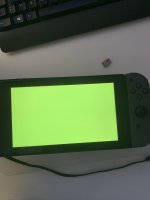
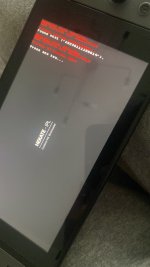
Hello guys i have a huge problem. Last week, when i tried to boot into sys cfw via hekate, i got an error(Picture 1). Because i wanted to play online, i booted into ofw. Today, i wanted to try again with booting into rcm then hekate and then emummc and sysmmc. My mom deleted tegrarcm gui and the hekate_ctcaer.bin file for my hekate version. I reinstalled tegrarcmgui and downloaded the latest release of hekate because i forgot which version i had used before. When i sent paypload, an error appeared saying that i have to update my bootloader folder and there will be "dragons". I just pressed a key and it disaapeared. After that i tried booting into emummc and everything worked. Thdn i went back to hekate and booted into sysmmc. A yellow screen appeared (picture two) and i cannot do anything now. Please help me!
I caoont click anything an it is not in rcm so i cant inject payload. Yesh it is actually yellow. It looks a bit green on the picture. Is there a way to boot into hekate without rcm?
I caoont click anything an it is not in rcm so i cant inject payload. Yesh it is actually yellow. It looks a bit green on the picture. Is there a way to boot into hekate without rcm?
Stick with first party dock, unless you want to brick, when the switch asks for specific voltage and the dock supply the wrong voltage that why the switch brick.
Wow... do you have some information about this so that I can investigate a bit more (forum dicussions on the topic, posts on some websites, ...) ?
Thanks
Wow... do you have some information about this so that I can investigate a bit more (forum dicussions on the topic, posts on some websites, ...) ?
Thanks
I've checked a bit, it seems that this type of issue is quite old, I was not able to find equivalent problems that are recent and it seems (at least from my recent research) to mainly impact Nyko docks.
But I've read multiple (not a lot for sure but still not only one) posts on forums from people using third party docks from aliexpress (or equivalent sites that I have not even heard of) that caused strange behaviour. It was pretty clear from some posts that maybe nothing happened, the person who posted basically said something like I think my battery is drained quicker than usual but had no real proof and was not even sure of that behaviour (for other posts it seemed clear that their switch had problems, was it because of the doc I don't know for sure but it can).
Nonetheless this is something that should be considered if someone reads my post one day. On my side, I won't take the risk.
I've checked a bit, it seems that this type of issue is quite old, I was not able to find equivalent problems that are recent and it seems (at least from my recent research) to mainly impact Nyko docks.
But I've read multiple (not a lot for sure but still not only one) posts on forums from people using third party docks from aliexpress (or equivalent sites that I have not even heard of) that caused strange behaviour. It was pretty clear from some posts that maybe nothing happened, the person who posted basically said something like I think my battery is drained quicker than usual but had no real proof and was not even sure of that behaviour (for other posts it seemed clear that their switch had problems, was it because of the doc I don't know for sure but it can).
Nonetheless this is something that should be considered if someone reads my post one day. On my side, I won't take the risk.
Ocarina of Time is back in style as the upcoming Switch 2 remake looms on the horizon. But what's a fan of the game to do over the next few months? If you've been...
Tired of waiting for Game Freak to bring Pokemon Emerald to modern platforms? We've got you covered with a brand new port in the works. Currently available on GitHub...
If you've been waiting for an excuse to replay Super Mario Sunshine and happen to have up to nine friends, do I have some good news for you. Released earlier today...
For fans of Sinnoh, the pickings are slim. If you want the best experience you're left deciding between the updated region in Platinum, or the somewhat controversial...
It's a good time to be a first generation Pokemon fan. But when was it not a good time to be one? In recent weeks we've seen a native LOVE2D recreation of Pokemon Red...
The Switch 2 has been out for a year now, but you shouldn't count the original system out yet! Released a few days ago, popular PS2 emulator NetherSX2 has found its...
Hot on the heels of their NetherSX2 port, @Nagaa is back with another hugely anticipated release: a Switch port of the popular Wii U emulator Cemu. We've got more...
The Pokemon series is known for its vast assortment of spin off titles, with the majority being well-received. We've had an assortment of Mystery Dungeon titles, a...
The golden age of emulation on the Switch continues as a native Dolphin port was released by @Nagaa earlier today. Included in this port, we're looking at cover art...
Right on the heels of a NetherSX2 port, the Switch once again proves it's still got some life left in it as 3DS emulation graces the system. Promising mostly...
Ocarina of Time is back in style as the upcoming Switch 2 remake looms on the horizon. But what's a fan of the game to do over the next few months? If you've been...
With the latest entry to the Fire Emblem series, Fortune's Weave, set to launch in September, Nintendo have today announced a new Nintendo Direct to put it soundly in...
Tired of waiting for Game Freak to bring Pokemon Emerald to modern platforms? We've got you covered with a brand new port in the works. Currently available on GitHub...
It's a good time to be a first generation Pokemon fan. But when was it not a good time to be one? In recent weeks we've seen a native LOVE2D recreation of Pokemon Red...
Amidst news of layoffs and cancellations in the wake of Xbox's larger changes, Bethesda has today come out with a statement discussing their active projects. In this...
For fans of Sinnoh, the pickings are slim. If you want the best experience you're left deciding between the updated region in Platinum, or the somewhat controversial...
Announced today during the Octopath Traveler 8th Anniversary live stream, it's been confirmed that both the first game and its sequel will be launching on the Switch...
In this time of everything costing more a year after it's released, it's nice to see some things sticking to the old ways. Capcom have today announced that the latest...
If you've been waiting for an excuse to replay Super Mario Sunshine and happen to have up to nine friends, do I have some good news for you. Released earlier today...
Hoenn to the ROM hacking scene is like Kanto to the official games. It's everywhere. At this point you've probably played through Pokemon Emerald with a party of...