Hacking Xenoblade Chronicle X [Undub]

  • Thread starter Thread starter Haevens
  • Start date Start date
  • Views Views 283,623
  • Replies Replies 539
  • Likes Likes 5
I guess all character info is stored in one place like in splatoon(size, equipped gear, stats,...), so if we can
change the name, we can also change those. That would be pretty good, because we don't have to search
anymore if that's true :P

(Dump in Gecko '10' (10000000 to max. 4000000 - going further will freeze your console)

Offset is 1XXXXXXX (ex. 1C38B620 where the image starts)

To confirm in Gecko, Memory Viewer > Address > 10 > insert offset where you want to go > update

To have a proper view (Text), switch view mode to ASCII. (You have always to poke 4 bytes!)
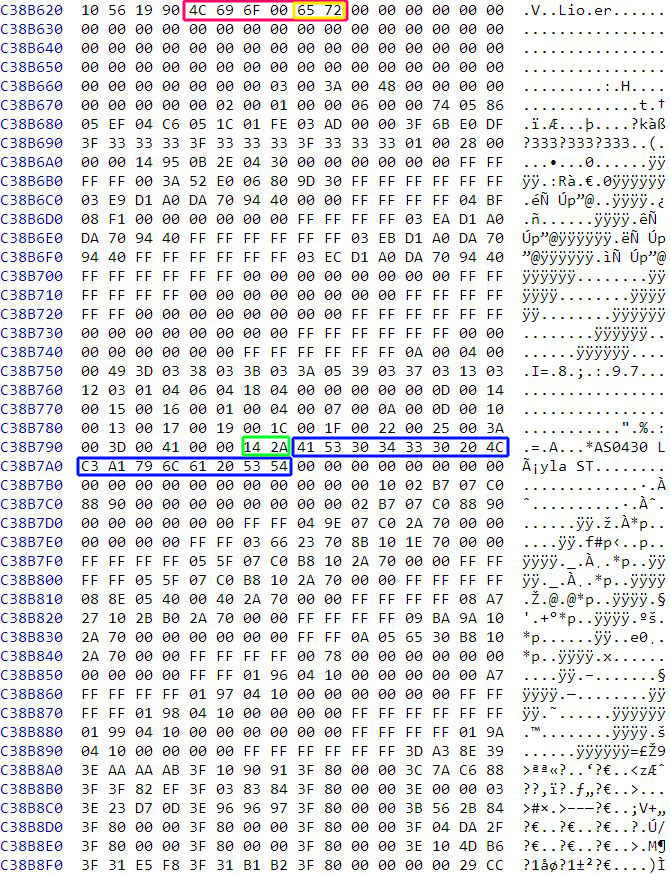
areaspau3l.jpg

after this comes the next char(npc) from your group

RED = Name of Character
YELLOW = Indicates Main Player (does not exist for other NPC's)
GREEN = Max. Health
BLUE = Skell's Name

C38B8FE 29CC = Max. Health for enlisted Skell

The rest is up to you ;)

Tested with Loadiine 3.0 pyload/ldgecko
 
Last edited by liomajor,
Ah btw, i've looked a little bit more into the dump, seems that its always similar > names are close to each other, this way you should find them very fast even if they are japanese.

nameskzz8f.jpg


EDIT:

Jackpot:

20151214_021738v1sdy.jpg


1C38B90C was my magic hex offset ;) (I think this offset might be static, was the same for two complete reboots.)

I had simply to leave menu and enter again, name was changed.

The whole character setup is next to it, followed from next char in your group.
No go :/

Good thing is offset is the same and it does change the name ingame, I tried lin's and Elma's, but it doesn't persist. After saving and reloading I'm back to a * per syllable names.

Also it didn't change the names on the skells register name list, so I searched for more of Elma's name, but, the other addresses with her name were unwritable... is that normal? No error, it simply din change those memory areas.
 
I got it to work, didn't even have to search for the names(liomajors address was near the name of my character, so if they change, it's not that bad.

Btw, new release of the patcher, no more stupid timing issues: filedropper.com/patcherv2
 
I got it to work, didn't even have to search for the names(liomajors address was near the name of my character, so if they change, it's not that bad.

Btw, new release of the patcher, no more stupid timing issues: filedropper.com/patcherv2
And they persisted after save? o.o mine didn't.
 
And they persisted after save? o.o mine didn't.

Sadly thats what i didn't test bcuz i had at that time no backup from my >60hrs savegame.

As for the memorydump itself, this was the offset to see ingame changes, but i found around 6 more hits for each npc in my group.

Maybe changing all might make it persistent. Currently i'm on nightshift and have little time.

I can't promise, but if i have time, i try to investigate further.
 
Sadly thats what i didn't test bcuz i had at that time no backup from my >60hrs savegame.

As for the memorydump itself, this was the offset to see ingame changes, but i found around 6 more hits for each npc in my group.

Maybe changing all might make it persistent. Currently i'm on nightshift and have little time.

I can't promise, but if i have time, i try to investigate further.
It's ok, u dun have to waste time with this, but it was weird that some areas, I remember at 1F+, I couldn't change the wiiu's memory... I'll try again when I have time, I'm about the only schmuck who is using a jpn save anyway :p
Btw, is there a way to get a list of the dumpable memory areas of the game like on the 3DS debugger, or everything related to the game in the wiiu is after that 10000000 address?
 
Btw, is there a way to get a list of the dumpable memory areas of the game like on the 3DS debugger, or everything related to the game in the wiiu is after that 10000000 address?
As far as I know only 10 is avaiable to games, and that only to about 40000000. Dumping after a certain value in that area crashes the game.
 
i found a beta undub from a certain wiiu iso website *hint hint, by a user by GGlol, is it legit? any relation to this thread?
 
It's the same thing we do, he even helped us by writing most oft the bat files, so you can be sure it's legit.

Also... I don't think you should post the names of those certain sites, I think that's against the rules :/
 
@liomajor @aracom tks for testing the name thing for the jpn save, I finally found the magic spot to change them for good, only need now to find all others to change all names, should be easy.

I went back to using the original smaller fonts too, with the jpn font there were too many dialogs cut off at the end.

I read cri atom viewer could read those .acb files, anybody has that program?
 
so is there any way to improve the eu/us font size?
as undubbing seems to be quite the hassle, i would think changing font or merely font size is more easily achieved?
on 57" led tv i cant read anything properly without sitting right in front of the damn thing and on the gamepad its barely readable.
 
  • Like
Reactions: cyb0rg
Did anyone figure out yet how to readd the bust control size for female avatars?
I told it a few people already, so I'm just gonna paste it here again:
Go to the GDN search tab, set the memory range to 10 10000000 - 30000000(20000000 could work, but I'm not sure), go the character select screen and select the size slider(make sure to have female selected). Then you can do a search for a unknown value(this can take a little while). Then, you decrease the size, set gecko to search for "less than". After that, you increase the size, and search for "greater than". Do that till you only have about 30 values left, and poke random ones to check. Format is: XXYY????
XX=Body size(00-64)
YY=Breast size(00-64)
??=Can change

We should probably put this into the first post :P
 
I told it a few people already, so I'm just gonna paste it here again:
Go to the GDN search tab, set the memory range to 10 10000000 - 30000000(20000000 could work, but I'm not sure), go the character select screen and select the size slider(make sure to have female selected). Then you can do a search for a unknown value(this can take a little while). Then, you decrease the size, set gecko to search for "less than". After that, you increase the size, and search for "greater than". Do that till you only have about 30 values left, and poke random ones to check. Format is: XXYY????
XX=Body size(00-64)
YY=Breast size(00-64)
??=Can change

We should probably put this into the first post :P

That's a little complicated and inconvenient for me for just wanting a bigger pair of breasts. I was hoping for a way to directly add the slider in-game just like in the Japanese version. Something easy like decensoring the US textures.
 
I searched for it yesterday, the size/breast value is at 1F something for me, if u make the size the tallest in the avatar creation room, it will have a value of 642B0101, 2B is their default breast size.

Couldn't find that value after saving anymore tho, so to change after creating character is not so easy... Also couldn't go for values outside the ones allowed by the slider, can't make avatar smaller than what the slider allows :/

I read that later in the game after making a couple missions we will have the option in-game to edit the avatar again, is that true?
 

Site & Scene News

Popular threads in this forum