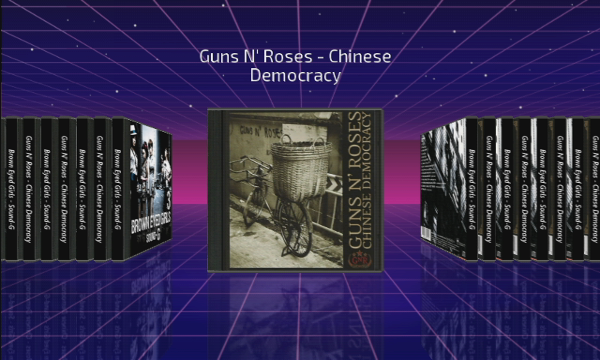
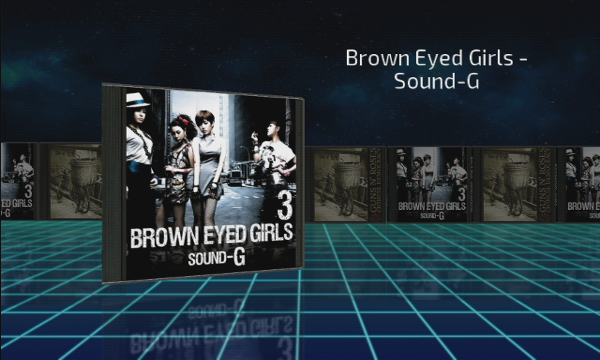
its wiiflow lite with playlists added for the music plugin.
edit your music plugin ini. change the filetypes line to include .pls for example:
filetypes=.mp3|.ogg|.pls
after doing this and adding your .pls files remember to reload cache.
the .pls playlist should be in your wiiflow/music folder with your ogg and mp3 songs.
but the songs the playlist contains can be anywhere as long as they are on the same device/partition as what your music plugin is set to.
i haven't tested this - hoping it works.
This is a really nice idea. I added the .pls extension to music_player.ini and created a pls file with about 10 ogg files, adding it to SD:/wiiFlow/music. Reloaded cache and clicked play on the file in CoverFlow.
Every time I click play on the .pls file, it plays a random song from SD:/WiiFlow/music (with randomizer on). With randomizer off, it will sequentially play songs alphabetically from SD:/WiiFlow/music every time the play button is clicked (click-song1-click-song2-click-song3-etc).
This is a really nice idea. I added the .pls extension to music_player.ini and created a pls file with about 10 ogg files, adding it to SD:/wiiFlow/music. Reloaded cache and clicked play on the file in CoverFlow.
Every time I click play on the .pls file, it plays a random song from SD:/WiiFlow/music (with randomizer on). With randomizer off, it will sequentially play songs alphabetically from SD:/WiiFlow/music every time the play button is clicked (click-song1-click-song2-click-song3-etc).
it should work as with .pls and .m3u as described in my previous post.
if randomize music is on it will shuffle the playlist songs otherwise it should play them in the order you set for the playlist.
I think I'm in love with this new playlist feature. Being able to have playlists/albums with cover art in WiiFlow has always been a dream for me. Yet, here it is, in all of its glory.
I just made two .M3U playlists, then threw together a couple of covers for them. It works great! I'm probably going to be up all night putting together playlists now. Looks like I may finally have a good use for that large vinyl-sized CoverFlow in Rhapsodii after all.
For the curious of mind, and to document my usage; I now have all my music files (ogg/mp3) located in a newly created folder in the root SD:/music, separate from SD:/wiiflow/music where the playlist files (pls/m3u) are located. Now when I start up WiiFlow Lite, no music plays unless I select one of the playlists from CoverFlow. When the playlist plays, you use [B + D-Pad Left/Right] to change songs within that playlist, until you select a new playlist. (The playlist loops, until you select a new playlist).
I think this is a good thing though. Presumably, (at least for my setup) I can just keep some generic "menu music/ambience" files in SD:/wiiflow/music to play automatically when wiiflow boots, and have the music by artists/soundtracks/radio shows play from selected playlist files in CoverFlow.
Thanks again!
------------------------------
A bug side-note: I've recently been having a strange issue with source_menu.ini automatically producing extra blank buttons. I'm still unsure what actions reproduce the problem, but I've been searching for the answer. Last time I noticed it happened right after changing themes. I'll continue trying to reliably reproduce it.
Here's what my source_menu.ini looks like after it happens. Should only have 7 buttons, but it has added 4 extra blanks to equal 12:
This seems to only happen on the base menu source_menu.ini. The other ini files (games, videos, homebrew) have all been unaffected so far. I'm not sure if it's because the total number of buttons is under 12, since homebrew.ini only has like 5 buttons on it and it hasn't been affected by the issue.
Thanks! Works like a dream. I've pressed 1/2 to change SourceFlow styles many times, changed themes back and forth a few times, turned the Wii on and off, and haven't seen the extra blank buttons pop up again.
I also really like the 5 extra Pages added to Settings. That will certainly save a lot of people's sanity, removing the necessity to manually edit wiiflow_lite.ini to customize their setup how they prefer.
Works perfectly for me too! No more freezing after changing settings in wii games. Now when I go to page 2 in my source menu the unneeded icons disappears with a nice squished animation! Excellent work.
Not sure what would cause this, but does anyone have any ideas why the date and time would (although correct in the system menu on the Wii) show as the year 3566, in Skyward Sword saves?
I've got old saves that showed correct dates, used from older WiiFlow versions. Just thought I'd ask to see if anyone else has seen this.
EDIT - a subsequent save now shows the year as 5099 or something. Bizarre.
Not sure what would cause this, but does anyone have any ideas why the date and time would (although correct in the system menu on the Wii) show as the year 3566, in Skyward Sword saves?
I've got old saves that showed correct dates, used from older WiiFlow versions. Just thought I'd ask to see if anyone else has seen this.
EDIT - a subsequent save now shows the year as 5099 or something. Bizarre.
I've been using USB Loader GX and have issues with some games freezing the wii on a black screen so I googled a bit and stumbled upon your software and thought I give it a try.
I downloaded "wfl_v4.4.0.r1161.zip" and extracted it to my Wii-SD/app/ folder and started it using the homebrew channel. First it displayed me "no games found on sd card" (which is true, I keep my games on an ext4 formatted usb2 hard drive and not on the far too tiny usb card).
Then it tried pressing a few buttons which didn't do anything except crashing the wii to an Exception + Stack & Code dump page.
If it helps I can upload a foto of that screen somewhere.
I've installed Hermes-cIOS
--> base 60 to 202, base 38 to 222, base 37 to 223, base 57 to 224
And I've installed d2x-v10-beta52 using the d2x cIOS Installer v3.1.
--> base 37 to 245, base 38 to 246, base 53 to 247, base 55 to 348, base 56 to 249, base 57 to 250, base 58 to 251
Also I've restored the trucha bug to IOS36, 236 & 80.
It would be great if you could help me get your software to run on my Wii. If you need more information or want me to use another communication channel please tell me.
Well for starters when you saw the message no games on sd card you shouldve moved your pointer to the bottom of the screen to make the buttons appear then click on the one that looks like some gears. Then the main settings menu appears and you should choose partition settings and then change the wii games partition to usb and exit back to the main screen and your wii games that you have installed should appear.
Thanks so much for the continued work on this. Works very well for me.
I seem to have got myself into an issue where it has selected SD partition, and I cannot switch it back to USB now that I have plugged my HDD back in?
edit: I managed to fix it by manually editing partition in ini file
Also, as a user who uses SD for games in progress and USB for other games, ideally I'll like to be able to set partition to SD/HDD so anything in SD would take precedence over the same games on HDD. I do not have my USB plugged in all the time.
Thanks so much for the continued work on this. Works very well for me.
I seem to have got myself into an issue where it has selected SD partition, and I cannot switch it back to USB now that I have plugged my HDD back in?
edit: I managed to fix it by manually editing partition in ini file
Also, as a user who uses SD for games in progress and USB for other games, ideally I'll like to be able to set partition to SD/HDD so anything in SD would take precedence over the same games on HDD. I do not have my USB plugged in all the time.
If you have the boot dol i posted a few posts back you should have 11 pages of the main settings. Either page 10 or 11 has the setting sd only. Set it to no or off. You might have to exit wiiflow and start it again for setting to work.
OK - So I've decided to make the switch from USB Loader GX to Wiiflow, because it just looks so damn pretty, and I love not having to run my emulators from the Wii Menu or via HBC. Also, full covers for NES, SNES, etc games? No-brainer.
I have had some hiccups. I installed WiiFlow Lite v4.4.0 r1161 from the link on the wiki. Then, I also grabbed the Abz' Masterpiece Pack. Here is where I am having some confusion. My intention is to basically have WiiFlow boot from SD (in the apps folder), and have everything else (Wii/GC backups, Emulated ROMS, Covers, Themes, etc...) run from my USB.
It is not entirely clear what from the Abz pack is compatible with WiiFlow Lite or not. For some reason, I can't get my WiiFlow to recognize any alternate themes, and I don't have the option to switch CoverFlows for my different plugins. When I go into the global settings in the GUI, the theme just says "DEFAULT" (all caps), and I can't scroll over to change it. I don't know if themes need to go into the /themes or the other wiiflowlite themes folder. (Presently, I have them in both folders, but WiiFlow still doesn't appear to recognize theme)
I've been holding off on downloading covers/custom banners until I get the theme and visuals squared away.
Also, another question. If a game requires neek2o booting in USB Loader GX (i.e. - Castlevania: The Adventure ReBIRTH) -- Should I assume that's the case for WiiFlow as well?
Apologies for the million questions. I really am eager to get this looking as beautiful as possible.
OK - So I've decided to make the switch from USB Loader GX to Wiiflow, because it just looks so damn pretty, and I love not having to run my emulators from the Wii Menu or via HBC. Also, full covers for NES, SNES, etc games? No-brainer.
I have had some hiccups. I installed WiiFlow Lite v4.4.0 r1161 from the link on the wiki. Then, I also grabbed the Abz' Masterpiece Pack. Here is where I am having some confusion. My intention is to basically have WiiFlow boot from SD (in the apps folder), and have everything else (Wii/GC backups, Emulated ROMS, Covers, Themes, etc...) run from my USB.
It is not entirely clear what from the Abz pack is compatible with WiiFlow Lite or not. For some reason, I can't get my WiiFlow to recognize any alternate themes, and I don't have the option to switch CoverFlows for my different plugins. When I go into the global settings in the GUI, the theme just says "DEFAULT" (all caps), and I can't scroll over to change it. I don't know if themes need to go into the /themes or the other wiiflowlite themes folder. (Presently, I have them in both folders, but WiiFlow still doesn't appear to recognize theme)
I've been holding off on downloading covers/custom banners until I get the theme and visuals squared away.
Also, another question. If a game requires neek2o booting in USB Loader GX (i.e. - Castlevania: The Adventure ReBIRTH) -- Should I assume that's the case for WiiFlow as well?
Apologies for the million questions. I really am eager to get this looking as beautiful as possible.
the only 2 themes that work with wiiflow lite are rhapsodii and carbonik abz. not the carbonik abz that comes in mastermod but the one on github in the themes and coverflows.zip found here - https://github.com/Fledge68/WiiFlow_Lite/releases
in wiiflow lite themes and coverflows are separated.
themes go in dev:/wiiflow/themes_lite
coverflows go in dev:/wiiflow/themes_lite/coverflows
so download themes and coverflows.zip and unzip in a folder. it contains 2 rar files. unzip carbonik abz wfl int dev:/wiiflow/themes_lite and unzip default coverflow into dev:/wiiflow/themes_lite/coverflows
you should have:
dev:/wiiflow/themes_lite/
Carbonik Abz.ini
Carbonik Abz (folder full of images)
and
dev:/wiiflow/themes_lite/coverflows
default.ini
and yes the game will still require neek2o. you will need go into main settings to tell wiiflow lite which nand to use and then the games settings to tell it to launch with neek2o.
for other downloads scroll down to find v4.4.0 - for themes, forwarders, and plugins.
side note: real life is busy now with Thanksgiving and Christmas and birthdays and appointments. don't expect many commits for the next 2 months. I'm waiting to see the patch to get mario kart wii to work with wiimmfi.
Thanks!
It’s about that time of year again where I check in with the community to see if we can get the front page aligned with what people are interested in knowing and what...
WiiCompiled is a new project that lets PC gamers play Mario Kart Wii natively on PC without emulation. Using static recompliation to convert the code into native PC...
The long awaited Grand Theft Auto VI Extended Look gameplay trailer has finally dropped on YouTube. As you all know, it had dropped 6 hours earlier on Netflix, and...
Though we knew all the way back in May that this was coming, the exact numbers remained a mystery for prospective Nintendo gamers in the UK. If you happen to have...
After being announced last week, the first of two broadcasts is set to go live later today with a stark focus on The Legend of Zelda and its 40th anniversary...
Thanks to the recent decomplication efforts; The Minish Cap 3DS brings the Game Boy Advance classic Zelda title to your 3DS.
The port takes full advantage of the 3DS...
In the wake of Sony's shift to a digital-only ecosystem within the next year, Xbox have today announced a surprising scheme. Aiming to offer physical buyers the same...
It is with a heavy heart that I announce the departure of our beloved Chary from the position of Chief Editor. Chary took over early 2021 and has done a wonderful job...
To celebrate its 25th anniversary, XBOX has launched pre-orders for the XBOX 25th Anniversary Collection. For the occasion, the trailer below was aired.
This...
GBAtemp is and always has been an independent community. Since 2002 our staff have voluntarily kept the site running, added new forums, features, provided constant...
It’s about that time of year again where I check in with the community to see if we can get the front page aligned with what people are interested in knowing and what...
After being announced last week, the first of two broadcasts is set to go live later today with a stark focus on The Legend of Zelda and its 40th anniversary...
It's been something of a quiet week in the gaming space, with the deluge of big hitters trying to find their place before GTA 6 launches really kicking off next week...
Though we knew all the way back in May that this was coming, the exact numbers remained a mystery for prospective Nintendo gamers in the UK. If you happen to have...
In the wake of Sony's shift to a digital-only ecosystem within the next year, Xbox have today announced a surprising scheme. Aiming to offer physical buyers the same...
The long awaited Grand Theft Auto VI Extended Look gameplay trailer has finally dropped on YouTube. As you all know, it had dropped 6 hours earlier on Netflix, and...
It is with a heavy heart that I announce the departure of our beloved Chary from the position of Chief Editor. Chary took over early 2021 and has done a wonderful job...
The second of a two-part special, a more traditional Nintendo Direct is set to air today. Unlike the Zelda Direct the contents of this one is still relatively up in...
Announced a few days ago, Nintendo of America have today launched their Customer Appreciation Sale. Featuring 30% discounts across a wide range of popular first-party...
A few days ago Chary stepped down as Chief Editor after 5 wonderful years, and everyone guessed the seat wouldn't stay empty for very long. Back in 2021 I proudly...