Hacking WiiFlow Lite

  • Thread starter Thread starter fledge68
  • Start date Start date
  • Views Views 1,032,427
  • Replies Replies 4,833
  • Likes Likes 66
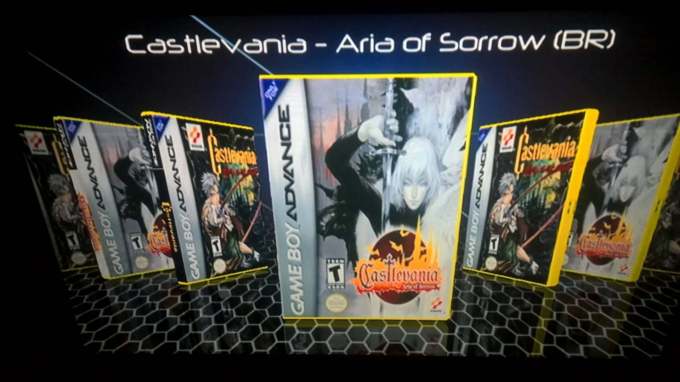
Are the covers the correct size for the coverflow style chosen? You can either adjust the coverflow style to fit the cover art, or adjust the art to fix the flow style chosen.
For example, my games menu is all the default WiiFlow DVD-Jewelcase style because I wanted all my titles to be searchable from the same consistent menu. But like this, all my original scanned SNES box covers were the wrong size and badly stretched, so I had to go make my own in Photoshop that fit properly based on the originals. As far as I can tell, WiiFlow never had the option to automatically resize the box geometry to covers, all it can do is stretch the artwork to the borders of the defined shape.
 
Are the covers the correct size for the coverflow style chosen? You can either adjust the coverflow style to fit the cover art, or adjust the art to fix the flow style chosen.
For example, my games menu is all the default WiiFlow DVD-Jewelcase style because I wanted all my titles to be searchable from the same consistent menu. But like this, all my original scanned SNES box covers were the wrong size and badly stretched, so I had to go make my own in Photoshop that fit properly based on the originals. As far as I can tell, WiiFlow never had the option to automatically resize the box geometry to covers, all it can do is stretch the artwork to the borders of the defined shape.



How to explain then that in the old Wiiflow the size is correct ?
 
@fledge68 Wiiflow lite the covers of the Game Boy Advance games are stretched, already Wiiflow are normal, can solve this problem?
41941939_685986801774608_5971835803825864704_n.jpg
check the plugin ini for the emu you are using for gameboy games. check the magic #
does it match any of the following:

static const char shortCovers[13][9] = {
"474d4254", //Gambatte
"474d4264", //Gambatte GB
"474d4274", //Gambatte GBC
"56425854", //VBA-Next
"56424158", //VbaGX
"56424168", //VbaGX GB
"56424178", //VbaGX GBC
"56424188", //VbaGX GBA
"4d45445e", //WiiMednafen GB
"4d45446e", //WiiMednafen GBC
"4d45447e", //WiiMednafen GBA
"57495358", //WiiSX - playstation
"51304dxx" //QuakeGX Modloader wild cards
};

if not let me know what emu and the magic #. and for now you can change to one of the above.
 
  • Like
Reactions: Hakaisha
check the plugin ini for the emu you are using for gameboy games. check the magic #
does it match any of the following:

static const char shortCovers[13][9] = {
"474d4254", //Gambatte
"474d4264", //Gambatte GB
"474d4274", //Gambatte GBC
"56425854", //VBA-Next
"56424158", //VbaGX
"56424168", //VbaGX GB
"56424178", //VbaGX GBC
"56424188", //VbaGX GBA
"4d45445e", //WiiMednafen GB
"4d45446e", //WiiMednafen GBC
"4d45447e", //WiiMednafen GBA
"57495358", //WiiSX - playstation
"51304dxx" //QuakeGX Modloader wild cards
};

if not let me know what emu and the magic #. and for now you can change to one of the above.
When I change the settings in "Adjust Coverflow" => "4:3" in Wiiflow Lite the size of the Game Boy Advance covers appear correctly, but I can not save the 4: 3 settings!

[PLUGIN]
displayname=VBA-GX GBA
magic=56424188
coverfolder=Game Boy Advance
dolfile=emuladores/VBA-GX.dol
romdir=Jogos/Game Boy Advance
filetypes=.agb|.gba|.bin|.elf|.mb|.dmg|.zip|.7z
consolecoverid=nintendo
covercolor=fcff00
bannersound=musicas/GBA.ogg
arguments={device}:/{path}|{name}|{loader}
 
When I change the settings in "Adjust Coverflow" => "4:3" in Wiiflow Lite the size of the Game Boy Advance covers appear correctly, but I can not save the 4: 3 settings!
using "adjust coverflow" doesn't work - as far as changing the cover size.

since your magic # is in that list. most likely you have another source or plugin selected combined with this plugin and it doesn't have any games which means you only see the gameboy covers and therefore its not using the smaller size cover.
are you using the source menu? maybe your source button has multiple magic numbers?

you need to check your wiiflow_lite.ini and look under [PLUGINS_ENABLED] and see if more than one magic number = 1
if so set the other one to 0 and save
 
using "adjust coverflow" doesn't work - as far as changing the cover size.

since your magic # is in that list. most likely you have another source or plugin selected combined with this plugin and it doesn't have any games which means you only see the gameboy covers and therefore its not using the smaller size cover.
are you using the source menu? maybe your source button has multiple magic numbers?

you need to check your wiiflow_lite.ini and look under [PLUGINS_ENABLED] and see if more than one magic number = 1
if so set the other one to 0 and save


I tested these tips and it did not solve, I appreciate the help, but I will use the old Wiiflow that the problem does not occur, thank you for your work in this new project!
 
I tested these tips and it did not solve, I appreciate the help, but I will use the old Wiiflow that the problem does not occur, thank you for your work in this new project!
I couldve helped you further because its not a problem with wiiflow lite. You just dont have something set up right. But if you want to go back to the old wiiflow fine.
 
  • Like
Reactions: rogerioronin
I couldve helped you further because its not a problem with wiiflow lite. You just dont have something set up right. But if you want to go back to the old wiiflow fine.

I think the problem here in Wiiflow Lite is connected to "emuflow", I can not change it, it only stays in a standard template!

edited: I tested here with "https://github.com/einsteinx2/wiiflow-lite-einstein-mod/releases" and it worked correctly just like the old Wiiflow, I tested the three versions with the same configuration files!
 
Last edited by rogerioronin,
Is it possible to point WiiFlow Lite to launch MMMod for GC games, instead of Nintendont?

It throws a DSI error atm. But launching the games in MMMod works flawlessly.
 
I think the problem here in Wiiflow Lite is connected to "emuflow", I can not change it, it only stays in a standard template!

edited: I tested here with "https://github.com/einsteinx2/wiiflow-lite-einstein-mod/releases" and it worked correctly just like the old Wiiflow, I tested the three versions with the same configuration files!
well that makes absolutely no sense. einstein mod uses the same setup and code for coverflows and cover sizes. he never changed any of that. and i just double checked wiiflow lite on my wii and gameboy advanced covers are not stretched the same size as wii covers. if it works for einstein mod then it should work for wiiflow lite. maybe you should redownload wiiflow lite here - https://github.com/Fledge68/WiiFlow_Lite/releases. maybe you have a bad copy. other than that i have no idea because it makes no sense.
Is it possible to point WiiFlow Lite to launch MMMod for GC games, instead of Nintendont?

It throws a DSI error atm. But launching the games in MMMod works flawlessly.
what the hell is MMMod? mmm is a multi mod manager app that has nothing to do with gamecube games. and why would you use another gc game launcher besides the best nintendont?

edit: after a quite a bit of googling i finally found out that MMMod is Mr Mysterio's Mod of Nintendont. they are both at v5.485. if his works flawlessly then so does nintendont. his mod just adds colored text and backgrounds and loading animation just like Abz's mastermod of nintendont. the only plus would be his gc bios animation that works for PAL. if you really want to use his mod then just put his boot.dol in the nintendont folder and wiiflow (lite) will launch gc games using it.
 
Last edited by fledge68,
@fledge68
im using wiiflow lite v4.4.0 r1161, as usual i downloaded covers using wii backup manager & copy boxcovers & covers folder to wiiflow folder on sd crad root
strangely it only display black cover, but if i downloaded using wiiflow lite the covers display correctly
any chance to fix this problem ?

thank you
 
@fledge68
im using wiiflow lite v4.4.0 r1161, as usual i downloaded covers using wii backup manager & copy boxcovers & covers folder to wiiflow folder on sd crad root
strangely it only display black cover, but if i downloaded using wiiflow lite the covers display correctly
any chance to fix this problem ?

thank you
what do you mean by black cover? or do you mean blank cover?

when downloading covers on pc via wii backup manager make sure you put them in the correct folders.

for 2d flat covers - sd:/wiiflow/covers
for full covers - sd:/wiiflow/boxcovers
 
Someone had mentioned wanting an mGBA WFL plugin a few pages back. Here's an ini file that enables the 'standalone' mGBA's boot.dol to function as a WiiFlow plugin:

http://www.mediafire.com/file/qs3hs244sgqs9a6/mgba_plugin_ini.rar/file
Official mGBA releases are found here: https://mgba.io/downloads.html

Just rename your mGBA's boot.dol to mgba.dol, then add it to your wiiflow/plugins folder along with this ini file. You may need to modify a few paths within the ini file to correctly match yours.

Bare in mind, this uses a new magic number 6d676261; which means it will not be represented in _SHORTFLOW, but instead will use _COVERFLOW. So, depending on which WFL theme you're using, the correct box sizes may not display. If you're using Rhapsodii as your theme, it has the correctly-sized box shape in COVERFLOW_8 for exceptions such as this.
 
Last edited by Hakaisha,
  • Like
Reactions: suspendedhatch
Hello everyone! I am spectacularly late to the party. I just decided out of the blue that I was going to get all my Wii Homebrew up to date, and I stumble on this and decide to install it immediately. I have decided that it will now be my go to for GC/Wii gameplay.

I had a few questions to ask.

1. I updated the Nintendont app with the latest version, 5.431 ( I think), but when I start a GC game via WFL, it shows the version I had before, 4.465(?). How do I fix this? It's not gamebreaking, just odd.

2. I love installing custom themes. Are the Wiiflow themes on your wiki site and spiffy360 compatable with WFL?

I think I have other questions, but it's probably me being sleepy. Thanks for making WiiFlow Lite! I'm starting to enjoy it.
 
Someone had mentioned wanting an mGBA WFL plugin a few pages back. Here's an ini file that enables the 'standalone' mGBA's boot.dol to function as a WiiFlow plugin:

http://www.mediafire.com/file/qs3hs244sgqs9a6/mgba_plugin_ini.rar/file
Official mGBA releases are found here: https://mgba.io/downloads.html

Just rename your mGBA's boot.dol to mgba.dol, then add it to your wiiflow/plugins folder along with this ini file. You may need to modify a few paths within the ini file to correctly match yours.

Bare in mind, this uses a new magic number 6d676261; which means it will not be represented in _SHORTFLOW, but instead will use _COVERFLOW. So, depending on which WFL theme you're using, the correct box sizes may not display. If you're using Rhapsodii as your theme, it has the correctly-sized box shape in COVERFLOW_8 for exceptions such as this.
fyi, there are wild cards for shortflow and sideflow:
51304dxx for short covers (gba style)
513053xx for side covers (snes style)

replace the 2 xx's with 0-9 and a-f in any combination. and then in wfl they will be displayed that way.

Hello everyone! I am spectacularly late to the party. I just decided out of the blue that I was going to get all my Wii Homebrew up to date, and I stumble on this and decide to install it immediately. I have decided that it will now be my go to for GC/Wii gameplay.

I had a few questions to ask.

1. I updated the Nintendont app with the latest version, 5.431 ( I think), but when I start a GC game via WFL, it shows the version I had before, 4.465(?). How do I fix this? It's not gamebreaking, just odd.

2. I love installing custom themes. Are the Wiiflow themes on your wiki site and spiffy360 compatable with WFL?

I think I have other questions, but it's probably me being sleepy. Thanks for making WiiFlow Lite! I'm starting to enjoy it.
wfl looks for nintendont in apps/nintendont/boot.dol. is it possible you have an old boot.dol installed in that folder and the new one is another apps folder?

those themes are not compatible with wfl. only rhapsodii and carbonik abz (available on github) are compatible with wfl. i was hoping to make the others compatible but never found the time.
 
  • Like
Reactions: Hakaisha
Now this is a cool feature. I can finally stop typing 'Z' in front of every Return to Base Menu button to make sure it's at the end.

I tried out several tests and it worked really well, initially. Then it stopped working.

I discovered that it will only work, until you click a Source [BUTTON] that opens a _COVERFLOW. After opening a _COVERFLOW, the [B and +] sorting function breaks for both SourceFlow and CoverFlow.

It works great when it does work, even browsing through multiple source_menu tiers. It only breaks after _coverflow is opened.

Powering off the Wii and back on doesn't repair the function, surprisingly. At least, when using Priiloader and the WFLA channel forwarder dol. The sorting function will only seem to repair itself and work again if WiiFlow Lite is rebooted from the HBC.

I use the source_on_start=yes on my setup, if that matters.

EDIT: Upon further testing, it's only plugin coverflows that break the function.

Opening up a Wii/GCN/Nand _coverflow fixes the issue. Opening a plugin _coverflow breaks the function again.
 
Last edited by Hakaisha,
  • Like
Reactions: kaisersozeh
Now this is a cool feature. I can finally stop typing 'Z' in front of every Return to Base Menu button to make sure it's at the end.

I tried out several tests and it worked really well, initially. Then it stopped working.

I discovered that it will only work, until you click a Source [BUTTON] that opens a _COVERFLOW. After opening a _COVERFLOW, the [B and +] sorting function breaks for both SourceFlow and CoverFlow.

It works great when it does work, even browsing through multiple source_menu tiers. It only breaks after _coverflow is opened.

Powering off the Wii and back on doesn't repair the function, surprisingly. At least, when using Priiloader and the WFLA channel forwarder dol. The sorting function will only seem to repair itself and work again if WiiFlow Lite is rebooted from the HBC.

I use the source_on_start=yes on my setup, if that matters.

EDIT: Upon further testing, it's only plugin coverflows that break the function.

Opening up a Wii/GCN/Nand _coverflow fixes the issue. Opening a plugin _coverflow breaks the function again.
thanks for testing. so when you select a plugin from sourceflow it only sorts in alpha the next time you go back to sourceflow until you choose wii or gc?
 
  • Like
Reactions: Hakaisha

Site & Scene News

Popular threads in this forum