Hacking VCFE Wip...

  • Thread starter Thread starter HowardC
  • Start date Start date
  • Views Views 140,172
  • Replies Replies 628
  • Likes Likes 2
I'm having a problem with U8, it gives me a system error no matter what, here's the warning that pops up:

System Error &H8007007E (-2147024770) The specified module could not be found

U8 Unpack IMET Fail.

I've asked this question a few other places but no one either knows or has any interest of shedding light, but what the hell, I'll ask here too, is there any know solution?

 
10.1 doesnt repack edited tpls correctly, always gets corrupted images. Ive been using darchD to repack instead without any corruption issues.
 
This may be a bit off topic, but could someone point me to a tutorial on how to inject save icons for Genesis games? I have Howard's save icon app, but I don't see what TPL I'm supposed to inject, etc...
 
use u8tool to unpack the genesis 00000005.app
then use ccftool2.0 to extract the contents of the data.ccf
then use ccftool2.0 to extract the contents of the misc.ccf.zlib
use VCIcon8.0 to make replacement genesis save icons
replace the files in the misc_ccf_zlib_OUT folder with new .wte files
save text is in banner.cfg.txt, easily changed just in notepad

repack misc.ccf.zlib with ccftool2.0
repack data.ccf with ccftool2.0
repack 00000005.app with u8tool
done
smile.gif
 
Just to be safe I want to make sure I don't brick myself.

I'm trying to repack 00000005.app from a SNES wad (DKC2) with a new banner.tpl to update the save image for the new game.

Which options and header do I use? I would assume I should NOT use LZ77, should I set Header to IMET(Banner Info) like 00000000.app?
 
unfy said:
Just to be safe I want to make sure I don't brick myself.

I'm trying to repack 00000005.app from a SNES wad (DKC2) with a new banner.tpl to update the save image for the new game.

Which options and header do I use? I would assume I should NOT use LZ77, should I set Header to IMET(Banner Info) like 00000000.app?


The 05.app just uses a "Regular" header.
 
Excellent, thanks you two. I couldn't get the VC save inject tool to work on SNES 01.app, it would just crash with the run-time error 5 so I figured I would just unpack the 05.app and manually replace the banner.tpl with a different image.
Forgive my ignorance, I have tried searching for these questions with no luck.
Is there a tool or method for modifying the save data text for snes now? I have seen some posts saying that it was not possible, but that was over a year ago.
 
unfy said:
Excellent, thanks you two. I couldn't get the VC save inject tool to work on SNES 01.app, it would just crash with the run-time error 5 so I figured I would just unpack the 05.app and manually replace the banner.tpl with a different image.
Forgive my ignorance, I have tried searching for these questions with no luck.
Is there a tool or method for modifying the save data text for snes now? I have seen some posts saying that it was not possible, but that was over a year ago.

Very easy to do:

Step 1: Download from the first page - VC Save Icon Injector/Save text Editor 5.0

Step 2: Open the tool.

Step 3: In the "Select Console" drop down box, select "SNES /SFW".

Step 4: Open "00000001.app" for the file to inject.

Step 5: Make sure "EN" is selected and change the title (the limit is up to 20 ASCII / 10 UNICODE letters).

Step 6: Click on the "Set" button.

Step 7: Click on the "Inject" button.

Step 8: Enjoy.
smile.gif


SNESSave-1.png


It is possible to use both lines for the save text but if you enter it in the tool (placing a ^ to start the next line), it doesn't save the second line (bug in the tool).

If you want to put text in the second line, you will have to modify the 01.app yourself with a hex editor (pretty easy). If that is required, I'll provide more detail.
 
This sounds very interesting, but I've yet to make a working VC using any of these tools, though I have been successful using other tools in the past.

Is there a guide for all of this somewhere as opposed to those bits and pieces you can find via crawling through this thread?

I'd really like to start making C64, MSX, SMS, and other custom VC's.

Thankx!

EDIT: I found this:

http://www.youtube.com/watch?v=pgVzb0Quko4


But could still use some help on the C64, SMS, and MSX side of things.
 
Everything has turned out perfect when converting a NES rom to VC. The ONLY problem I keep having is that the main icon that you see from the initial Wii Menu is kind of scrambled looking, though the save icon, and the icon that displays after you click the game are O.K.

EDIT:

The above problem has been narrowed down to when I am re-packing the icon.bin file. I can pack any file with U8Tool, but Icon.bin. If I pack Icon.bin I get the scrambled graphics. If I pack it using u8pack v0.08 then everything turns out fine.
 
I didn't see that topic for a long time
tongue.gif


Syfo-Dyas said:
...

EDIT:

The above problem has been narrowed down to when I am re-packing the icon.bin file. I can pack any file with U8Tool, but Icon.bin. If I pack Icon.bin I get the scrambled graphics. If I pack it using u8pack v0.08 then everything turns out fine.

The "inject" option in u8tool 10.1 should also fix that problem.
 
I have tried these tools (keeps giving me a 'filesize is different error' with injecting).

Trying to inject the english translated Bahamut Lagoon into the Japanese one.

frown.gif
 
Syfo-Dyas said:
Everything has turned out perfect when converting a NES rom to VC. The ONLY problem I keep having is that the main icon that you see from the initial Wii Menu is kind of scrambled looking, though the save icon, and the icon that displays after you click the game are O.K.

EDIT:

The above problem has been narrowed down to when I am re-packing the icon.bin file. I can pack any file with U8Tool, but Icon.bin. If I pack Icon.bin I get the scrambled graphics. If I pack it using u8pack v0.08 then everything turns out fine.
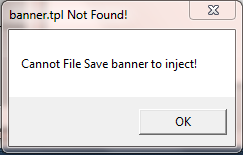
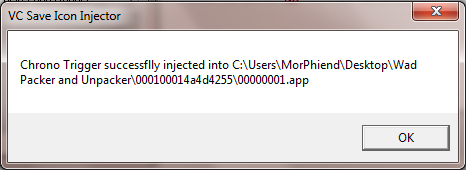
I have a similar problem. I'm trying to change the banner on a SNES wad. The icon after clicking the game is fine, but the channel icon itself is choppy. As far as the save icon goes, I can't even get that one changed at all. I choose the banner.tpl from the "save icon and save title injector" tool, but when I click "Inject" I get these two windows:
Notfound.png

Save.png


Then the save icon is still DKC2.

Anyone know what I am doing wrong or what I am missing?
 

Site & Scene News

Popular threads in this forum