Hacking USB Loader GX "Failed To Initialize USB"

  • Thread starter Thread starter jpita100800
  • Start date Start date
  • Views Views 12,290
  • Replies Replies 2

jpita100800

New Member
Newbie
Joined
Jun 3, 2020
Messages
3
Reaction score
0
Trophies
0
Age
25
XP
81
Country
United States
Upon launching USB Loader GX, I get an error message saying that it failed to initialize the USB. This is strange considering that CFG Loader works just fine. I prefer USB Loader GX's interface more than CFG Loader, has anyone found a solution to this problem?
 
Hello.:)

Upon launching USB Loader GX, I get an error message saying that it failed to initialize the USB. This is strange considering that CFG Loader works just fine. I prefer USB Loader GX's interface more than CFG Loader, has anyone found a solution to this problem?


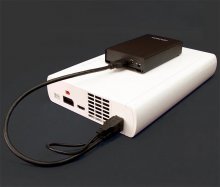
- Please try to avoid USB Sticks/Flash Drives/Thumb Drives/Pen Drives.Please use an HDD (with Power Supply or Y-Cable)
- Please use the USB Port(s) on the Back Side:
gggggggggggggfnNmVebYyaxZ-rmxdi_cblQ.jpg

- if you are using USBLoader GXVersion v3.0 r1272:

Please change:
- Settings/Global Settings - Loader Settings - Loader´s IOS try 58 or 249 (restart the Loader after Changing please).

You can try @blackb0x Enhanced MOD:
https://gbatemp.net/threads/usb-loader-gx.149922/page-1316#post-8856063

You can try an older Revision - r1268 or 1271 are good ones.
https://sourceforge.net/projects/usbloadergx/files/Releases/New revisions (3.0+)/


Good Luck
Thank you.:)
 
Last edited by Alexander1970,
  • Like
Reactions: jeannotte
Hello, for anybody in the future stumbling upon this, what fixed it for me was setting "Multiple Partitions" to ON in "Hard Drive Settings" as I use my drive for Multi-Purpose use on FAT32.
 
  • Like
Reactions: jeannotte

Site & Scene News

Popular threads in this forum