Nonetheless, i'm about to do that after i'm done making the backup. Is there anything i should keep in mind when doing this, or a specific order to add things back to the sd card?
also would it be fine to j ust leave the "nintendo" folder alone?
1) Move/Rename /atmosphere to /atmosphere.bk
2) Move/Rename /bootloader to /bootloader.bk
3) copy /bootloader.bk/hekate_ipl.ini to /bootloader/
4) do PC version of this: https://rentry.org/UpdateCFW
That will give you the cleanest reinstall with a copy of everything to roll back to should you need to do so.
1) Move/Rename /atmosphere to /atmosphere.bk
2) Move/Rename /bootloader to /bootloader.bk
3) copy /bootloader.bk/hekate_ipl.ini to /bootloader/
4) do PC version of this: https://rentry.org/UpdateCFW
That will give you the cleanest reinstall with a copy of everything to roll back to should you need to do so.
ok! i'm just doing all this now.
i had to take a little break bc i was getting super anxious about the whole thing, i didn't want to like... brick my console or render it dead, that's my largest fear of all time lol.
I managed to get a fresh install of atmos. ii'll let you know if it still crashes.
same error- ptm. seems to only be happening on animal crossing. will test in handheld to see if i just... can't play it docked anymore for this one game. i really don't understand, and i wish that i wasn't interested in playing this game right now because it's making me overly depressed.
EDIT:
It only crashes when docked, and i think i'm confirming that. not sure why, but it's just really annoying for when i want to have things on the tv i guess....
same error- ptm. seems to only be happening on animal crossing. will test in handheld to see if i just... can't play it docked anymore for this one game. i really don't understand, and i wish that i wasn't interested in playing this game right now because it's making me overly depressed.
EDIT:
It only crashes when docked, and i think i'm confirming that. not sure why, but it's just really annoying for when i want to have things on the tv i guess....
You are not using any mods?
You are not using any cheats?
No save games?
This is a 100% clean setup, right?
Try deleting the game save data and the game itself using Settings -> Data Management. You want to remove all traces of the game.
Delete your cache:
Clear Nintendo Switch system cache.
If your game is slow, crashes, or freezes regularly, it may be caused by an outdated system cache. Try clearing the console’s system cache to fix the problem. Don’t worry, this will not delete any of your personal data or game progress.
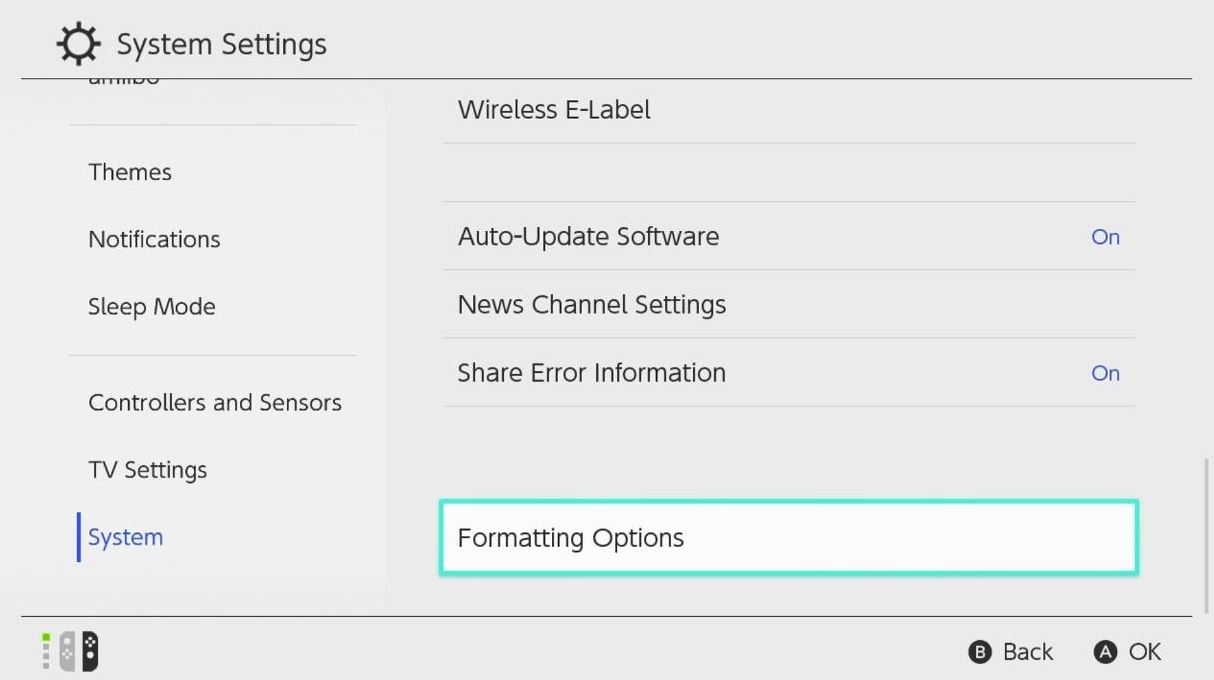
Follow these steps to delete the system cache:
-Go to the Home Menu.
-Select System Settings.
-Select System.
-Select Formatting Options.
-Select Clear Cache.
–Select the user for which you want to clear cache and follow the instructions.
–Restart your Nintendo Switch and check for the problem.
just for good voodoo, enter maintenance mode (steps 1 and 2 but NOT 3) and simply reboot.
Finally:
Download ACNH from a completely different source and install to internal memory (this will be your emunand…it’s still technically your sd card…don’t worry.)
The intent is to get the game installed completely away from everything you’ve done in the past.
e: if it still doesn’t work, let’s try to install and play Zelda BOTW and/or Bayonetta2 to see if either of them crash.
You are not using any mods?
You are not using any cheats?
No save games?
This is a 100% clean setup, right?
Try deleting the game save data and the game itself using Settings -> Data Management. You want to remove all traces of the game.
Delete your cache:
Clear Nintendo Switch system cache.
If your game is slow, crashes, or freezes regularly, it may be caused by an outdated system cache. Try clearing the console’s system cache to fix the problem. Don’t worry, this will not delete any of your personal data or game progress.
Follow these steps to delete the system cache:
-Go to the Home Menu.
-Select System Settings.
-Select System.
-Select Formatting Options.
-Select Clear Cache.
–Select the user for which you want to clear cache and follow the instructions.
–Restart your Nintendo Switch and check for the problem.
just for good voodoo, enter maintenance mode (steps 1 and 2 but NOT 3) and simply reboot.
Finally:
Download ACNH from a completely different source and install to internal memory (this will be your emunand…it’s still technically your sd card…don’t worry.)
The intent is to get the game installed completely away from everything you’ve done in the past.
e: if it still doesn’t work, let’s try to install and play Zelda BOTW and/or Bayonetta2 to see if either of them crash.
yeah it recently just crashed in miitopia, same issue and so i'm going to clear the cache. I'm not using mods or cheats and it's a 100% clean setup.
everything runs completely fine in handheld mode, for any period of time. It only is crashing when docked and I really just don't understand why.
I'll edit this with the results asap.
i'm kinda bummed about this since it'll make my streaming things near impossible... i don't understand what I did that could have caused this. I'm so tired and stressed out.
---
Edit:
So far it's doing significantly better after clearing the cache (in a lot of ways, really).
just as i typed that it crashed again. really starting to lose hope in all this.
I don't know what's wrong. Is my console just useless in docked mode now? I feel kinda sick about this.
i'm kinda bummed about this since it'll make my streaming things near impossible... i don't understand what I did that could have caused this. I'm so tired and stressed out.
---
Edit:
So far it's doing significantly better after clearing the cache (in a lot of ways, really).
just as i typed that it crashed again. really starting to lose hope in all this.
I don't know what's wrong. Is my console just useless in docked mode now? I feel kinda sick about this.
I don’t think you did anything in particular. In docked mode the Switch runs at a higher clock speed. Oddly enough this is exactly what PTM deals with. Beginning to think there’s something hardware related going on.
Maybe you can find a friend nearby that can let you use their dock to confirm or deny that’s the issue (might just need new dock?)
If that doesn’t pan out you might want to have an electronics shop look at the Switch itself.
-It's sd card, failed hard. So, I bought a new one.
-It had emummc, file based (i think), exfat.
-Thankfully, I could read the the old sd files, but not write to it, and some files were corrupted, but I think the savegames, wich is the thing I want to restore, is still there. It is in contents folder?
-want to use a new sd card, fat32 this time, and partition based. I got it to work, just fine.
-The backuped sd files does not work to switch boot, because some files were corrupted. So, I made a new emummc for the new sd card.
-How can I recover the saves, mannually? Apparently, just copy stuff from the old sd emummc to the new one doesn't work.
-It's sd card, failed hard. So, I bought a new one.
-It had emummc, file based (i think), exfat.
-Thankfully, I could read the the old sd files, but not write to it, and some files were corrupted, but I think the savegames, wich is the thing I want to restore, is still there. It is in contents folder?
-want to use a new sd card, fat32 this time, and partition based. I got it to work, just fine.
-The backuped sd files does not work to switch boot, because some files were corrupted. So, I made a new emummc for the new sd card.
-How can I recover the saves, mannually? Apparently, just copy stuff from the old sd emummc to the new one doesn't work.
It's not hard at all, I have a Mariko aswell.
Grab latest release of Lockpick_RCM from here https://github.com/shchmue/Lockpick_RCM, put the .bin to /bootloader/payloads/ and then reboot to hekate, tab the "Payloads" tab and then select Lockpick.
In Lockpick just select sysNAND with volume buttons and confirm with POWER button, it's also explained on-screen, keys will be in your /switch/ folder.
The miitopia crash shows it’s not just ACNH. That’s what I wanted to determine.
To be crystal clear…Are you saying you can play ACNH as long as you‘d like in handheld mode?
I don’t think you did anything in particular. In docked mode the Switch runs at a higher clock speed. Oddly enough this is exactly what PTM deals with. Beginning to think there’s something hardware related going on.
Maybe you can find a friend nearby that can let you use their dock to confirm or deny that’s the issue (might just need new dock?)
If that doesn’t pan out you might want to have an electronics shop look at the Switch itself.
I tested the dock of my roommate and sadly, it still crashed. All games run fine in handheld.
I don't know any nearby shops that can look at my switch., and i'm worried that if i do take it to someone professional I will be unable to get proper help due to it being modded, and they may just blame me for having it modded in the first place.
I tested the dock of my roommate and sadly, it still crashed. All games run fine in handheld.
I don't know any nearby shops that can look at my switch., and i'm worried that if i do take it to someone professional I will be unable to get proper help due to it being modded, and they may just blame me for having it modded in the first place.
It’s very likely inside your Switch alone then. An independent shop won’t care about mods. They don’t work for Nintendo. They will look at the specs of the components within the circuits and want to get paid for fixing them rather than turning away work. Blame is only in your mind.
It’s very likely inside your Switch alone then. An independent shop won’t care about mods. They don’t work for Nintendo. They will look at the specs of the components within the circuits and want to get paid for fixing them rather than turning away work. Blame is only in your mind.
alright. i'll probably see what i can do then. i just need to see if there's anyplace nearby that's reliable for this
i also have the issue of money then: i don't have a job so i'm just.... kinda broke. fun roadblock, haha.
i'll have to figure something out.
also- edit:
Is there a way to make it so when atmosphere crashes, it reboots to hekate instead of rcm? It's mostly a hassle to have to constantly undokc it to put it on my pc and inject the payload. I can deal with the crashes until i find another solution really.
I also was wondering if there's a way to make the docked switch run as if it were handheld while still displaying to the tv?
i'm testing some more of my games to see if they kick my switch's ass too ahah.
sorry to double post again, but:
The console runs fine when booted to stock from hekate.
I'm really wondering if this somehow an issue with atmosphere instead now since it's only doing the crash when i'm using cfw. Any advice?
sorry to double post again, but:
The console runs fine when booted to stock from hekate.
I'm really wondering if this somehow an issue with atmosphere instead now since it's only doing the crash when i'm using cfw. Any advice?
In any case, you saying that it only crashes in CFW points to an issue in your setup, so you did not install it freshly as you claimed before. Remove or move the contents folder inside SD/atmosphere to your PC and try again, if it doesn't crash in docked while running CFW I proved my point.
In any case, you saying that it only crashes in CFW points to an issue in your setup, so you did not install it freshly as you claimed before. Remove or move the contents folder inside SD/atmosphere to your PC and try again, if it doesn't crash in docked while running CFW I proved my point.
apologies, i think I didn't see it bc i've been incredibly stressed out as of late.
I guarantee that I completely removed the old atmosphere folder the past two times i tried, however, i will try once more regardless. I'm just so confused and i may be forgetting vital steps.
apologies, i think I didn't see it bc i've been incredibly stressed out as of late.
I guarantee that I completely removed the old atmosphere folder the past two times i tried, however, i will try once more regardless. I'm just so confused and i may be forgetting vital steps.
As I said, either removing/deleting the contents folder from your SD card completely, or moving it as backup to your PC, just make sure it's not on your SD anymore before you boot Atmosphere. No need to remove the entire atmosphere folder.
It’s about that time of year again where I check in with the community to see if we can get the front page aligned with what people are interested in knowing and what...
WiiCompiled is a new project that lets PC gamers play Mario Kart Wii natively on PC without emulation. Using static recompliation to convert the code into native PC...
After being announced last year, the fan-made remake Gamma Emerald has finally gotten its first early access release. A complete rebuild of fan-favourite Pokemon...
The long awaited Grand Theft Auto VI Extended Look gameplay trailer has finally dropped on YouTube. As you all know, it had dropped 6 hours earlier on Netflix, and...
Though we knew all the way back in May that this was coming, the exact numbers remained a mystery for prospective Nintendo gamers in the UK. If you happen to have...
Thanks to the recent decomplication efforts; The Minish Cap 3DS brings the Game Boy Advance classic Zelda title to your 3DS.
The port takes full advantage of the 3DS...
In the wake of Sony's shift to a digital-only ecosystem within the next year, Xbox have today announced a surprising scheme. Aiming to offer physical buyers the same...
After being announced last week, the first of two broadcasts is set to go live later today with a stark focus on The Legend of Zelda and its 40th anniversary...
It is with a heavy heart that I announce the departure of our beloved Chary from the position of Chief Editor. Chary took over early 2021 and has done a wonderful job...
To celebrate its 25th anniversary, XBOX has launched pre-orders for the XBOX 25th Anniversary Collection. For the occasion, the trailer below was aired.
This...
It’s about that time of year again where I check in with the community to see if we can get the front page aligned with what people are interested in knowing and what...
After being announced last week, the first of two broadcasts is set to go live later today with a stark focus on The Legend of Zelda and its 40th anniversary...
It's been something of a quiet week in the gaming space, with the deluge of big hitters trying to find their place before GTA 6 launches really kicking off next week...
In the wake of Sony's shift to a digital-only ecosystem within the next year, Xbox have today announced a surprising scheme. Aiming to offer physical buyers the same...
Though we knew all the way back in May that this was coming, the exact numbers remained a mystery for prospective Nintendo gamers in the UK. If you happen to have...
The long awaited Grand Theft Auto VI Extended Look gameplay trailer has finally dropped on YouTube. As you all know, it had dropped 6 hours earlier on Netflix, and...
It is with a heavy heart that I announce the departure of our beloved Chary from the position of Chief Editor. Chary took over early 2021 and has done a wonderful job...
The second of a two-part special, a more traditional Nintendo Direct is set to air today. Unlike the Zelda Direct the contents of this one is still relatively up in...
After being announced last year, the fan-made remake Gamma Emerald has finally gotten its first early access release. A complete rebuild of fan-favourite Pokemon...
A few days ago Chary stepped down as Chief Editor after 5 wonderful years, and everyone guessed the seat wouldn't stay empty for very long. Back in 2021 I proudly...