Hacking Supercard DStwo plug-ins

  • Thread starter Thread starter alidsl
  • Start date Start date
  • Views Views 307,288
  • Replies Replies 868
  • Likes Likes 3
CannonFoddr said:
Yep - I've noticed that as well - I've done an icon & uploaded a new version @ http://filetrip.net/f11920-DSTwo-DSLibris-Plugin-1-01.html

Also I can also confirm that DSLibris also runs as a plugin on a DSi as well (only tried the 'quick start' guide though - which incidentally the [start] and [select] instructions are the wrong way round
laugh.gif
) - the only thing I've noticed is when starting up you tend to get a lot of green text show up

I've been using dslibris, and it works fine for all the files I've been reading. I have not gotten any green text.

 
dhjohn said:
CannonFoddr said:
the only thing I've noticed is when starting up you tend to get a lot of green text show upI've been using dslibris, and it works fine for all the files I've been reading. I have not gotten any green text.Hmm weird - what I see when starting it up is
2 black screens but with '$ dslibris' showing in top left corner of the bottom screen for a couple of seconds.. then see a list of what looks like file paths (like '/font/') before getting dslibris file selection screen up.. which I THINK is the same text you see in the dslibris.log file

AND I've also found out you can change the 'dslibris.xml' file - so it seems you can place the fonts/books into another folder instead of the defaults (I've got a hidden 'data' folder already - so that's where I've placed the fonts)
CODE
ÂÂÂÂ
ÂÂÂÂ
ÂÂÂÂ
ÂÂÂÂ
ÂÂÂÂ
ÂÂÂÂÂÂÂÂ
ÂÂÂÂÂÂÂÂ
ÂÂÂÂ
Notice I've changed '/font/' to '/data/' in the line

EDIT: Didn't like the original icon I did for DSlibris (it looked more like an 'Organiser' than a book) - so I've changed it to
11921-dslibris.JPG
http://filetrip.net/f11921-DSTwo-DSLibris-Plugin-1-01.html
& I've deleted the other one @ filetrip.net/f11920-DSTwo-DSLibris-Plugin-1-01
 
Oh, for some reason, I thought that was blue... (I checked, its green for me too).
I've always ignored it as a initialization log.
btw, I like the icon.
 
At this rate Stormwave, I won't NEED DSorganize as a DSTwo plugin

- what with 'TextDS' and 'Clock' - that's 2 features of DSOrganize that can be replaced (Just need 'Calender/To Do/Appointment', 'Address book', 'Calculator' and a 'File Browser' app & I'll be happy)

EDIT: Shame it doesn't have a 'reset2desktop'/'quit' function [Hint Hint] - guess you haven't figured that part out yet
unsure.gif
 
QUOTE said:
EDIT: Shame it doesn't have a 'reset2desktop'/'quit' function [Hint Hint] - guess you haven't figured that part out yet unsure.gif

lol, no, not yet. I looked into it briefly yesterday, I understand how loading NDS files works now, but I've yet to implement or test it in anything. When I get back from holiday I'll have a proper look into it, and then I'll implement it in all of my programs in the future.

As for the calender, I actually have made a calender application a few months ago (the first program I wrote for the DS), although it was made more as an hourly logging diary, it is perfectly usable as a calender. I might release it one day
smile.gif
Maybe I'll put all these little apps into a larger app (comparable to DSOrganise) at some point in the future.
 
Ah yeh, it works fine on my DSi. Not sure for DS Lite, but I'm pretty sure it'll work fine. If anyone can confirm this, it would be great.
 
Missingno._ sent me another format for the first post much of it is still the same

however I have posted a poll to see if people prefer the old/new first post
smile.gif
 
my votes for the old layout. the OP looks about the same to me. the one important thing i see missing is a link to my full pack =(

..and i think this needs to be re-worded, theres a lot of repetition here

QUOTE said:
If a Plug-In is not here you may request for one by posting the Plug-In you want here. The Plug-In you request must be for an existing homebrew application.

ie: If the homebrew plug-in youre looking for isnt represented yet, you can request it here at this thread.
 
Like the new layout - just one small addition (if you keep to it)..
Since my instructions are really based on GIMP, may I suggest adding under 'CannonFoddr's Bitmap Instructions' (between the 'In GIMP:' and 'That's it' lines), something like:-
QUOTE said:
> In 'PaintShopPro', or any other graphic program unable to save in a suitable '16-bit format': Use 'spinal_cord's Bitmap Convertor' in the spoiler below
 
One small problem with BBcode though, can't find it and until I do I can't edit the first post in the new format, the poll will come down and the old format will stay for a bit, I'm trying to find the problem now
 
Alidsl, i went through the (non-Vato) fullpack, and noticed that a couple of mines were sub-par and didnt quite match the set,

so i revamped the individual plugs-ins with the "spinal_cord border look" and amended them as versions 1.1

AemioDA http://filetrip.net/file.php?id=11950

Animanatee http://filetrip.net/file.php?id=11953

1942 http://filetrip.net/file.php?id=11951

1943 http://filetrip.net/file.php?id=11952

if you'd be so kind as to update them at the OP, that'd be kewl, and also add them to the fullpack if ya could =D
 
spinal_cord said:
VatoLoco said:
so i revamped the individual plugs-ins with the "spinal_cord border look" and amended them as versions 1.1

The what look ?
mellow.gif


hehe, it was meant as a compliment=P i put the black border around the icon, so they'd hoopily frood with the ones from the icon converter you built..so now theyre Spinal tapped =D


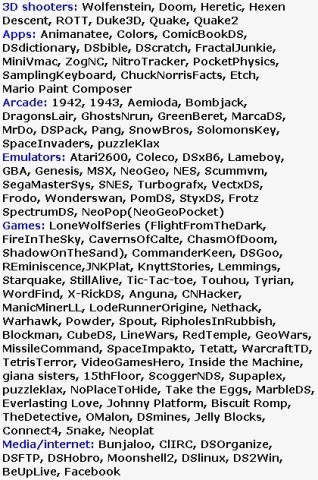
Heres my latest 8 new additions to the VatoPacks. get em hot at this threads OP or my signature, ya dig

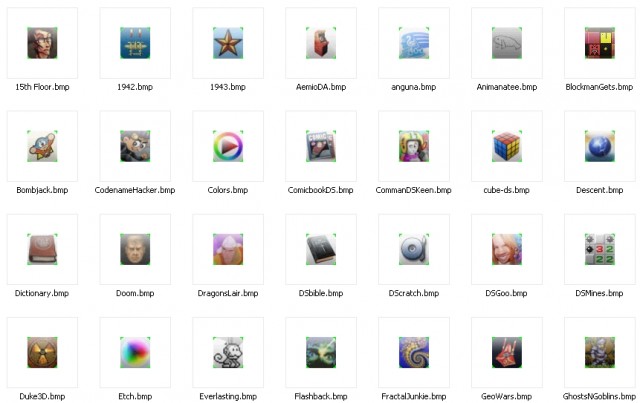
11558-NBiconset.jpg
11558-Icons.jpg


to quote myself lol:
QUOTE
06/21/10 added Heretic(slot2_nds), Knytt Stories, TouhouDS, Bombjack, GhostNrun(ghostsNgoblins),MrDo, SnowBros, Solomons Key, ..and misc fixes
 
VatoLoco said:
spinal_cord said:
VatoLoco said:
so i revamped the individual plugs-ins with the "spinal_cord border look" and amended them as versions 1.1

The what look ?
mellow.gif

hehe, it was meant as a compliment=P

Compliment taken!
 

Site & Scene News

Popular threads in this forum