Hacking Sm4sh Injector Pack

  • Thread starter Thread starter mariosonicds
  • Start date Start date
  • Views Views 72,640
  • Replies Replies 83
  • Likes Likes 7
The only place I could find TexConv2 was on github by NWPlayer to also get textures. Is there somewhere else I should get it from?
 
The only place I could find TexConv2 was on a github page by NWPlayer to also get textures. Is there somewhere else I should get it from?
 
The only place I could find TexConv2 was on a github page by NWPlayer to also get textures. Is there somewhere else I should get it from?
 
The only place I could find TexConv2 was on a github page by NWPlayer to also get textures. Is there somewhere else I should get it from?

--------------------- MERGED ---------------------------

So sorry about all the posts. It wasn't posting and I hit the button a bunch of times. How do I delete them?
 
EDIT: Apologies for double post, I thought the posts auto-merged

The only place I could find TexConv2 was on a github page by NWPlayer to also get textures. Is there somewhere else I should get it from?

Okay I found another place with TexConv2
https://archive.is/Fzhfb
Heres a direct link
http://www.mediafire.com/download/cxv1na6ava81kc6/texconv2.zip

Grab TexConv2.exe, texUtils.dll, and gfd.dll

After putting these 3 files into the inject pack folder, the GTX to DDS converter (GTX2DDS.bat) worked fine.

I'm confused as to why these 3 files weren't included to begin with. I feel like this is the incorrect way of doing it.
Let me know if you have any luck getting a texture in the game.
 
Last edited by DakotaBonez,
I'm having some problems with the TexIDfix. I've got red gloves on all additional mario alts, red tipped hair on my 10th peach costume, red hair on all additional tlink alts, weird black texture over the eyes of my my extra corrin alt, red eyes on my extra ROB alt, red glasses on both my extra Falcon alts.

Curiously, the alts on all these characters work with no issues: Luigi, Little Mac, Link, Zero Suit Samus, King Dedede, Lucario, Lucina, Mega Man, and Roy. I think it's something to do with adding extra costume slots.

Some pictures: http://imgur.com/a/WI9mC
 
  • Like
Reactions: FlappyFalco
Screenshot_1.png
Help?
 
Last edited by josh124,
when I put chr_00_Murabito_02.nut through the ol' grinder here, I end up with a .dds files that seems to be corrupted has lines and purple all over the image..

what do?
 
okay so i added the intel texture works plugin for the A8B8G8R8 files and they're still coming up blank and corrupted.
 
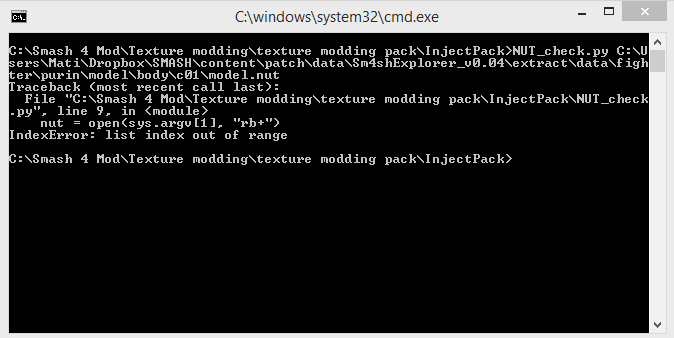
Alright, after spending 12 hours trying to get nut_check.py to work (I am dead serious), I managed to get it to work. However, it seems that GTX2DDS.bat does not work, so I'm stuck right as I used to be for the last half a day. So annoying...

Can someone take a look at this and see what I could do so GTX2DDS.bat works? Double clicking it gives me the same result as just typing it into the Command window. It just says "Failed to load DLL Failed to load DLL Failed to load DLL Failed to load DLL Failed to load DLL Failed to load DLL Failed to load DLL Failed to load DLL Failed to load DLL................................. Failed to load DLL"

I have no clue what to do. Also before you point a finger at it, "python nut_check.py model.nut" is literally the ONLY WAY I HAVE EVER, EVER, gotten nut_check.py to work for me. I have tried every single other possibility. This is no exaggeration.
Python_nut_check_py_and_then_GTX2DDS_bat_doesnt_work.png


Here is a view of all the contents on my Inject Pack folder:
Python_nut_check_py_and_then_GTX2DDS_bat_doesnt_work_my_folder.png

Some (perhaps) important details: I gravved the TexConv2.exe from the older version of the Inject Pack which was directly linked as a download by TS4M in the pastebin... ( http://pastebin.com/NENj6bTV )

Is there some other way I should grab it? What exactly should I do?

I wish someone would just cut this garbage and post all the extracted files out on a website...
 
Last edited by TyranitarGodzilla,
Alright, I can make the textures now--but not inject them into the model.nut. This is the last step, the very last step! (prior to putting them back in Sm4shexplorer) And it's ANOTHER BLOCKADE! ARGHGAHGHGAGH

Alright. I have the DDS files on hand. I have everything. But I get this stupid error message when I run EasyInject.bat:

"Traceback (most recent call last):
File "C:\Users\Darkrai\Downloads\Inject_Pack\NUT_Inject.py", line 87, in <module>
magic = readu64be(GTX)
NameError: name 'readu64be' is not defined"

Am I missing some "readu64be" file?? I quite frankly don't get it.

The thing creates a tmp file but this thing happens before it can actually inject the dds files into model.nut. When I extract the textures from model.nut after doing EasyInject.bat to see if the textures got injected, it only shows the old textures. The new textures are not injected. This is so stupid. It's been on the closer end to a day since I began this. I'm going to sleep and hopefully get some answers... I attached the images instead of linking them this time.
 

Attachments

  • my inject pack.png
    my inject pack.png
    20.5 KB · Views: 467
  • readu64be garbage.png
    readu64be garbage.png
    43.1 KB · Views: 403
So, how can I edit chr_00 and stock_90 files? :/ all of my editing programs have problems opening those
 
So, how can I edit chr_00 and stock_90 files? :/ all of my editing programs have problems opening those

I am currently trying to do the same thing. I believe you first have to convert the dds to a png, THEN save it as a dds.
There is a dds to png converter included with the inject pack, just change the path to where you have amd compress installed. I thought the path was the same as mine but there was an extra space, so double check.

 
  • Like
Reactions: Insdong
I am currently trying to do the same thing. I believe you first have to convert the dds to a png, THEN save it as a dds.
There is a dds to png converter included with the inject pack, just change the path to where you have amd compress installed. I thought the path was the same as mine but there was an extra space, so double check.

Hmm I see thanks, and which file is the converter? The Inject Pack has too much stuff lol

Edit: So I think I figured this stuff out, but I don't have AMD installed, where is that?

Edit2: Nevermind lol
 
Last edited by Insdong,

Site & Scene News

Popular threads in this forum