Hacking sleep mode with SX PRO ?

  • Thread starter Thread starter alucard_xs
  • Start date Start date
  • Views Views 6,547
  • Replies Replies 20

alucard_xs

Well-Known Member
Member
Joined
Oct 31, 2012
Messages
708
Reaction score
136
Trophies
2
Age
115
XP
3,358
Country
Canada
Hello everyone,

Proud of my SX pro, I'm wondering what it is possible :

= can I put my console in sleep mode without the dongle ?

Thanks
 
Not really something to be proud about, but being stoked about what you can do with it sure :)

Yes, i keep mine docked and sleep mode when not in use. The only time i need to use the dongle is when i update sx os or add another xci to my sd card
 
I don't see any issue with that. Keeping it in sleep mode sounds like the best idea as long as your keeping it charged.

Im assuming your using auto rcm to keep your efuses at 2.3.0, turning it off can cause battery issues if not done correctly. Sometimes when using auto rcm the switch will not fully shut down and go into a wierd semi off sleep/rcm state and drain your battery.

If you never heard about it i suggest you look into the auto rcm battery drain so as to avoid it, or just keep your switch in sleep mode as it should be ! :)

The dongle is only used from the off/on or reset state. Once the os is loaded up you no longer need the dongle untill next off/on. Sleep mode the os never shuts off.
 
Last edited by CrAzYLiFe,
  • Like
Reactions: Olmectron
well in fact, I do not use (and do not want) autoRCM, I prefer plug in my dongle everytime I switch it ON.
Is sleep mode possible as I do not want to burn my efuses and as do not use autoRCM ?
What would happen if, in sleep mode, I plug the charger ? The console would wake up but burning my efuses as it would start in Nintendo OS ?
 
Last edited by alucard_xs,
well in fact, I do not use (and do not want) autoRCM, I prefer plug in my dongle everytime I switch it ON.
Is sleep mode possible as I do not want to burn my efuses and as do not use autoRCM ?
What would happen if, in sleep mode, I plug the charger ? The console would wake up but burning my efuses as it would start in Nintendo OS ?

I'm no expert but I thought I read autoRCM is important to turn on if you update without burning efuses. I'm assuming if you accidentally turn that unit on without booting into RCM mode you will instantly burn fuses.
 
You will want auto rcm to prevent accidently loading official firmware and burning your fuses if you power off...

Sleep mode will not burn your fuses it will wake up where you last left the switch... being what ever game or sx os firmware.
 
If you have a sx pro. You mught as well install autorcm with briccmii v2 and then keep the device in sleep mode. That way you dont burn your fuses if your jig just stops working one day lol

Also, if you do boot briccme v2 it will show you your efuse count. Im curious to see how many of them are burned without autorcm
 
thanks dudes, but as I read autoRCM can drain sometimes the battery and disable the possibility to switch the console back ON, I prefer the "manual" way. I'm very carefull everytime I switch it on and everytime I need to charge it (order is : dongle plugged, console ON then dongle OFF and USBC plugged).
Btw, still too early to use homebrew (or NCP files) as it modifies the NAND (I want to keep my console as clean as possible).
So you confirm that :
(without autoRCM)

dongle ON
power + Volume
custom firmware
dongle OFF
sleep mode

so if I charge it in sleep mode, i will still be in custom firmware ?
or if I wake it up, i will still be in custom firmware ?

PS : sorry for my English that can be sometimes awkward… french Inside ...

 
Last edited by alucard_xs,
Just thought I'd add to this. I contacted Nintendo last week and asked if using sleep mode can damage the console if carried about in a case and the answer was yes. They said you need to keep it in a well ventilated area as the fan is still active even in sleep mode, despite the relatively low power consumption. So sleep while docked, otherwise power off.
 
  • Like
Reactions: elm and Random Joe
Yeah it supports sleep mode fine.

The only time's I've ever needed the dongle was when I accidentally drained the battery, and when I went into regular firmware to see if I was banned or not.
 
well in fact, I do not use (and do not want) autoRCM, I prefer plug in my dongle everytime I switch it ON.
Is sleep mode possible as I do not want to burn my efuses and as do not use autoRCM ?
What would happen if, in sleep mode, I plug the charger ? The console would wake up but burning my efuses as it would start in Nintendo OS ?
You still need the dongle, AutoRCM just removes the need for the button combination/jig (and removes the risk of accidentally forgetting anb having your fuses burned)
thanks dudes, but as I read autoRCM can drain sometimes the battery and disable the possibility to switch the console back ON, I prefer the "manual" way. I'm very carefull everytime I switch it on and everytime I need to charge it (order is : dongle plugged, console ON then dongle OFF and USBC plugged).
Btw, still too early to use homebrew (or NCP files) as it modifies the NAND (I want to keep my console as clean as possible).
So you confirm that :
(without autoRCM)

dongle ON
power + Volume
custom firmware
dongle OFF
sleep mode

so if I charge it in sleep mode, i will still be in custom firmware ?
or if I wake it up, i will still be in custom firmware ?

PS : sorry for my English that can be sometimes awkward… french Inside ...
You need to make sure it's fully turned off and didn't enter RCM instead of powering down fully, then you won't have any problems with battery drain.
 
thanks dudes, but as I read autoRCM can drain sometimes the battery and disable the possibility to switch the console back ON, I prefer the "manual" way. I'm very carefull everytime I switch it on and everytime I need to charge it (order is : dongle plugged, console ON then dongle OFF and USBC plugged).
Btw, still too early to use homebrew (or NCP files) as it modifies the NAND (I want to keep my console as clean as possible).
If you are "very carefully", autoRCM is not a problem.
 
Just thought I'd add to this. I contacted Nintendo last week and asked if using sleep mode can damage the console if carried about in a case and the answer was yes. They said you need to keep it in a well ventilated area as the fan is still active even in sleep mode, despite the relatively low power consumption. So sleep while docked, otherwise power off.
I'm sure that's just a generic "cover our ass" scripted legal response. I've never seen the fan come on while in sleep mode. Have you?
Plus we would have a ton of burnt out switches since I'm sure nobody turns off their switch before throwing it in their case. I know I don't and mine still runs fine. I have an official case and there is no warning to turn off your console. Also the tegra has thermal trip fuses to prevent such a thing from occurring iirc.
 
Last edited by Mr. Wizard,
Keep in mind that updating in the normal way — including if you get an update by syncing game versions offline with another console running a newer firmware version — also removes autoRCM/BriccMii. I found it in the worst possible way.
 
I would recommend using AutoRCM. Without it the chances of getting fuses burnt are very likely sooner or later. I've been using it for the longest time without issue. Plus if you do get stuck in a powered off state from battery drain, then at worst you have to externally charge or replace the battery.

All the best ✌️
 
I'm sure that's just a generic "cover our ass" scripted legal response. I've never seen the fan come on while in sleep mode. Have you?
Plus we would have a ton of burnt out switches since I'm sure nobody turns off their switch before throwing it in their case. I know I don't and mine still runs fine. I have an official case and there is no warning to turn off your console. Also the tegra has thermal trip fuses to prevent such a thing from occurring iirc.
It could be tho, in sleep mode temperature control should still be active and when overheating like in a bag it could be that the fan kicks in
 
externally charge or replace the battery
Not aware of anyone who's had to do that. I've seen a few people have to unplug/replug the battery to reset the PD controller but that's like 2 people out of thousands so...

Any proof to back up your outrageous claim?


It could be tho, in sleep mode temperature control should still be active and when overheating like in a bag it could be that the fan kicks in
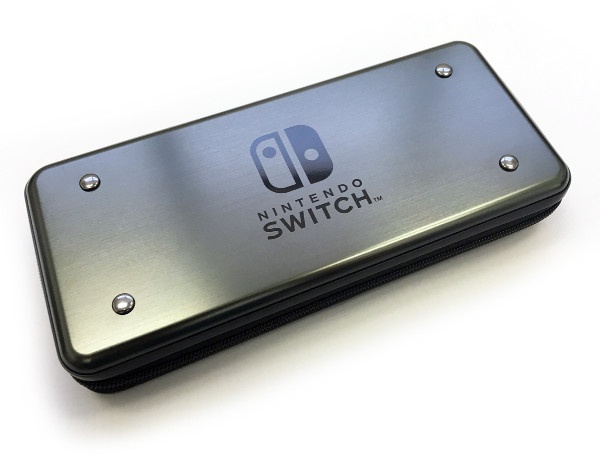
Would have heard about it by now. I certainly haven't had any problems and I keep mine in this:

name-original.jpg


Which then also gets stuffed into this:

91gS67wmuBL._SL1500_.jpg


Which then gets stuffed into my trunk in 30c+ weather.

So I'm pretty confident sleep mode is good enough, but then I don't leave games running in the background I always save and close when putting the switch down. Force of habit from my 3DS days, odd things would happen when leaving a game running for long periods of time.
 

Site & Scene News

Popular threads in this forum