Hacking Screwed up Gateway Emunand....

  • Thread starter Thread starter DevilZeroX
  • Start date Start date
  • Views Views 4,106
  • Replies Replies 30

DevilZeroX

Member
Newcomer
Joined
Jul 28, 2007
Messages
21
Reaction score
0
Trophies
1
XP
201
Country
United States
I have a Japanese 3DS.

I just go in my Gateway 3ds. Downgraded to 4.4. Installed Emunand. Updated that Emunand. Everything was working correctly. I go into the eshop for the emunand, but I can't read Japanese so I thought it was just asking me to create my mii or Nintendo Network ID I hit ok until I see it's installing another firmware.......

It finished installing and My 3DS is now on 9.9J. Man I want to shoot myself. I didn't even get to enjoy the Gateway....

 
I have a Japanese 3DS.

I just go in my Gateway 3ds. Downgraded to 4.4. Installed Emunand. Updated that Emunand. Everything was working correctly. I go into the eshop for the emunand, but I can't read Japanese so I thought it was just asking me to create my mii or Nintendo Network ID I hit ok until I see it's installing another firmware.......

It finished installing and My 3DS is now on 9.9J. Man I want to shoot myself. I didn't even get to enjoy the Gateway....

Your Sysnand is now on 9.9?
Did you make a backup of your Sysnand from the Gateway Menu like you were supposed to?

If yes to the above two questions, then you can do a hardmod / have one done & flash your 3ds back to an exploitable firmware.
 
Yes, I did back up the Sysnand. How do I hardmod it? Do I have to buy something else take apart the 3DS?

https://gbatemp.net/threads/3ds-xl-nand-access-via-usb-mod.363245/
http://www.amazon.com/Anker®-Reader-RS-MMC-Support-Warranty/dp/B006T9B6R2?

Or send it to @hundshamer and he can do it for you for a fee. Iirc he charges $50(?)

Edit: There are other Hardmod guides that may be a bit simpler, you'll just have to google / search the forums for those. I don't have'm saved. :P
 
I'm assuming it's not a "new" 3DS, because of the downgrade part. Is it an XL or no?
 
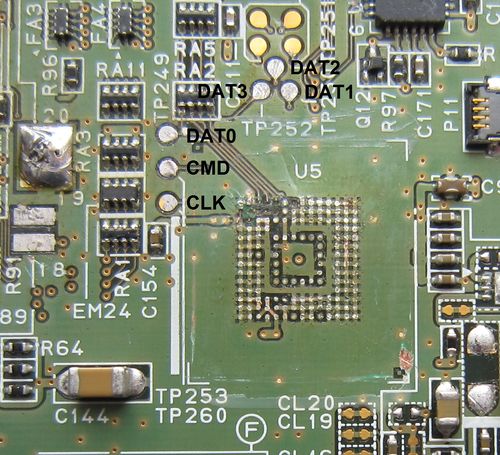
That's the easiest one. There are 4 points. They are DAT0, CMD, CLK, and GND( you can ignore DAT1, DAT2, and DAT3)). Solder them to an SD card's corresponding pins. Use win32diskimager to dump the 9.9 NAND twice and compare them (via MD5 or SHA hash) in case of error. Then write the 4.x backup to the NAND with win32diskimager.
500px-CTR_NAND_pinout_XL.jpg

sd-card-pinout.png
 
That's the easiest one. There are 4 points. They are DAT0, CMD, CLK, and GND( you can ignore DAT1, DAT2, and DAT3)). Solder them to an SD card's corresponding pins. Use win32diskimager to dump the 9.9 NAND twice and compare them (via MD5 or SHA hash) in case of error. Then write the 4.x backup to the NAND with win32diskimager.

I see thanks. I made a NAND dumb of the original when it was at 5.X. Is that fine or did I really need a 4.X backup? Also, how does win32diskimager allow me to create a new NAND dump for 9.9? I thought I wouldn't be able to create any dump because I don't have Gateway access. Also, if I connect the pins how do I dumb with win32diskimager? How do I connect the SD card I mean to a USB/SD slot?
 
I see thanks. I made a NAND dumb of the original when it was at 5.X. Is that fine or did I really need a 4.X backup? Also, how does win32diskimager allow me to create a new NAND dump for 9.9? I thought I wouldn't be able to create any dump because I don't have Gateway access.
Your 5.x dump is fine and win32diskimager has a read/write feature.
 
I went to emunand. Went to system settings to check the version and saw GW 9.9. Backed out by closing via the button on the menu. I'm guessing leaving that screen reverted back to my sysnand for some reason.
 
I went to emunand. Went to system settings to check the version and saw GW 9.9. Backed out by closing via the button on the menu. I'm guessing leaving that screen reverted back to my sysnand for some reason.
Exiting from System Settings will always reset the console and it will load sysNAND :(
I wish luck on your NAND flashing.
Tip if you succeed to restore your NAND backup, create folders in sysnand and emunand with different 1st character or use themes on emunand, to differentiate them.
 
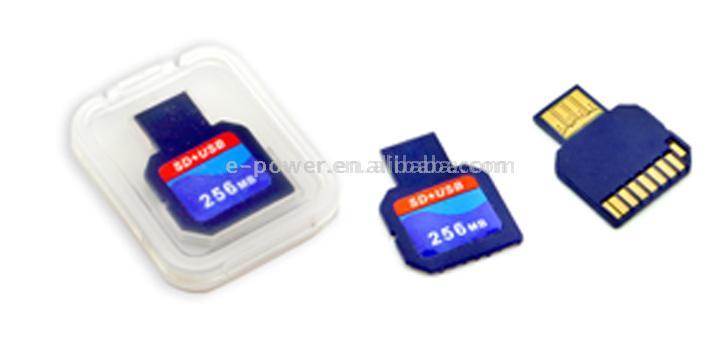
Is this a MMC card?
U130_3C_Card__USB___SD___MMC_2_in_1_or_3_in_1_Card_.jpg
No no...
All you need is a micro SD adapter (to make micro SD card to normal SD card) disassemble it and solder pins with the photo mentioned above by hundshamer. Keep the wires as short as possible to avoid any read/write errors.
And you need a SD card reader, if you have an external SD card reader or the one you have on the laptop give it a try. If there is some errors not able to get correct dumps then look for Anker SD card reader to buy (a specific model, look in topics or ask hundshamer for assistance).
 

Site & Scene News

Popular threads in this forum