D
Deleted User
Guest
I meant go to his profile page. He explains why he removed the top screen....
You can see his profile picture...
We already knew that was the case.
I meant go to his profile page. He explains why he removed the top screen....
You can see his profile picture...
We already knew that was the case.
...
You can see his profile picture...
We already knew that was the case.
Why post the messages in his profile when he has made a thread about it? that's mad as well 

But he stated the update failed...All jokes aside, maybe the new update changed something in how the screens worked, and made it so your setup doesn't work.

But he stated the update failed...
But didn't the system work fine for a couple seconds before it powered off?It could have done a partial update, as is often the case when there's a power interruption.
That would suck. But I'll never know for sure until I get a replacement screen.All jokes aside, maybe the new update changed something in how the screens worked, and made it so your setup doesn't work.
I don't know what caused the update to interrupt. In hindsight, maybe the update wasn't interrupted. All I know is I went to the eshop afterward and it asked me to update again. Is it possible to have to do multiple updates? (such as if you haven't updated in a long while)It could have done a partial update, as is often the case when there's a power interruption.

That would suck. But I'll never know for sure until I get a replacement screen.
Can anyone tell me which screen to buy?
Maybe what I should do is buy a broken 3DS XL instead of buying a replacement screen. That way I know I will get the real deal, not a cheap knockoff. Or I can get one of the two screens offered on dealextreme. But when I ordered a UMD drive from them, it looked like it was found in a pizza oven.
I don't know what caused the update to interrupt. In hindsight, maybe the update wasn't interrupted. All I know is I went to the eshop afterward and it asked me to update again. Is it possible to have to do multiple updates? (such as if you haven't updated in a long while)
The timing is very conspicuous. It's as though the update really did my screen to stop working.
Yes.That would suck. But I'll never know for sure until I get a replacement screen.
Can anyone tell me which screen to buy?
Maybe what I should do is buy a broken 3DS XL instead of buying a replacement screen. That way I know I will get the real deal, not a cheap knockoff. Or I can get one of the two screens offered on dealextreme. But when I ordered a UMD drive from them, it looked like it was found in a pizza oven.
I don't know what caused the update to interrupt. In hindsight, maybe the update wasn't interrupted. All I know is I went to the eshop afterward and it asked me to update again. Is it possible to have to do multiple updates? (such as if you haven't updated in a long while)
The timing is very conspicuous. It's as though the update really did my screen to stop working.
So your telling us he cant understand why his 3DS is not working properly, when he knew in the first place his top screen was missing!Why post the messages in his profile when he has made a thread about it? that's mad as well
![]()
It will be much cheaper to buy the replacement screen on its own. There are eBay sellers who sell original screens, but just about every seller on Dealextreme are probably selling third-party screens, even if they throw around words like "genuine" and "OEM".That would suck. But I'll never know for sure until I get a replacement screen.
Can anyone tell me which screen to buy?
Maybe what I should do is buy a broken 3DS XL instead of buying a replacement screen. That way I know I will get the real deal, not a cheap knockoff. Or I can get one of the two screens offered on dealextreme. But when I ordered a UMD drive from them, it looked like it was found in a pizza oven.
I don't know what caused the update to interrupt. In hindsight, maybe the update wasn't interrupted. All I know is I went to the eshop afterward and it asked me to update again. Is it possible to have to do multiple updates? (such as if you haven't updated in a long while)
The timing is very conspicuous. It's as though the update really did my screen to stop working.
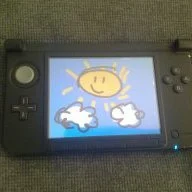
The sound works!! The system seems to work a-okay, its only the the screen that is borked. I was even able to boot up Mr. Driller simply by using audio cues to guess which home menu icon I was selecting.
Also, the screen does work sorta, but you only see ghosting from stuff that happens like 20 seconds ago. It's also really dark. I first noticed this when I was tinkering in the home menu and noticed that the image frozen onto the screen was different from before. And when I started Mr Driller, I sat at the title screen for a few seconds and it started to gradually fade in.
Seriously borked correct spelling is broken
Hold on. How are you using the 3DS without a top screen? I thought it wouldn't power on without that.
It certainly looks like the screen is broken, I don't see any way that could happen from a borked firmware update. In general all that happens if an update is interrupted partway through is that you end up with a partially updated firmware where some things are updated and others aren't (but it still works fine), or it can brick if you're unlucky, but the peculiar behavior of the screen (like fading) isn't something that could be caused by that, I think.
I was about to ask you to contact Nintendo until I saw half the 3DS was missingnot much hope of getting them to fix that.