
- Joined
- Dec 22, 2002
- Messages
- 8,202
- Reaction score
- 115
- Trophies
- 3
- Age
- 38
- Location
- Australia
- Website
- www.gbatemp.net
- XP
- 1,259
- Country

Rominator v5.3.2 released
backup saves & bug fixes
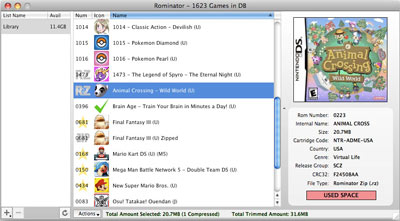
Local Rominator extraordinaire, Hankchill, has released a new version of his popular ROM manager. This update adds a few new things like the ability to backup saves from your flashcart and a contextual right-click menu along with some bug fixes.
[title:Changelog]v5.3.2 Release Notes:
[FIX] If you had your Games Location set to an external drive, and that drive was not present, it would give error 1034 and error 1001 every few seconds afterwards. This has been corrected
[FIX] Fixed error 1058 when setting your Games Location in the startup wizard
[+] Settings is renamed Preferences, and is accessible in the Application menu (Mac OS X Only). Has also been renamed to Preferences for Windows.
[+] There have been a couple issues where icons would show up blank or scrambled. Just double click on the icon and it will be re-cached and refreshed
[+] Contextual Menu is now available when right-clicking in the Rom List -- The menu contains the same functionality as the Actions menu
[FIX] Fixed an issue that would sometimes cause a '##' to appear after the flash card name, giving an error
[FIX] Fixed error 1107, where if you had a corrupt box art it would crash
[+] Added a new action when in a Flash Card list: Backup Save. You can now backup an existing save game by either right clicking on the game, or selecting the option from the Actions button
[GUI] Revamped Export options for Statistics. You can now export either both owned/missing games together, export as a text file or Microsoft Excel .CSV file, as well as having more export options available
So what are you waiting for? Grab the latest version from the GBAtemp download centre.
 Download (Windows)
Download (Mac OS X)
Download (Linux)
backup saves & bug fixes
Local Rominator extraordinaire, Hankchill, has released a new version of his popular ROM manager. This update adds a few new things like the ability to backup saves from your flashcart and a contextual right-click menu along with some bug fixes.
[title:Changelog]v5.3.2 Release Notes:
[FIX] If you had your Games Location set to an external drive, and that drive was not present, it would give error 1034 and error 1001 every few seconds afterwards. This has been corrected
[FIX] Fixed error 1058 when setting your Games Location in the startup wizard
[+] Settings is renamed Preferences, and is accessible in the Application menu (Mac OS X Only). Has also been renamed to Preferences for Windows.
[+] There have been a couple issues where icons would show up blank or scrambled. Just double click on the icon and it will be re-cached and refreshed
[+] Contextual Menu is now available when right-clicking in the Rom List -- The menu contains the same functionality as the Actions menu
[FIX] Fixed an issue that would sometimes cause a '##' to appear after the flash card name, giving an error
[FIX] Fixed error 1107, where if you had a corrupt box art it would crash
[+] Added a new action when in a Flash Card list: Backup Save. You can now backup an existing save game by either right clicking on the game, or selecting the option from the Actions button
[GUI] Revamped Export options for Statistics. You can now export either both owned/missing games together, export as a text file or Microsoft Excel .CSV file, as well as having more export options available
So what are you waiting for? Grab the latest version from the GBAtemp download centre.