Homebrew RetroArch Switch

  • Thread starter Thread starter ShadowOne333
  • Start date Start date
  • Views Views 2,166,899
  • Replies Replies 9,226
  • Likes Likes 100
Hey guys does anyone know the folder structure for 3DO games? The Playlist picture isn´t shown correctly for me, other emulators are looking fine.

I am using Playlist Buddy to create the playlist, the games itself are also wokring fine, it´s just the picture that is not shown correctly.

Thanks in advance!

EDIT: Nevermind I got it, wasn´t careful enough when typing the exact name...

 
Last edited by Houjin,
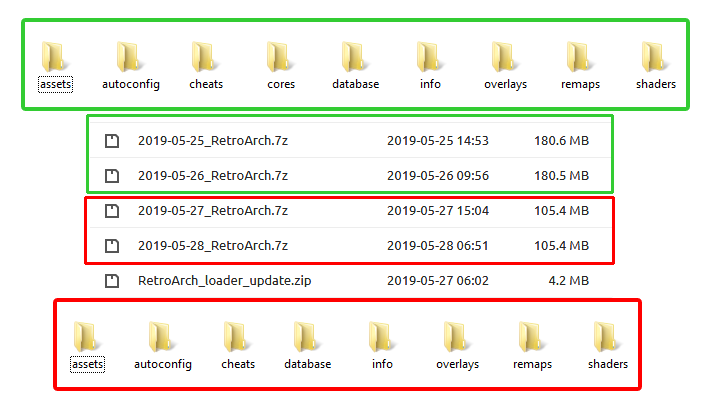
Just a heads up for anyone else who downloads Nightlies from the buildbot, the two latest builds 2019-05-27 & 2019-05-28 DO NOT contain the cores folder anymore. I'm not sure if this is a glitch or an intended change, but you can still download the cores from https://buildbot.libretro.com/nightly/nintendo/switch/libnx/latest/

RA-Nightlies-No-Cores.png
 
  • Like
Reactions: lordelan
Just a heads up for anyone else who downloads Nightlies from the buildbot, the two latest builds 2019-05-27 & 2019-05-28 DO NOT contain the cores folder anymore. I'm not sure if this is a glitch or an intended change, but you can still download the cores from https://buildbot.libretro.com/nightly/nintendo/switch/libnx/latest/

RA-Nightlies-No-Cores.png

It didn’t appear to have the main Retroarch nro either (I just changed to the one from three days ago because I was confused by change!)
 
Update to latest nightly (cores and main nro) or previous since last seems to be borked.
no latest build and cores are not working with Thumbnails. also i noticed a bug in the favourites list/
Thumbnails only apply to playlist listings, not the filebrowser.
not sure what you mean. when i load a core and go to my list of games created with playlist buddy, theres a little box saying no thumbnail available but i know my thumbnail png files are correct as they work on XMB
 
no latest build and cores are not working with Thumbnails. also i noticed a bug in the favourites list/

not sure what you mean. when i load a core and go to my list of games created with playlist buddy, theres a little box saying no thumbnail available but i know my thumbnail png files are correct as they work on XMB

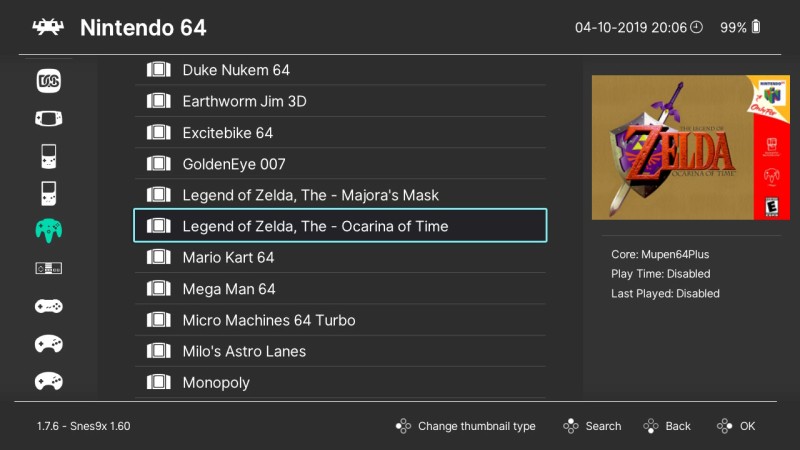
You have to select a game to see the thumbnails.

Playlist-Thumbnails.jpg
 
  • Like
Reactions: kevinbrew
no latest build and cores are not working with Thumbnails. also i noticed a bug in the favourites list/

not sure what you mean. when i load a core and go to my list of games created with playlist buddy, theres a little box saying no thumbnail available but i know my thumbnail png files are correct as they work on XMB
Press Y to cycle them.
 
ive been doing what you say but still no thumbnails. i knoticed on your picture your useing build 1.7.6.
im useing the latest build on downloads but mine is 1.7.5. could that be the issue?

--------------------- MERGED ---------------------------

You have to select a game to see the thumbnails.

Playlist-Thumbnails.jpg
Where did you get 1.7.6 build from? Thanks For helping by the way. its much apreciated.
ive made a noob mistake that 1.7.6 number in the corner of your screenshot is the version of your SNES9X CORE. LOl silly me.
 
Last edited by kevinbrew,
ive been doing what you say but still no thumbnails. i knoticed on your picture your useing build 1.7.6.
im useing the latest build on downloads but mine is 1.7.5. could that be the issue?

--------------------- MERGED ---------------------------


Where did you get 1.7.6 build from? Thanks For helping by the way. its much apreciated.
I believe 1.7.7 is the current version and it's what you download from retroarch.com.
 
ive been doing what you say but still no thumbnails. i knoticed on your picture your useing build 1.7.6.
im useing the latest build on downloads but mine is 1.7.5. could that be the issue?

--------------------- MERGED ---------------------------


Where did you get 1.7.6 build from? Thanks For helping by the way. its much apreciated.
ive made a noob mistake that 1.7.6 number in the corner of your screenshot is the version of your SNES9X CORE. LOl silly me.

1.7.7 is the version you want, that was just an older screenshot.
 

Site & Scene News

Popular threads in this forum