Homebrew RetroArch Switch

  • Thread starter Thread starter ShadowOne333
  • Start date Start date
  • Views Views 2,166,808
  • Replies Replies 9,226
  • Likes Likes 100
I dunno if i did something wrong over here but every PSP game i'm trying to run is displaying just a black screen now. I've updated the core over the retroarch updater.

EDIT - IT WAS MY FAULT, FIXED.
 
Last edited by TamarindoJuice,
Overscan.
We no longer do autocrop as it was working badly and it got removed from upstream.
Games are often coded with black borders, that setting fixes it. Requires fbemu
Also set aspect ratio to Core provided.
1. fbemu?

2. Overscan is already enabled by default in core options (all four sub options are set to 0).

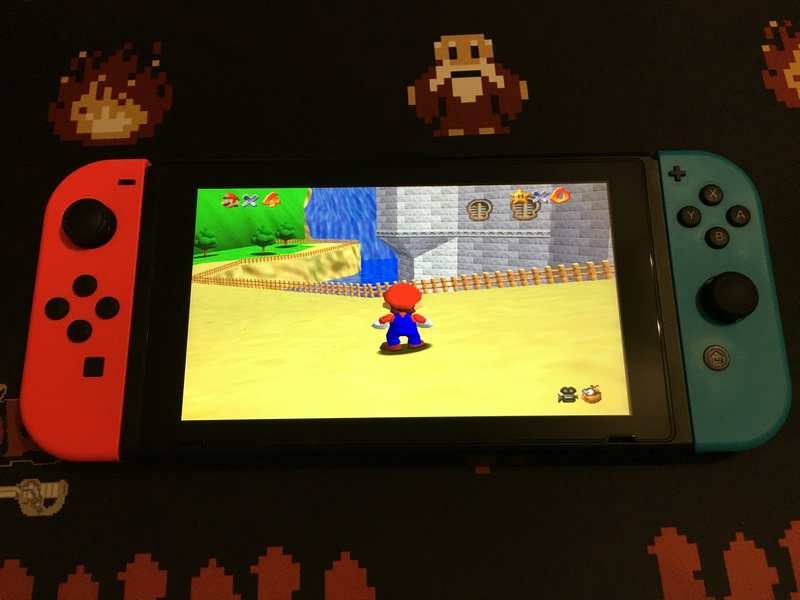
Game I'm trying is SM64.

Would be cool to keep aspect ratio to Core provided as that works perfectly for PPSSPP as well.
 
What program to use to convert to chd? Does anyone know? For psx

If you want to convert your PSX .bin & .cue Files to the .chd Format, then you need the latest MAME build.

Extract the mame0209b_32bit.exe and look for a File called: chdman.exe. Direct Link (THX @EmulateLife)

Copy the chdman.exe to your Rom Folder (with .bin & .cue Files).

Press WIN + R, and type cmd.

Press Enter and a Black Window will pop up.

Navigate to your Rom Folder (example: cd C:\Roms\FFVII\CD1) and press Enter.

Paste: for %i in (*.cue) do chdman createcd -i "%i" -o "%~ni.chd" and press Enter.

The conversion should start now. After the Process is finished, you should have your Game in the compressed .chd Format.

If you have multi Disk Games, you better create an .m3u File
 
Last edited by crazy_p,
  • Like
Reactions: satel and Nin4one
If you want to convert your PSX .bin & .cue Files to the .chd Format, then you need the latest MAME build.

Extract the mame0209b_32bit.exe and look for a File called: chdman.exe.

Copy the chdman.exe to your Rom Folder (with .bin & .cue Files).

Press WIN + R, and type cmd.

Press Enter and a Black Window will pop up.

Navigate to your Rom Folder (example: cd C:\Roms\FFVII\CD1) and press Enter.

Paste: for %i in (*.cue) do chdman createcd -i "%i" -o "%~ni.chd" and press Enter.

The conversion should start now. After the Process is finished, you should have your Game in the compressed .chd Format.
For those that don't want to mess with getting the new MAME you can get chdman.exe here.

https://drive.google.com/file/d/0B-ElaPpvBHs5aUd0QUM3c05kY2c/view?usp=sharing
 
  • Like
Reactions: satel and crazy_p
Overscan.
We no longer do autocrop as it was working badly and it got removed from upstream.
Games are often coded with black borders, that setting fixes it. Requires fbemu
Also set aspect ratio to Core provided.
Guess fbemu is framebuffer emulation. That is already set to true by default as well.
 
1. fbemu?

2. Overscan is already enabled by default in core options (all four sub options are set to 0).

Game I'm trying is SM64.

Would be cool to keep aspect ratio to Core provided as that works perfectly for PPSSPP as well.
You don't only need to enable overscan, you also need to configure how much should be cut off (top, right, bottom, left). This is different for every game, so you should save it as a game-specific config.

You definitely should keep the aspect ratio as Core provided. Then set the aspect ratio in the core settings to 4:3, 16:9 (if the game has a widescreen mode or there's a widescreen patch) or 16:9 adjusted (this forces the game to display in widescreen without stretching the image, it usually leads to pop-in on the side of the screen, because the games are not designed to display objects in that area). N64 really requires game-specific configs, because there's just no single config that works with every game if you want to have everything looking and playing perfectly.
 
  • Like
Reactions: lordelan
Tested on latest build of mupen64plus-next. Conker's Bad Fur Day still not able to reach full speed with Frame buffer emulation on. Switch really reach it limit capability.
 
Tested on latest build of mupen64plus-next. Conker's Bad Fur Day still not able to reach full speed with Frame buffer emulation on. Switch really reach it limit capability.
Cbfd runs perfect for me with fbemu in 720p handheld or 1080p dock
 
Cbfd runs perfect for me with fbemu in 720p handheld or 1080p dock
Yo M4xw u experienced any issues with MGS Peacewalker specifically the mission that requires c4. Thing is i have c4 already but still says "c4 is required for this mission" any idea?
 
1. fbemu?

2. Overscan is already enabled by default in core options (all four sub options are set to 0).

Game I'm trying is SM64.

Would be cool to keep aspect ratio to Core provided as that works perfectly for PPSSPP as well.

If they are set to "0" then that means you are NOT cropping any pixels. You have to set them something in order to crop pixels.

Here's the Overscan Settings that I'm using to get a perfect "edge to edge" display with SM64.

Overscan Offset (Top) - 10
Overscan Offset (Left) - 5
Overscan Offset (Right) - 5
Overscan Offset (Bottom) - 10

SM64-Overscan.jpg
 
It works great but whenever I put it in the dock it stops sounding, I’ve tried both Bitstream and PCM output on TV but that didn’t do it. What else should I do?
Thanks
 
  • Like
Reactions: EmulateLife
@Trice @FanboyKilla
Thx guys! I will try this today when I'm home.
I read somewhere that those Overscan values are in fact the thickness of the borders which confused me lol. So I thought having all the values at 0 should already be the best option.
Also @Brawl345 told me, that I'm might having issues using your configs since I was using the german (PAL) version. So I'll play around a bit and will end up with a perfect setting for each game. :)
 
Yo M4xw u experienced any issues with MGS Peacewalker specifically the mission that requires c4. Thing is i have c4 already but still says "c4 is required for this mission" any idea?
Known bug.
I worked around with a custom ver that uses savestates from standalone.
Happens on PC too (libretro specific)
 
@m4xw
Shouldn't the config priority list go like this:
1. use game override settings if present
2. use core override settings if present (and if no game setting is present)
3. use global RetroArch settings (if no core and no game setting is present)

I loaded up SM64 (PAL), went to core options and adjusted the Overscan values to:
TOP: 33
LEFT: 8
RIGHT: 9
BOTTOM: 36

That seems perfect for 16:9 adjusted ratio. I saved a game override from within the quick menu.
Then closed content and loaded up SM64 (NTSC) where areas of the pictures are cut off obviously.
Went to core options, set all four Overscan values to 0 again and saved that as a core override.
(So I did not create a game override for the NTSC version of SM64.)

However everytime I load one of the two games (no matter which one), all four Overscan values are where I "left" them.
Since I saved a game override for the PAL version, it should automatically load it when I load the PAL version (values 33, 8, 9, 36) and when I load the NTSC version it should load the core override values (0, 0, 0, 0) since I didn't save a game override for that one but a core override instead.

What am I missing or doing wrong?
 
Last edited by lordelan,

Site & Scene News

Popular threads in this forum