Homebrew RetroArch Switch

  • Thread starter Thread starter ShadowOne333
  • Start date Start date
  • Views Views 2,166,600
  • Replies Replies 9,226
  • Likes Likes 100
no not yet. Not my decision... I am honoring m4xw decision to make it patron-only for a few days. I don't want to backstab anybody. This is a collaboration, I did keyboard/mouse in Retroarch libnx, m4xw implemented dynarec for Switch, and now fr500 aka radius also stepped in with more improvements.
 
  • Like
Reactions: Csmrcc
no not yet. Not my decision... I am honoring m4xw decision to make it patron-only for a few days. I don't want to backstab anybody. This is a collaboration, I did keyboard/mouse in Retroarch libnx, m4xw implemented dynarec for Switch, and now fr500 aka radius also stepped in with more improvements.
Of course, I understand
 
no not yet. Not my decision... I am honoring m4xw decision to make it patron-only for a few days. I don't want to backstab anybody. This is a collaboration, I did keyboard/mouse in Retroarch libnx, m4xw implemented dynarec for Switch, and now fr500 aka radius also stepped in with more improvements.
keyboard/mouse? Like OSK? Have you hooked this into Vice (C64)? For the love of... <your choice of diety/person/object>, we NEED that!
 
No I mean physical USB keyboard and USB mouse

--------------------- MERGED ---------------------------

The incredible machine also runs great

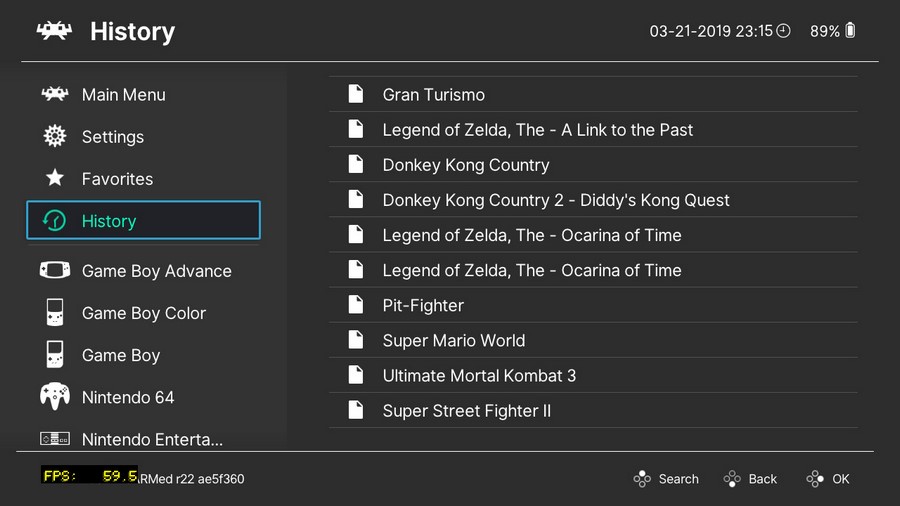
2019032210153700-D0B9AC9357A3561F8D041C64209A70F0.jpg


2019032123015500-D0B9AC9357A3561F8D041C64209A70F0.jpg
 
Last edited by x0x0,
One question. When I play Conker Bad Fur Day, there is one black box (with white outlines) that`s stuck there forever, on the upper left corner of the screen. Is there a way to get rid of it? I already tried some options change but nothing. Thanks in advance and, thanks to the developer, @m4xw , because I`m a 31 year old parent and teacher, but been a fan of Nintendo since 1991, so, being able to play these games on the go in the Switch is something just too awesome. Thank you to all that make all of this possible.
 
no not yet. Not my decision... I am honoring m4xw decision to make it patron-only for a few days. I don't want to backstab anybody. This is a collaboration, I did keyboard/mouse in Retroarch libnx, m4xw implemented dynarec for Switch, and now fr500 aka radius also stepped in with more improvements.

Could you try Command & Conquer Red Alert? :)
Please
 
Does anyone have any tips for running Rogue Squadron? I'm getting a lot of audio stuttering, but the video is smooth enough.
 
Does anyone have the config file for Mupen64Plus-Next with GLiden64 3.0 preview? Getting poor gameplay on n64. Only thing im missing is config file.
 
How far away are we from playing roller coaster tycoon 1 via this dosbox thing?

Never, it was a windows release only. Only hope is an Open RCT2 port, which you can put the RCT1 levels into luckily!

--------------------- MERGED ---------------------------

I mean if you can get windows 95/98 to run on dosbox with RCT installed then maybe but I'm sure it'll be terrible

--------------------- MERGED ---------------------------

Hmmm, yeah ozone working fine for me also.. :unsure:

2019032123151800-F0813053-F5-E68-D338-B07-D7-D5-A145189-E-Copy.jpg

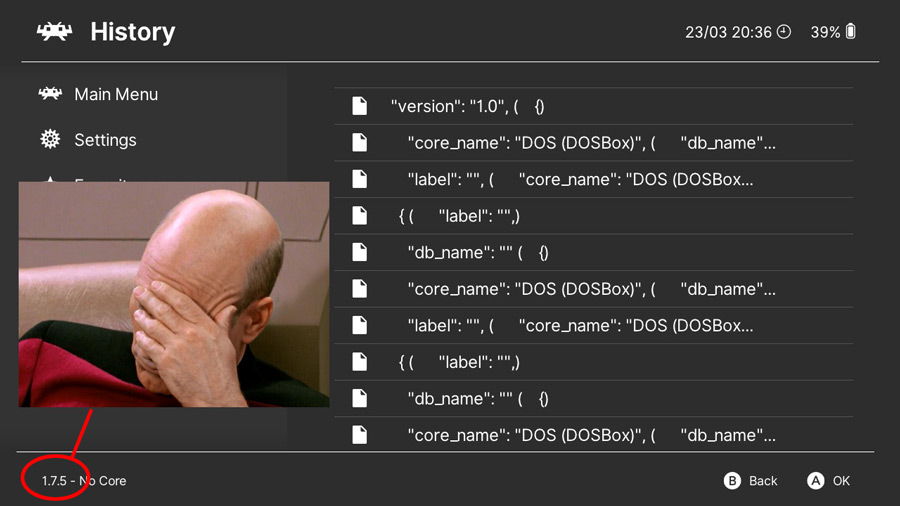
2019032320361100-6CF3D73B21F776032F8CCD9728DF9C68.jpg
 
I've tried the mgba and vba next cores. I've tried three different SAV files (using both .sav and .srm file names).

One from gamefaqs.


One from Zelda Legends Emulation.


And one I got from searching the Forums here from user T-hug.

Still won't let me post the links here but if you need later I can try and upload the files.

Thanks!

I've had some luck moving saves from an original Pokémon Emerald cart to mGBA on Retroarch Switch (and vice versa) simply by renaming the file extension from .sav to .srm and putting it in the correct folder... I see you've already tried this with no success.

That said, when I was using older versions of VBA Next (ie. before we got official releases) there was a mismatch in save file sizes between the official cart and the Retroarch core. Retroarch would add on the extra bytes (probably to manage RTC, IDK) so it was a bit trickier to reverse the process to put the save back on my cart.

So I'm not familiar with the save size of the Zelda game you're using. When the Retroarch core creates its own .srm save file after starting the game for the first time, what's its file size in kb and how does that compare to the .sav files you've downloaded from elsewhere?
 
Here we go with the "mix and match" bullshit again! :glare:

likjasdfilajsdf.jpg
I had this gibberish in history too when i was on 1.7.5 and using nsp (wich was unsupported officially)..and as far as i remember somebody told me it was because of the outdated nro/nsp..so i did a clean install of 1.7.6 and stopped using nsp (not forwarder) and everything has been working perfectly. And not long ago i made an nsp forwarder to RA nro and not a singe problem so far. Latest Atmo, 6.2, RA 1.7.6
 
Last edited by bad361,
  • Like
Reactions: FanboyKilla
You can also use nsp injection to launch Retroarch (no nsp forwarder needed). On SX OS just hold R pressed while launching any game, not album. I think Atmosphere has a similar feature now.
 

Site & Scene News

Popular threads in this forum