ROM Hack [Release] Usagi 3DS Theme Editor (+ .Net Library) - Testers Wanted

  • Thread starter Thread starter usagirei
  • Start date Start date
  • Views Views 296,190
  • Replies Replies 560
  • Likes Likes 63
Before-End-Of-Year-Update out (1.0.11.0):

* Fixed images not being auto-resized when dropped instead of loaded from menu
* Added Support for dropping .bin files in the Left Panel Area (Tabs)
* Added Quick Image Toolbar in the Right Panel Area (Preview): Allows dropping of image files on their respective buttons, as well as clicking to fire the File Browser Dialog. Screen Panels are no longer drop targets
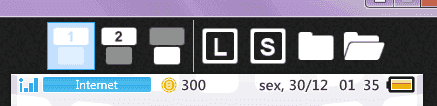
capturar-png.73216

The Toolbar

---

Import/Export of Colors and Options will stay for the next update, since it involves writing new code instead of refactoring existing code.
 

Attachments

  • Capturar.PNG
    Capturar.PNG
    5.2 KB · Views: 1,661
Last edited by usagirei,

  • Like
Reactions: cvskid and Arubaro
@usagirei A suggestion: You could make the shortcuts of this new update change color. If the item has been added to the theme the shortcut color changes, indicating the addition of the item.
 
Last edited by Ryumaru,
hey whats best sizes for top and bottom screens for regular themes? and whats the best site or tool to get the sizes?
 
Top screen is 1024x256 but it uses 960x240
Bottom screen is 512x256 on static, 1024x256 if it's animated. Some parts of the image aren't seen on 3DS.
Check the file I've attached.
I suggest using Photoshop (or GIMP)
 

Attachments

  • THEMEIMG_1ex.png
    THEMEIMG_1ex.png
    46.4 KB · Views: 383
  • Like
Reactions: Mr.Faq2015
I searched thread and it didn't provide the results I'm looking for...

For CWAV Manager, what are Frame0, Frame1, and Frame2 sound effects used for?
 
For CWAV Manager, what are Frame0, Frame1, and Frame2 sound effects used for?
It's the sound that plays when you scroll to the next "frame". Like when you keep scrolling right and the background changes on an "animated" background.
 
  • Like
Reactions: Stash23
it wont let me select BGM load ; ; for background music
You have enabled the music option in the theme and placed the brctm file inside gives the theme folder ?
The songs must be placed inside the folder of the theme, they are automatically recognized by Usagi and the name of the music should be bgm.brctm.
 
Last edited by Ryumaru,
I'm getting quite a long error message upon trying to boot up;;

aplologies if this is on my end-

System.TypeInitializationException: The type initializer for 'ThemeEditor.WPF.MainWindow' threw an exception. ---> System.IO.FileNotFoundException: Could not load file or assembly 'ThemeEditor.Common, Version=1.0.11.0, Culture=neutral, PublicKeyToken=null' or one of its dependencies. The system cannot find the file specified.
at ThemeEditor.WPF.MainWindow.InitValidSizes()
at ThemeEditor.WPF.MainWindow..cctor()
--- End of inner exception stack trace ---
at ThemeEditor.WPF.MainWindow..ctor()
at ThemeEditor.WPF.App.App_OnStartup(Object sender, StartupEventArgs e)
at System.Windows.Application.OnStartup(StartupEventArgs e)
at System.Windows.Application.<.ctor>b__1_0(Object unused)
at System.Windows.Threading.ExceptionWrapper.InternalRealCall(Delegate callback, Object args, Int32 numArgs)
at System.Windows.Threading.ExceptionWrapper.TryCatchWhen(Object source, Delegate callback, Object args, Int32 numArgs, Delegate catchHandler)
 
Is it possible to use a mono track .wav file?

--------------------- MERGED ---------------------------

I found out that it needs to be stereo
 
You have enabled the music option in the theme and placed the brctm file inside gives the theme folder ?
The songs must be placed inside the folder of the theme, they are automatically recognized by Usagi and the name of the music should be bgm.brctm.

yes ubt it needs to be a bcstm or it won't be reconized. all the other themes have preview sound except the ones i made ; ; but if i shuffle it i can install the theme with the sound it just wont preview.
 
Last edited by heraymo,
Sorry if I may sound newbish (I'm never like that), but the .zip in GitHub doesn't contain a application to run the 3DS Theme Editor (not sure if that's a mistake) so I'm assuming we're supposed to create a build to use the application and I do not know how to. If you, Usagirei, or anyone else could give a link to a version that contains a runnable application for the files or a fast introduction to create a build, that would be greatly appreciated. Thank you
 
When I close this program Windows throws me this error screen:
Capture.PNG

"Problem signature:
Problem Event Name: CLR20r3
Problem Signature 01: themeeditor.wpf.exe
Problem Signature 02: 1.0.11.0
Problem Signature 03: 5865d322
Problem Signature 04: PresentationFramework
Problem Signature 05: 4.0.30319.17929
Problem Signature 06: 4ffa7956
Problem Signature 07: 9bd
Problem Signature 08: 55
Problem Signature 09: System.InvalidOperationException
OS Version: 6.1.7601.2.1.0.256.48
Locale ID: 1033
Additional Information 1: 0a9e
Additional Information 2: 0a9e372d3b4ad19135b953a78882e789
Additional Information 3: 0a9e
Additional Information 4: 0a9e372d3b4ad19135b953a78882e789

Read our privacy statement online:
http://go.microsoft.com/fwlink/?linkid=104288&clcid=0x0409

If the online privacy statement is not available, please read our privacy statement offline:
C:\Windows\system32\en-US\erofflps.txt"

Is it normal?
 
Last edited by EthanAddict,
Sometimes, when I have already a theme and I open other theme, the sfx is disabled altought it exist in the folder.
Close the app and open again and its works
 
when i load up my theme everything is ok, till later it goes blank (the plain standard white theme) works for awhile tho, anyone got any ideas on how to fix that? also wanna know what the Alternative Top is for (in better details, cause im still kinda confused after reading tho it). I use CHMM2 to install theme
 
Last edited by Anonstoner420,
EWusagi 3DS theme Maker

1492001097-capture.png

Right now I reedit the @usagirei software. I integrate the preview on a single line and integrate a bgm manager and a WAV to CWAV converter. The next options are added "little by little".

The software is not yet ready. If you want to test it, contact me in private message. Note that I will not share this.


Last edited by Ewin,

Site & Scene News

Popular threads in this forum