Rcm not detected

  • Thread starter Thread starter Neilo
  • Start date Start date
  • Views Views 1,876
  • Replies Replies 8

Neilo

New Member
Newbie
Joined
Jan 14, 2024
Messages
3
Reaction score
1
Trophies
0
Age
24
XP
44
Country
Algeria
Hello, I tried to inject hekate like I always do since 2 years now and now I have the error No RCM device detected.

Here what I already tried :
- change cable
- change usb port
- install driver again
- try on other pc.

I am out of Idea I just don't know where the problem from
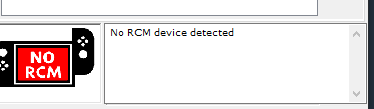
1705225212920.png
 
With power off, insert Jig in right rail, press and hold Volume+ button down, then tap power button once, then let go of Vol+ button. Screen should stay black, then hook to PC and check RCM with Tegra. If screen not staying black, booting to Logo, then you not entering RCM correctly. Maybe your Jig is not making contact on the pins of the Switch.
 
With power off, insert Jig in right rail, press and hold Volume+ button down, then tap power button once, then let go of Vol+ button. Screen should stay black, then hook to PC and check RCM with Tegra. If screen not staying black, booting to Logo, then you not entering RCM correctly. Maybe your Jig is not making contact on the pins of the Switch.
Thanks for your answer but I don't think this is the problem, I am 100% sure I am in RCM because I don't have the nintendo logo. I don't understand because everything worked perfectly some days ago, maybe it's from the sd card ??
 
Thanks for your answer but I don't think this is the problem, I am 100% sure I am in RCM because I don't have the nintendo logo. I don't understand because everything worked perfectly some days ago, maybe it's from the sd card ??
SD card should not have anything to do with RCM mode. Only thing else I can recommend, but looks maybe you've already tried is: Reinstall Zadig Drivers - https://gbatemp.net/download/zadig-generated-nintendo-switch-drivers-for-windows.37504/
Or try different cables (some USB-C cables only charge, will not transfer data) also try different USB ports on PC.
You could always try reinstall Tegra also if nothing else helps, Good luck!
https://github.com/eliboa/TegraRcmGUI/releases/tag/2.6
 
Last edited by BigOnYa,
SD card should not have anything to do with RCM mode. Only thing else I can recommend, but looks maybe you've already tried is: Reinstall Zadig Drivers -
Or try different cables (some USB-C cables only change, will not transfer data) also try different USB ports on PC.
You could always try reinstall Tegra also if nothing else helps, Good luck!
SD card should not have anything to do with RCM mode. Only thing else I can recommend, but looks maybe you've already tried is: Reinstall Zadig Drivers -
Or try different cables (some USB-C cables only charge, will not transfer data) also try different USB ports on PC.
You could always try reinstall Tegra also if nothing else helps, Good luck!
Still the same issue, zadig don't detect the switch in RCM but he detect the switch in OFW
Post automatically merged:

SD card should not have anything to do with RCM mode. Only thing else I can recommend, but looks maybe you've already tried is: Reinstall Zadig Drivers -
Or try different cables (some USB-C cables only charge, will not transfer data) also try different USB ports on PC.
You could always try reinstall Tegra also if nothing else helps, Good luck!
Update : I give it another try but I really go hard when I put my jig and it worked. Thanks for the help dude
 
Last edited by Neilo,
  • Like
Reactions: BigOnYa
With power off, insert Jig in right rail, press and hold Volume+ button down, then tap power button once, then let go of Vol+ button. Screen should stay black, then hook to PC and check RCM with Tegra. If screen not staying black, booting to Logo, then you not entering RCM correctly. Maybe your Jig is not making contact on the pins of the Switch.
mine stays black but dont show that is detected
 

Site & Scene News

Popular threads in this forum