
RCM Loader bootup showing static on Switch

  • Thread starter Thread starter Kuramations
  • Start date Start date
  • Views Views 1,407
  • Replies Replies 13

Kuramations

Well-Known Member
Member
Joined
May 31, 2021
Messages
116
Reaction score
23
Trophies
1
Age
26
XP
1,250
Country
United States
Funny thing happened to me today after updating to the latest custom firmware on my Switch and injecting the payload.

When I used my RCM Loader to inject a payload, (fusee) I got.... this.
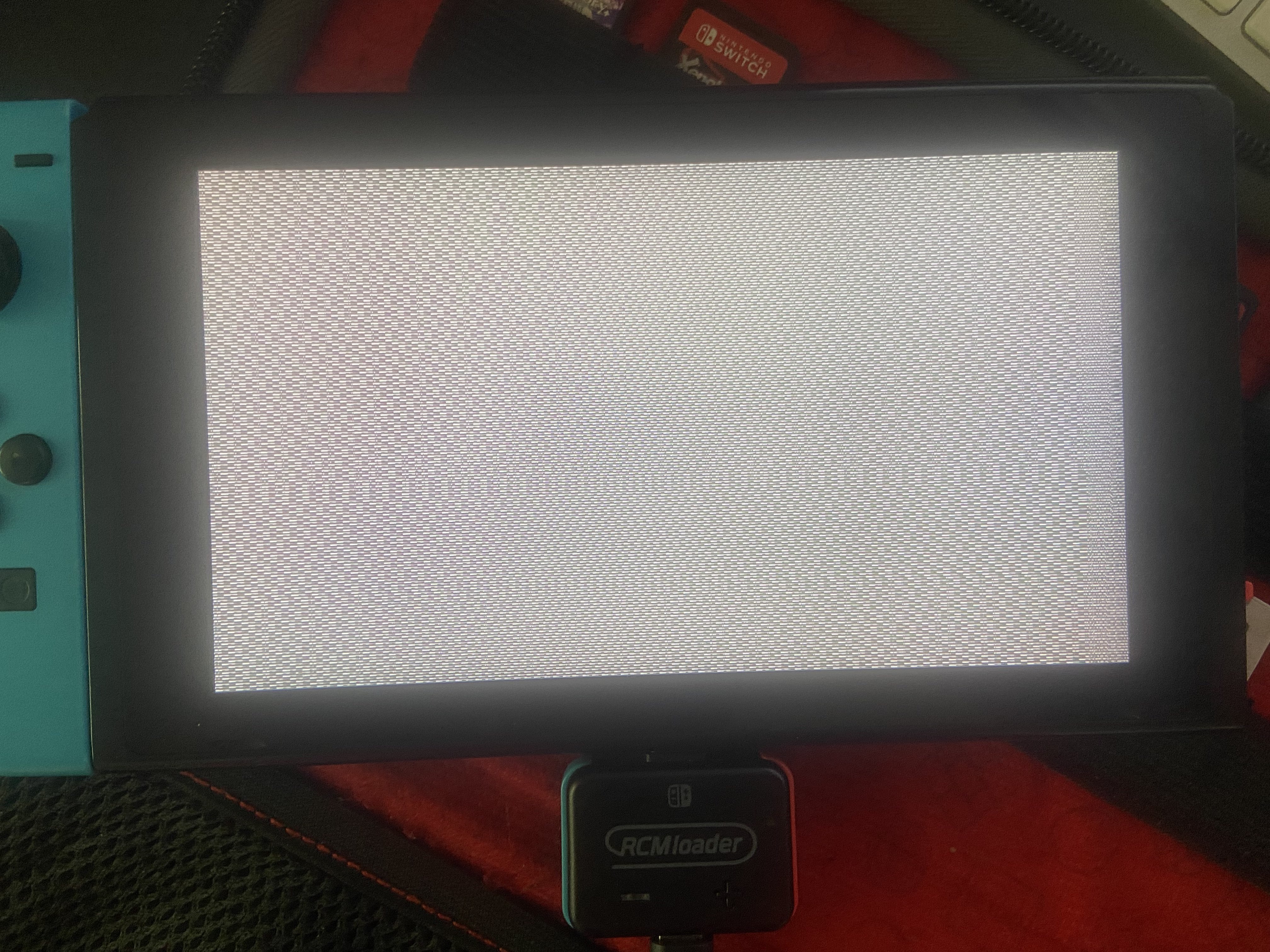
IMG_3469.jpg


And this has never happened to me before.
I was able to inject the payload normally with my computer, so I assume it has something to do with my RCM Loader.

Is there anything I can do?

Thank you in advance.

 
Funny thing happened to me today after updating to the latest custom firmware on my Switch and injecting the payload.

When I used my RCM Loader to inject a payload, (fusee) I got.... this.
View attachment 390035

And this has never happened to me before.
I was able to inject the payload normally with my computer, so I assume it has something to do with my RCM Loader.

Is there anything I can do?

Thank you in advance.

Try pressing the reset button on the RCM LOADER. I just found out about this today.
 
Funny thing happened to me today after updating to the latest custom firmware on my Switch and injecting the payload.

When I used my RCM Loader to inject a payload, (fusee) I got.... this.
View attachment 390035

And this has never happened to me before.
I was able to inject the payload normally with my computer, so I assume it has something to do with my RCM Loader.

Is there anything I can do?

Thank you in advance.
You can try to update the payload on the RCMloader if yours is one of the genuine RCMloader dongles and not one of the later copycats with Hekate hardcoded. Maybe the flash memory got corrupted.
 
  • Like
Reactions: dragonz
You can try to update the payload on the RCMloader if yours is one of the genuine RCMloader dongles and not one of the later
I'm getting my RCM Loader tomorrow, and I wanted to share the product description and ask a quick question:


Product Description Highlights:

  • Upgradable: Automatically recognized as a USB flash drive when connected to a computer or mobile phone. You can update the payload by simply dragging and dropping a new payload.bin file.
  • Easy Installation:
    1. Press and hold the "+" button until the LED turns blue.
    2. Remove the red RCM jig from the back and slide it onto the right rail of your Switch.
    3. Plug the RCM Loader into the USB-C port at the bottom of the Switch.
    4. Hold the volume button and press the power button to boot.
    5. Once booted, you can configure the system to your preferences.
  • Payload Injector: Supports injection of payload.bin files. Comes preloaded with ReiNX, SX, and Hekate payloads, allowing access to Recovery Mode.
  • Plug & Play: Simple one-button payload switching. Be sure to check your Switch’s serial number for compatibility before purchasing.
  • Included in the Package:
    • 1 × RCM Loader One
    • 1 × RCM Jig
    • 1 × Micro USB Cable

My Question:

Once I receive it, how can I tell if it's a clone or a version that allows me to update the Hekate payload? For example, if it comes with Hekate v4.00, but I want to use v6.00, is there a way to confirm whether I can replace or update the built-in payload?

Thanks in advance.
 
I'm getting my RCM Loader tomorrow, and I wanted to share the product description and ask a quick question:


Product Description Highlights:

  • Upgradable: Automatically recognized as a USB flash drive when connected to a computer or mobile phone. You can update the payload by simply dragging and dropping a new payload.bin file.
  • Easy Installation:
    1. Press and hold the "+" button until the LED turns blue.
    2. Remove the red RCM jig from the back and slide it onto the right rail of your Switch.
    3. Plug the RCM Loader into the USB-C port at the bottom of the Switch.
    4. Hold the volume button and press the power button to boot.
    5. Once booted, you can configure the system to your preferences.
  • Payload Injector: Supports injection of payload.bin files. Comes preloaded with ReiNX, SX, and Hekate payloads, allowing access to Recovery Mode.
  • Plug & Play: Simple one-button payload switching. Be sure to check your Switch’s serial number for compatibility before purchasing.
  • Included in the Package:
    • 1 × RCM Loader One
    • 1 × RCM Jig
    • 1 × Micro USB Cable

My Question:

Once I receive it, how can I tell if it's a clone or a version that allows me to update the Hekate payload? For example, if it comes with Hekate v4.00, but I want to use v6.00, is there a way to confirm whether I can replace or update the built-in payload?

Thanks in advance.
Right in the first line. The clones aren't recognized when plugged into a PC. There's no flash drive to copy payloads to.
Also, the + button on the front is a dummy and has no actual functionality. All it does is light up the LED while held. On the real RCMloader you double click it to switch payloads (which changes the color of the LED) and it does not light up the LED when held down.
As far as I know, real RCMloader dongles aren't made anymore, either the company cheaped out and started cutting corners on their own product or they have just ceased production. But it seems like all the RCMloader dongles you find now are the new type (what I call fakes, though I don't actually know who's making them) with heavily cut down functionality.
 
  • Like
Reactions: dragonz
Right in the first line. The clones aren't recognized when plugged into a PC. There's no flash drive to copy payloads to.
Also, the + button on the front is a dummy and has no actual functionality. All it does is light up the LED while held. On the real RCMloader you double click it to switch payloads (which changes the color of the LED) and it does not light up the LED when held down.
As far as I know, real RCMloader dongles aren't made anymore, either the company cheaped out and started cutting corners on their own product or they have just ceased production. But it seems like all the RCMloader dongles you find now are the new type (what I call fakes, though I don't actually know who's making them) with heavily cut down functionality.
Thanks- So, bottom line—since it's 2025, am I likely to end up with a fake RCM Loader? Should I cancel the order? You mentioned there's a "new" type (Still Fake), so is there still hope that my PC will recognize it, allowing me to update my Hekate version?
 
Thanks- So, bottom line—since it's 2025, am I likely to end up with a fake RCM Loader? Should I cancel the order? You mentioned there's a "new" type (Still Fake), so is there still hope that my PC will recognize it, allowing me to update my Hekate version?
If the Hekate version on the dongle is recent enough (and I believe it is), it doesn't really matter, since Hekate will just reboot to the Hekate payload on your SD card when it sees it's a more recent version.
 
  • Like
Reactions: dragonz
If the Hekate version on the dongle is recent enough (and I believe it is), it doesn't really matter, since Hekate will just reboot to the Hekate payload on your SD card when it sees it's a more recent version.
According to the detailed description, it comes with hekate_ctcaer_4.2.bin. Ideally, I'd want to use a more recent version of the Hekate payload from my SD card. That said, do I need to prepare my SD card in any specific way to ensure compatibility or proper booting?
 
According to the detailed description, it comes with hekate_ctcaer_4.2.bin. Ideally, I'd want to use a more recent version of the Hekate payload from my SD card. That said, do I need to prepare my SD card in any specific way to ensure compatibility or proper booting?
Just install Hekate in a normal way, copying the files on the SD card. Don't pay attention to the payload you inject from the dongle, as it will just boot the Hekate on your SD card at the end.
 
Just install Hekate in a normal way, copying the files on the SD card. Don't pay attention to the payload you inject from the dongle, as it will just boot the Hekate on your SD card at the end.
I recently made the final decision to never update my Nintendo Switch again—it's now officially my Sega Saturn. I bought the Switch 2 for future Switch games, so this original console is strictly for homebrew and retro use. My last Hekate payload is hekate_ctcaer_6.2.2.bin, and honestly, I’m super happy with it. I don’t want to update or mess with anything else—lol.

That said, do I need to look for a newer version of Hekate, or is sticking with 6.2.2 totally fine? I’m worried that updating might mess something up, and I’d rather leave it as-is if possible.

Also, I’m not entirely sure if I installed hekate_ctcaer_6.2.2.bin properly or if I used a different method. What does a proper install of this version look like? On my SD card, where should the file be located, and what other files or folders should I make sure are present before I plug in the (possibly fake) RCM Loader and hope everything works smoothly?
 
I recently made the final decision to never update my Nintendo Switch again—it's now officially my Sega Saturn. I bought the Switch 2 for future Switch games, so this original console is strictly for homebrew and retro use. My last Hekate payload is hekate_ctcaer_6.2.2.bin, and honestly, I’m super happy with it. I don’t want to update or mess with anything else—lol.

That said, do I need to look for a newer version of Hekate, or is sticking with 6.2.2 totally fine? I’m worried that updating might mess something up, and I’d rather leave it as-is if possible.

Also, I’m not entirely sure if I installed hekate_ctcaer_6.2.2.bin properly or if I used a different method. What does a proper install of this version look like? On my SD card, where should the file be located, and what other files or folders should I make sure are present before I plug in the (possibly fake) RCM Loader and hope everything works smoothly?
To test that the latest Hekate (or 6.2.2) can boot all you need is the Bootloader folder from the Hekate zip file on your SD card. When you start your Switch with the RCM loader, check the version of Hekate once it started. If it is 6.2.2 then you are good. After that you need Atmosphere also to boot CFW
 
  • Like
Reactions: dragonz
To test that the latest Hekate (or 6.2.2) can boot all you need is the Bootloader folder from the Hekate zip file on your SD card. When you start your Switch with the RCM loader, check the version of Hekate once it started. If it is 6.2.2 then you are good. After that you need Atmosphere also to boot CFW

Found a folder named bootloader
located in the SDCard sdmc:/
The bootloader has several other folders and files ... One folder is called payloads and it has a hekate_ctcaer 6.2.2.bin , fusee.bin , ect.

Hopefully we get it working tomorrow !
 
Thanks- So, bottom line—since it's 2025, am I likely to end up with a fake RCM Loader? Should I cancel the order? You mentioned there's a "new" type (Still Fake), so is there still hope that my PC will recognize it, allowing me to update my Hekate version?
They're the same thing. I don't exactly know if they are fakes or just cost cut, but it doesn't matter, since it seems like they are all you can get anyway, and they get the job done (at least until the battery inevitably dies)
 
They're the same thing. I don't exactly know if they are fakes or just cost cut, but it doesn't matter, since it seems like they are all you can get anyway, and they get the job done (at least until the battery inevitably dies)

Everything worked okay,
and apparently I got a real one because it looks nothing like the fake ones after doing some research.

Thank you guys!
Post automatically merged:

(at least until the battery inevitably dies)

It won't work when connected?
maybe use a split usb cable?
 
Last edited by dragonz,
  • Like
Reactions: The Real Jdbye

Site & Scene News

Popular threads in this forum
