
Question about Bad Update and version 17559

  • Thread starter Thread starter Ashramkun
  • Start date Start date
  • Views Views 2,097
  • Replies Replies 2

Ashramkun

Well-Known Member
Newcomer
Joined
Sep 30, 2013
Messages
59
Reaction score
22
Trophies
1
Age
43
XP
992
Country
Brazil
I got a used US Xbox 360 that can play burned DVDs. Its a Zephyr one.

In the system info, it says 2.0.16537

b.png


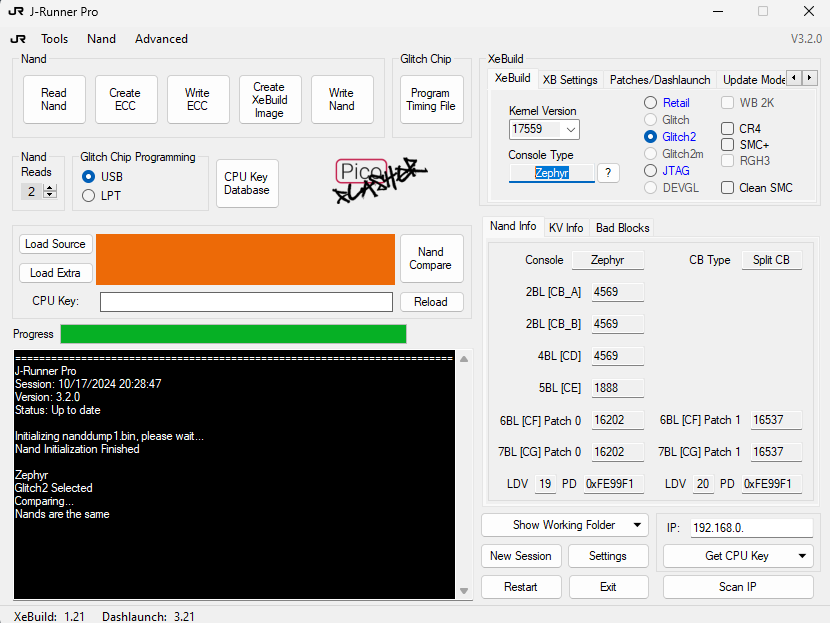
But, when I tried to RGH3, I got that the kernel version is 17559.
a.png


Once I could not use RGH3, I would like to try the new Bad Update method.

I don´t care to play pirate games, but I would like to play original japanese games. So, the DVD drive must be working.

Is it safe to try to update the console to 17559? I read that some people had problems in the DVD drive after the update. Problems I mean lost the ability to read original games. As I said, i don´t care to lose the ability to play burned games.

 
What is shown in the XeBuild square is not showing what is currently on your console. That is for building flash images and you can change the firmware there to match your console firmware. If you are worried about your DVD drive before updating console firmware, you can connect the DVD drive to PC (360 Firmware Toolbox) and turn it back to stock drive, then update console, to be safe. Then reflash DVD drive if you wanted, or leave it as stock.
Read more here about RGH for Zephyr models: (Can't RGH3 it but can RGH2 it)
https://xbox360hub.com/zephyr-rgh2-tutorial/
 
Last edited by BigOnYa,
I got a used US Xbox 360 that can play burned DVDs. Its a Zephyr one.

In the system info, it says 2.0.16537
View attachment 492143

But, when I tried to RGH3, I got that the kernel version is 17559.
View attachment 492144

Once I could not use RGH3, I would like to try the new Bad Update method.

I don´t care to play pirate games, but I would like to play original japanese games. So, the DVD drive must be working.

Is it safe to try to update the console to 17559? I read that some people had problems in the DVD drive after the update. Problems I mean lost the ability to read original games. As I said, i don´t care to lose the ability to play burned games.
You should update before installing RGH3, it's easier to update first rather than later.
My 360 no longer reads discs but I doubt very much that updating had anything to do with it. On very rare occasions, it will still recognize a disc. The laser is probably just dirty/worn. With RGH you have no need for discs anyway. So that is a good incentive to install RGH3 if you needed one.
 

Site & Scene News

Popular threads in this forum
