

Hello all. Here is a save editor for Pokémon Rumble U
Available for Windows, Linux and Mac. Releases can be found on Github:
https://github.com/user154lt/RumbleUSaveEditor/releases
It's probably a bit full-on for a simple save editor, but it was primarily designed for my son to use.
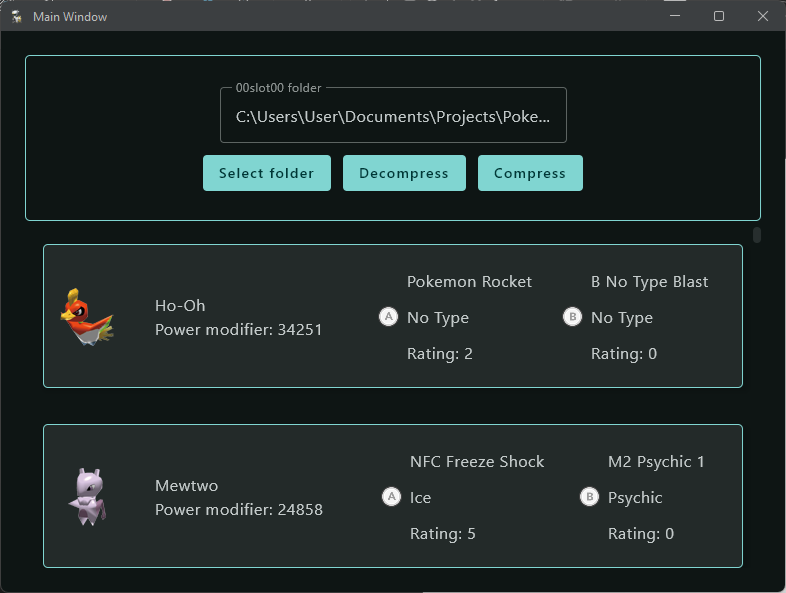
Please backup your save before editing, I will note that there are some species whose legit save data is slightly different to what is stored in the file by this tool (Some Pokémon with additional forms have an extra 2 added to the value. Weepinbell has an extra 1 added). You could choose to avoid changing a species to any of these values if you wish but me and my son have tested this extensively and it hasn't caused any problems. The Pokémon are parsed just file by the game and they don't cause the rest of the box the be considered invalid (This is what happens if you set any value that is not considered to be valid by the game).
I haven't included the ability to edit traits, they don't seem to do much and given you can set a Pokémon's power to be just over 10,000,00 it's a little redundant anyway.
Attached to this post is a python script for decompressing and then re-compressing singly. It will also ask you if you wish to produce a zip file when finished. This doesn't serve any real practical purpose, it's just a bit of fun. Because the save files are compressed using ZLib if strip the ZLib signature and the Adler32 footer you are left with a deflate stream. If you have already decompressed the data and calculated the CRC32 you can then craft a zip file around the deflate stream that can be decompressed with any standard zip utility to give you a copy of the decompressed file.
Special thanks must go to @SciresM for his Pokémon Rumble World save tool. When I saw that the Pokémon Rumble U save files had the same structure as the Pokémon Rumble World save files, I knew that it would be possible to make an editor for this game too. Not only that but my son loves the Pokémon Rumble World tool. He's a massive Pokémon Rumble fan and it has brought him countless hours of enjoyment. It also really helped ease his frustration at losing all his Pokémon when Nintendo decided to shut down Pokémon Rumble Rush!
Available for Windows, Linux and Mac. Releases can be found on Github:
https://github.com/user154lt/RumbleUSaveEditor/releases
It's probably a bit full-on for a simple save editor, but it was primarily designed for my son to use.
Please backup your save before editing, I will note that there are some species whose legit save data is slightly different to what is stored in the file by this tool (Some Pokémon with additional forms have an extra 2 added to the value. Weepinbell has an extra 1 added). You could choose to avoid changing a species to any of these values if you wish but me and my son have tested this extensively and it hasn't caused any problems. The Pokémon are parsed just file by the game and they don't cause the rest of the box the be considered invalid (This is what happens if you set any value that is not considered to be valid by the game).
I haven't included the ability to edit traits, they don't seem to do much and given you can set a Pokémon's power to be just over 10,000,00 it's a little redundant anyway.
Attached to this post is a python script for decompressing and then re-compressing singly. It will also ask you if you wish to produce a zip file when finished. This doesn't serve any real practical purpose, it's just a bit of fun. Because the save files are compressed using ZLib if strip the ZLib signature and the Adler32 footer you are left with a deflate stream. If you have already decompressed the data and calculated the CRC32 you can then craft a zip file around the deflate stream that can be decompressed with any standard zip utility to give you a copy of the decompressed file.
Special thanks must go to @SciresM for his Pokémon Rumble World save tool. When I saw that the Pokémon Rumble U save files had the same structure as the Pokémon Rumble World save files, I knew that it would be possible to make an editor for this game too. Not only that but my son loves the Pokémon Rumble World tool. He's a massive Pokémon Rumble fan and it has brought him countless hours of enjoyment. It also really helped ease his frustration at losing all his Pokémon when Nintendo decided to shut down Pokémon Rumble Rush!