Picofly AIO Thread

  • Thread starter Thread starter Adran_Marit
  • Start date Start date
  • Views Views 763,383
  • Replies Replies 3,575
  • Likes Likes 64
good afternoon colleagues I have the rp2040-one but when I pass the 2.6 or any files thegood afternoon colleagues I have the rp2040-one but when I pass the 2.6 or any files the led does not turn on
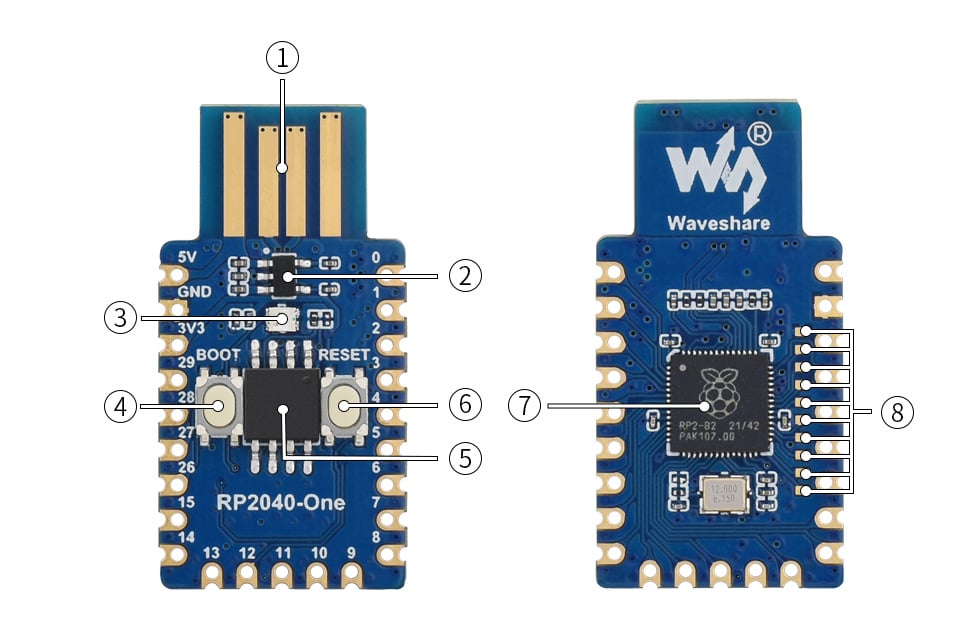
RP2040-One-details-intro.jpg
 
Those are 47 000 Ohm. Use this and choose 47 Ohm: https://a.aliexpress.com/_mPVFw1q
Post automatically merged:


You could even use 1/4W resistors, but you'll struggle to fit them. The 0805 fit quite well on the Pico pins, I imagine that you could get 1206 working as well. Show us some pics when you get it installed.

Those are 47 000 Ohm. Use this and choose 47 Ohm: https://a.aliexpress.com/_mPVFw1q
Post automatically merged:


You could even use 1/4W resistors, but you'll struggle to fit them. The 0805 fit quite well on the Pico pins, I imagine that you could get 1206 working as well. Show us some pics when you get it installed.

Finally I used the 1206 ones.
 

Attachments

  • IMG_20230409_215430.jpg
    IMG_20230409_215430.jpg
    654.7 KB · Views: 81
  • IMG_20230409_224326.jpg
    IMG_20230409_224326.jpg
    1.1 MB · Views: 84

This is a Pikofly AIO Thread/Tutorial.
This information has been pulled from other threads and forums on this site, I haven't done anything except compile it in this one thread.
All credit goes to those who worked on all the relevant information and stuff.


First things First; I not not endorse piracy and those who released the firmware don't either so this is for home-brew use only.


DOING THIS MODIFCATION TO YOUR SWITCH MAY CAUSE PERMANENT DAMGE. I RECOMMEND YOU HAVE THIS DONE BY A PROFESSIONAL INSTALLER


DISCLAIMER! Me nor any of the other temp members who helped make this happen will be held liable to any damage you cause your console in attempting to mod it. Professional installation is recommended for this mod.

Just because a mod is cheap doesn't mean it's easy. - Trust me I learnt the hard way - Adran 2023


FW Changelog


General InformationInstallation overviewImagesCredits


  1. RequirementsBoard Pinout ListHintsLED IndicatorsFAQ's


      • RP2040-Zero
      • SMD 0805 47 to 50 ohm Resistors
      • Mosfet (IRFHS8342 MOSFET) or cpu flex cable - I personally recommend - (lite flex for lites, v2 flex for v2 mariko etc etc)
      • switch (duh)
      • Wire
      • RP2040 Firmware (get the latest firmware from here FW 2.6 onwards doesn't need unlock)

    1. !!!!PinOut for Other Boards!!!! (resistors / mosfets are still required)


Changelog:
8-April-2023
Added FW 2.61 and changelog

7-Apr-2023
- Fixed size Mistake
- Added Firmware 2.6Alpha
-added Firmware 2.6a changelod and more board support pinout.

29-mar-2023
- Added link to Toshiba Firmware for rp2040
- Added alternative mosfets
- Added Erista (patched) diagram

P.S More formatting and information to cum

 
Last edited by MXRD4K1LL4,
Can someone tell me how they soldered on the emmc board?
Personally it does not stick and is pretty hard (it do not work)

Or if there's an easier place to solder
If you don't know how to do that. This mod really isn't something you should try.
 
Yes it works
rp2040-one working since 2.6 alpha FW.
I have cut off USB connector after flashing via USB.
Later updated via Picofly toolbox to 2.61. No problems so far...

1681113710204.jpeg
1681113723451.jpeg
 

Attachments

  • 1681113413779.jpeg
    1681113413779.jpeg
    161.9 KB · Views: 72
  • WhatsAppova datoteka Slika, 2023-04-07 ob 10.09.10.jpg
    WhatsAppova datoteka Slika, 2023-04-07 ob 10.09.10.jpg
    104 KB · Views: 75
That was you mistake, video guides always are outdated and sometimes wrong.

you can read the guide:

https://rentry.org/switchHackingIsEasy

for understand the basics configurations.

you need to understand how the file HEKATE_IPL.ini the explanation is on the hekate page:

https://github.com/CTCaer/hekate#bootloader-configuration

when you put the autoboot=2 pointing to a config (on this case the second of the file), and the config have the EmuMMC you always will autoboot on it, by example:

Code:
{--- EMUNAND START---}
[CFW (EMUMMC)]
id=EMUNAND
emummcforce=1
fss0=atmosphere/package3
atmosphere=1
logopath=bootloader/EnergyStarBL.bmp
icon=bootloader/res/payload_hue_nobox.bmp
kip1patch=nosigchk
{--- EMUNAND END ---}
Post automatically merged:

note this is my configuration, and as I have custom icon and logo the sentences point to mines.

but emummcforce, fss0 and atmosphere ones are the needed to force emmummc
First, thanks for you reply.
Honestly, after doing all the backups in the hekate settings I found all the settings I personally need.
The video link is very updated and detailed, I don't think I did something wrong.
I didn't need to edit any files, I configured everything from the autoboot settings.
Post automatically merged:

Another question.
Where can I find the picofly toolbox and the procedures to update the FW with this tool?
Thanks, good job.
 
Last edited by cicci084,
  • Like
Reactions: impeeza

Site & Scene News

Popular threads in this forum