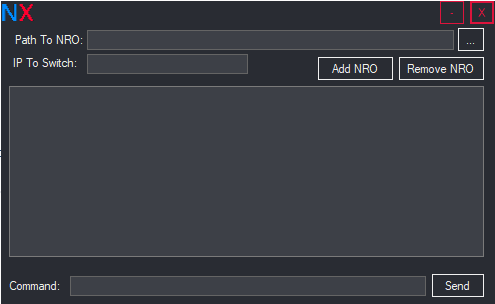
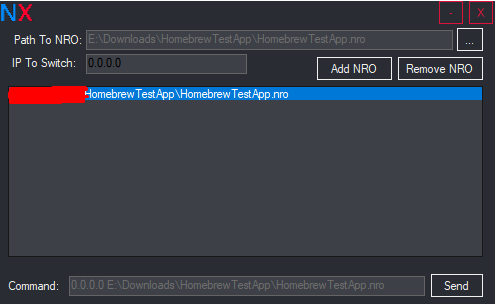
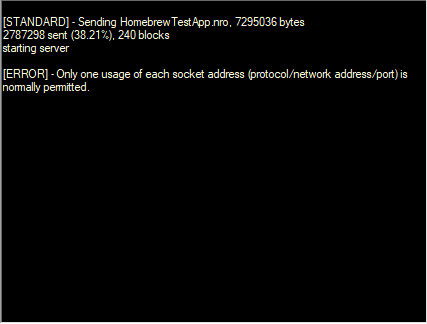
This keeps happening

Log file:
PLATFORM VERSION INFO
Windows : 10.0.29648.0 (Win32NT)
Common Language Runtime : 4.0.30319.42000
System.Deployment.dll : 4.8.10001.0 built by: 913ba47ac000003
clr.dll : 4.8.10001.0 built by: 913ba47ac000000
dfdll.dll : 4.8.10001.0 built by: 913ba47ac000000
dfshim.dll : 10.0.29648.1000 (WinBuild.160101.0800)
SOURCES
Deployment url : file:///E:/A5Tr0/Downloads/NXLinkGUI.v2.5.2.0/NXLinkGUI%20v2.5.2.0/NKLinkGUI.application
Application url : file:///E:/A5Tr0/Downloads/NXLinkGUI.v2.5.2.0/NXLinkGUI%20v2.5.2.0/NKLinkGUI.exe.manifest
IDENTITIES
Deployment Identity : NKLinkGUI.application, Version=2.5.1.16, Culture=neutral, PublicKeyToken=0000000000000000, processorArchitecture=msil
Application Identity : NKLinkGUI.exe, Version=2.5.1.16, Culture=neutral, PublicKeyToken=0000000000000000, processorArchitecture=msil, type=win32
APPLICATION SUMMARY
* Installable application.
ERROR SUMMARY
Below is a summary of the errors, details of these errors are listed later in the log.
* Activation of E:\A5Tr0\Downloads\NXLinkGUI.v2.5.2.0\NXLinkGUI v2.5.2.0\NKLinkGUI.application resulted in exception. Following failure messages were detected:
+ Downloading file:///E:/A5Tr0/Downloads/NXLinkGUI.v2.5.2.0/NXLinkGUI v2.5.2.0/NKLinkGUI.exe.config.deploy did not succeed.
+ Could not find file 'E:\A5Tr0\Downloads\NXLinkGUI.v2.5.2.0\NXLinkGUI v2.5.2.0\NKLinkGUI.exe.config.deploy'.
+ Could not find file 'E:\A5Tr0\Downloads\NXLinkGUI.v2.5.2.0\NXLinkGUI v2.5.2.0\NKLinkGUI.exe.config.deploy'.
+ Could not find file 'E:\A5Tr0\Downloads\NXLinkGUI.v2.5.2.0\NXLinkGUI v2.5.2.0\NKLinkGUI.exe.config.deploy'.
COMPONENT STORE TRANSACTION FAILURE SUMMARY
No transaction error was detected.
WARNINGS
* The manifest for this application does not have a signature. Signature validation will be ignored.
* The manifest for this application does not have a signature. Signature validation will be ignored.
OPERATION PROGRESS STATUS
* [05/09/2026 4:16:06 PM] : Activation of E:\A5Tr0\Downloads\NXLinkGUI.v2.5.2.0\NXLinkGUI v2.5.2.0\NKLinkGUI.application has started.
* [05/09/2026 4:16:06 PM] : Processing of deployment manifest has successfully completed.
* [05/09/2026 4:16:06 PM] : Installation of the application has started.
* [05/09/2026 4:16:06 PM] : Processing of application manifest has successfully completed.
* [05/09/2026 4:16:13 PM] : Found compatible runtime version 4.0.30319.
* [05/09/2026 4:16:13 PM] : Request of trust and detection of platform is complete.
ERROR DETAILS
Following errors were detected during this operation.
* [05/09/2026 4:16:13 PM] System.Deployment.Application.DeploymentDownloadException (Unknown subtype)
- Downloading file:///E:/A5Tr0/Downloads/NXLinkGUI.v2.5.2.0/NXLinkGUI v2.5.2.0/NKLinkGUI.exe.config.deploy did not succeed.
- Source: System.Deployment
- Stack trace:
at System.Deployment.Application.SystemNetDownloader.DownloadSingleFile(DownloadQueueItem next)
at System.Deployment.Application.SystemNetDownloader.DownloadAllFiles()
at System.Deployment.Application.FileDownloader.Download(SubscriptionState subState, X509Certificate2 clientCertificate)
at System.Deployment.Application.DownloadManager.DownloadDependencies(SubscriptionState subState, AssemblyManifest deployManifest, AssemblyManifest appManifest, Uri sourceUriBase, String targetDirectory, String group, IDownloadNotification notification, DownloadOptions options)
at System.Deployment.Application.ApplicationActivator.DownloadApplication(SubscriptionState subState, ActivationDescription actDesc, Int64 transactionId, TempDirectory& downloadTemp)
at System.Deployment.Application.ApplicationActivator.InstallApplication(SubscriptionState& subState, ActivationDescription actDesc)
at System.Deployment.Application.ApplicationActivator.PerformDeploymentActivation(Uri activationUri, Boolean isShortcut, String textualSubId, String deploymentProviderUrlFromExtension, BrowserSettings browserSettings, String& errorPageUrl, Uri& deploymentUri)
at System.Deployment.Application.ApplicationActivator.PerformDeploymentActivationWithRetry(Uri activationUri, Boolean isShortcut, String textualSubId, String deploymentProviderUrlFromExtension, BrowserSettings browserSettings, String& errorPageUrl)
--- End of stack trace from previous location where exception was thrown ---
at System.Runtime.ExceptionServices.ExceptionDispatchInfo.Throw()
at System.Deployment.Application.ApplicationActivator.PerformDeploymentActivationWithRetry(Uri activationUri, Boolean isShortcut, String textualSubId, String deploymentProviderUrlFromExtension, BrowserSettings browserSettings, String& errorPageUrl)
at System.Deployment.Application.ApplicationActivator.ActivateDeploymentWorker(Object state)
--- Inner Exception ---
System.Net.WebException
- Could not find file 'E:\A5Tr0\Downloads\NXLinkGUI.v2.5.2.0\NXLinkGUI v2.5.2.0\NKLinkGUI.exe.config.deploy'.
- Source: System
- Stack trace:
at System.Net.FileWebRequest.EndGetResponse(IAsyncResult asyncResult)
at System.Deployment.Application.SystemNetDownloader.DownloadSingleFile(DownloadQueueItem next)
--- Inner Exception ---
System.Net.WebException
- Could not find file 'E:\A5Tr0\Downloads\NXLinkGUI.v2.5.2.0\NXLinkGUI v2.5.2.0\NKLinkGUI.exe.config.deploy'.
- Source: System
- Stack trace:
at System.Net.FileWebResponse..ctor(FileWebRequest request, Uri uri, FileAccess access, Boolean asyncHint)
at System.Net.FileWebRequest.GetResponseCallback(Object state)
--- Inner Exception ---
System.IO.FileNotFoundException
- Could not find file 'E:\A5Tr0\Downloads\NXLinkGUI.v2.5.2.0\NXLinkGUI v2.5.2.0\NKLinkGUI.exe.config.deploy'.
- Source: mscorlib
- Stack trace:
at System.IO.__Error.WinIOError(Int32 errorCode, String maybeFullPath)
at System.IO.FileStream.Init(String path, FileMode mode, FileAccess access, Int32 rights, Boolean useRights, FileShare share, Int32 bufferSize, FileOptions options, SECURITY_ATTRIBUTES secAttrs, String msgPath, Boolean bFromProxy, Boolean useLongPath, Boolean checkHost)
at System.IO.FileStream..ctor(String path, FileMode mode, FileAccess access, FileShare share, Int32 bufferSize, FileOptions options, String msgPath, Boolean bFromProxy)
at System.Net.FileWebStream..ctor(FileWebRequest request, String path, FileMode mode, FileAccess access, FileShare sharing, Int32 length, Boolean async)
at System.Net.FileWebResponse..ctor(FileWebRequest request, Uri uri, FileAccess access, Boolean asyncHint)
COMPONENT STORE TRANSACTION DETAILS
No transaction information is available.