Hardware Moving SD Cards

ShigoNaito

Active Member
OP
Newcomer
Joined
Mar 12, 2019
Messages
29
Trophies
0
XP
585
Country
Philippines
Hello,
I have a 200GB SD card that I will be changing out with a 400GB. I have a hidden emunand setup running SXOS 2.7.1 on 8.0.1. I am looking to see what is the easiest why to move everything over.

Or if possible can I just start from scratch and remake the emunand so its a folder then just move the config and save files over and reinstall the games? (if so what folders should a care about)

Thanks for the help

Edit - Sorry, typed the version number wrong
 
Last edited by ShigoNaito,

D

Deleted User

Guest
Hello,
I have a 200GB SD card that I will be changing out with a 400GB. I have a hidden emunand setup running SXOS 2.7.2 on 8.0.1. I am looking to see what is the easiest why to move everything over.

Or if possible can I just start from scratch and remake the emunand so its a folder then just move the config and save files over and reinstall the games? (if so what folders should a care about)

Thanks for the help
guess you have version 2.7.1

its very easy you must use a clone program.
 

ShigoNaito

Active Member
OP
Newcomer
Joined
Mar 12, 2019
Messages
29
Trophies
0
XP
585
Country
Philippines
I am assuming you mean clone on the PC, would I then import the backup on the 400GB then resize the not emunand partition? would you happen to have a recommendations on partitioning tools?
 

Hayato213

..
Member
Joined
Dec 26, 2015
Messages
16,088
Trophies
1
Location
Aionios
XP
14,584
Country
United States
I am assuming you mean clone on the PC, would I then import the backup on the 400GB then resize the not emunand partition? would you happen to have a recommendations on partitioning tools?

Just make a clone of the SD card and resize the partition that is not hidden with software like EaseUS or Minitool Partition Wizard, believe you needs to find full version, not sure if it would work with free version.
 

stitchxd

Well-Known Member
Member
Joined
Apr 27, 2017
Messages
401
Trophies
0
Location
nope
Website
gnusocial.me
XP
679
Country
United States
Just make a clone of the SD card and resize the partition that is not hidden with software like EaseUS or Minitool Partition Wizard, believe you needs to find full version, not sure if it would work with free version.

Disk Management in Windows (and Ubuntu) should be able to do this for both exFAT and FAT32 SDCards so no freemium software is required.
 

stitchxd

Well-Known Member
Member
Joined
Apr 27, 2017
Messages
401
Trophies
0
Location
nope
Website
gnusocial.me
XP
679
Country
United States
Expanding yea not cloning.

Ah yes, Linux can do the clone. However the comment you made specifically mentioned software for resizing. Unless I misread the comment??

--------------------- MERGED ---------------------------

Ah yes, Linux can do the clone. However the comment you made specifically mentioned software for resizing. Unless I misread the comment??

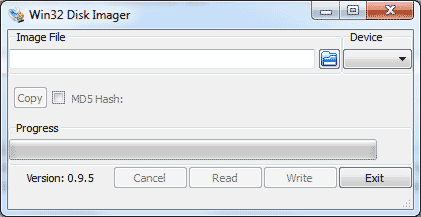
For imaging an SDCard (or any usb device) I recomment Win32Disk imager (http://sourceforge.net/projects/win32diskimager/files/latest/download) it's open source and does not require a premium payment to use all features.
 

Hayato213

..
Member
Joined
Dec 26, 2015
Messages
16,088
Trophies
1
Location
Aionios
XP
14,584
Country
United States
1.PNG
Ah yes, Linux can do the clone. However the comment you made specifically mentioned software for resizing. Unless I misread the comment??

--------------------- MERGED ---------------------------


For imaging an SDCard (or any usb device) I recomment Win32Disk imager (http://sourceforge.net/projects/win32diskimager/files/latest/download) it's open source and does not require a premium payment to use all features.

There is a limit to what you can do with windows build in Disk Management, he can do both with EaseUS Partition Master, Win32disk imager is only for writing the disk image, he still need to create an image to write it to the sd card, when he can do it in one program.
 
Last edited by Hayato213,

the_randomizer

The Temp's official fox whisperer
Member
Joined
Apr 29, 2011
Messages
31,284
Trophies
2
Age
37
Location
Dr. Wahwee's castle
XP
18,940
Country
United States
View attachment 167900

There is a limit to what you can do with windows build in Disk Management, he can do both with EaseUS Partition Master, Win32disk imager is only for writing the disk image, he still need to create an image to write it to the sd card, when he can do it in one program.

Yeah but doesn't that program cost money to get all the features? Kinda lame if you ask me.
 

stitchxd

Well-Known Member
Member
Joined
Apr 27, 2017
Messages
401
Trophies
0
Location
nope
Website
gnusocial.me
XP
679
Country
United States
Win32disk imager is only for writing the disk image, he still need to create an image to write it to the sd card, when he can do it in one program.

Win32Disk Imager does reading and writing of images (as in can create and write.) Again, no need for paid software, unless the user absolutely needs EaseUS for a specific feature (auto-resizing is nice but not necessary for their needs)

Screenshot of Win32Disk Imager, Notice the READ and WRITE buttons.

Win32DiskImager-0.9.5.gif
 

Hayato213

..
Member
Joined
Dec 26, 2015
Messages
16,088
Trophies
1
Location
Aionios
XP
14,584
Country
United States
Yes, but I don't think it has all those features in that screenshot

True I was just pointing out the difference between windows build in disk management and other software like Easeus, beside who the hell pay for software no a day, just use a crack, I know you can get full version online for free anyway. He can do what he needs to do with just one program, clone and then resizing it.
 

stitchxd

Well-Known Member
Member
Joined
Apr 27, 2017
Messages
401
Trophies
0
Location
nope
Website
gnusocial.me
XP
679
Country
United States
True I was just pointing out the difference between windows build in disk management and other software like Easeus, beside who the hell pay for software no a day, just use a crack, I know you can get full version online for free anyway. He can do what he needs to do with just one program, clone and then resizing it.

Cracks are bad:

1. They don't support the devs you enjoy stealing the software from
2. They almost always contain some type of malware.

You should never suggest cracking software unless you've done the crack yourself. There is no way to trust warez like that.
 

Hayato213

..
Member
Joined
Dec 26, 2015
Messages
16,088
Trophies
1
Location
Aionios
XP
14,584
Country
United States
Cracks are bad:

1. They don't support the devs you enjoy stealing the software from
2. They almost always contain some type of malware.

You should never suggest cracking software unless you've done the crack yourself. There is no way to trust warez like that.

Except most people doesn't care if it get the job done.
 

stitchxd

Well-Known Member
Member
Joined
Apr 27, 2017
Messages
401
Trophies
0
Location
nope
Website
gnusocial.me
XP
679
Country
United States
I'm educated, work in IT, and I used crack to activate full version of software, haven't got anything stolen yet.

Ah you work in IT as well? Where do you work? So I can report you for stealing software (obvious sarcasm)... Come on, support your devs man. You shouldn't be stealing software...
 
Last edited by stitchxd,

stitchxd

Well-Known Member
Member
Joined
Apr 27, 2017
Messages
401
Trophies
0
Location
nope
Website
gnusocial.me
XP
679
Country
United States
Nice try fool, down the alley from you have fun finding me. Most people wouldn't pay for software if they don't need to.

Sorry I made an edit there - Obvious sarcasm. IDC what you do, but don't sit here and suggest someone go and pirate something here. (I think that's against the rules anyway too??)
 
General chit-chat
Help Users
  • No one is chatting at the moment.
    K3N1 @ K3N1: https://youtube.com/shorts/PArWUK0WyDQ?feature=share