
Seeing so many people trying out MHXX/MHGU for the first time, or returning after Wilds, I decided to finally make a proper thread about this tool that I made at the end of last year.
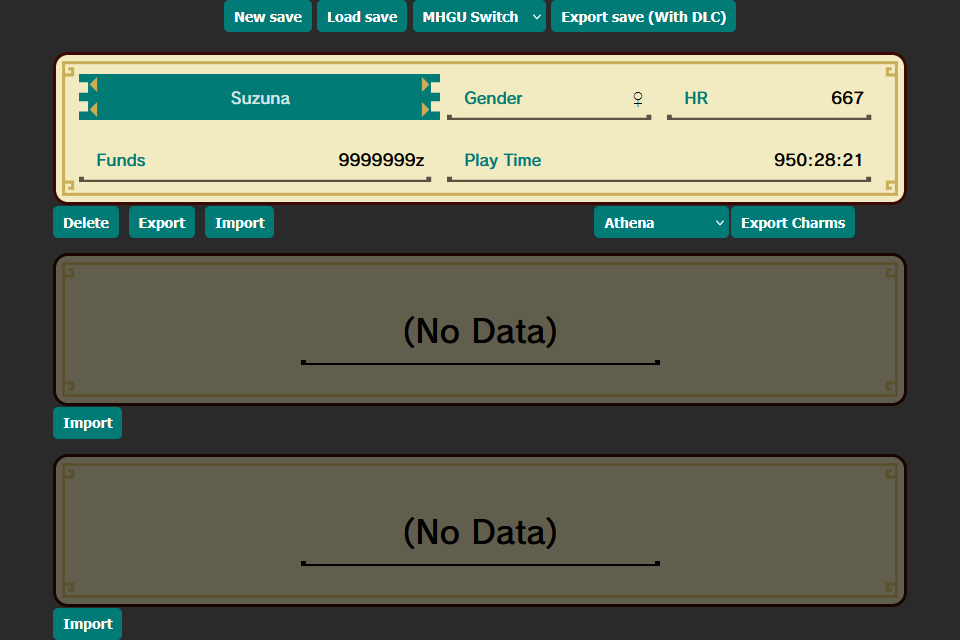
MHXX/MHGU Save Manager is a web tool that allows you to upload your save data 'system' file for MHXX for the 3DS and Switch, or MHGU for the Switch.
What it does:
NOTE: Unequip any MHXX-exclusive armor/weapons before transferring to MHGU. Also make sure to keep backups of your save files.
How to use:
LINK: https://silverjolteon.github.io/MHGU/save-manager/index.html
Credit:
MHXX/MHGU Save Manager is a web tool that allows you to upload your save data 'system' file for MHXX for the 3DS and Switch, or MHGU for the Switch.
What it does:
- Allows conversion between all three versions of the game.
- Includes all DLC: all quests, all item packs, and all DLC Palicoes (up to 50 can be selected).
- Reorder, import/export, and delete character slots.
- Export charms for use with Athena or mhxx.wiki-db.
- It will not modify save slot data (IE: edit character, equipment, items, palicoes).
- Cross-version event quests. Only MHXX Palicoes are available in MHGU, all quests are mutually exclusive between versions.
- It cannot convert MHX/MHGen save files to MHXX/MHGU.
NOTE: Unequip any MHXX-exclusive armor/weapons before transferring to MHGU. Also make sure to keep backups of your save files.
How to use:
- Dump your save data using either JKSM/JKSV or Checkpoint. (MHXX 3DS uses ExtData).
- The important file is system, transfer it from your 3DS/Switch.
- In MHXX/MHGU Save Manager, click 'Load Save' at the top and select your system file.
- You can now reorder your save slots by clicking and dragging, export/import/delete individual save slots, and export a list of charms for use with Athena or mhxx.wiki-db.
- After you are finished, click the dropdown at the top and select which version of the game you want to export the save file as.
- Click 'Export Save (With DLC)' to export a new 'system' file that includes your changes as well as DLC for the respective game.
- Re-import the new 'system' file using JKSM/JKSV or Checkpoint.
LINK: https://silverjolteon.github.io/MHGU/save-manager/index.html
Credit:
- u/Levobertus, WillTheHunter, and Caza_MH for all the DLC Palicoes
Attachments
Last edited by SilverJolteon,