


- Joined
- May 28, 2009
- Messages
- 375
- Reaction score
- 173
- Trophies
- 1
- Age
- 32
- Website
- josh.birnholz.com
- XP
- 620
- Country

So I bought and installed a custom shell for my DSi. It looks very cool.
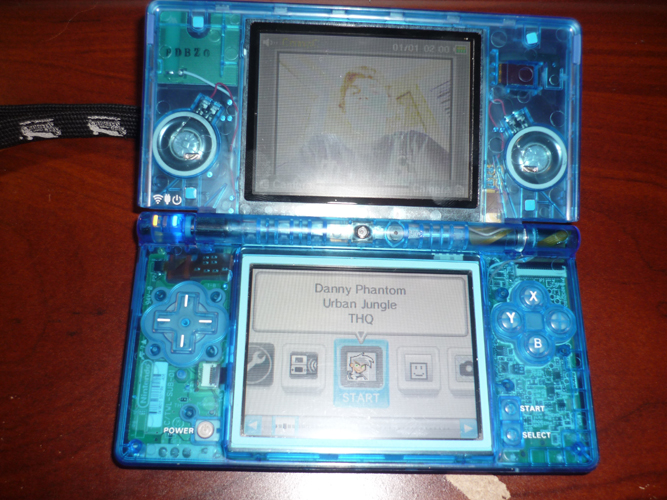
Anyway, as you can see in the picture, the screens are a little messed up. When you first turn on the system, the top screen looks almost normal, but as you continue using it, it gradually gets darker and eventually the colors turn weird, or seem inverted.
The bottom screen is mostly usable, but the colors are a bit lighter and both screens seem to have lines that almost look like scanlines though them. When I compared the same game on a DS lite and my DSi, the DS lite's colors were much more vivid.
Obviously, I messed something up when I took apart and put my DSi back together when installing the new shell. I've never taken anything apart like this before, so I knew I would probably make a mistake.
Is there any way I can fix this myself? Does anyone know how to fix it? Obviously I can't send it to Nintendo… Does anyone know of anywhere that would fix this for me, if I can't fix it myself?
Thanks!
Anyway, as you can see in the picture, the screens are a little messed up. When you first turn on the system, the top screen looks almost normal, but as you continue using it, it gradually gets darker and eventually the colors turn weird, or seem inverted.
The bottom screen is mostly usable, but the colors are a bit lighter and both screens seem to have lines that almost look like scanlines though them. When I compared the same game on a DS lite and my DSi, the DS lite's colors were much more vivid.
Obviously, I messed something up when I took apart and put my DSi back together when installing the new shell. I've never taken anything apart like this before, so I knew I would probably make a mistake.
Is there any way I can fix this myself? Does anyone know how to fix it? Obviously I can't send it to Nintendo… Does anyone know of anywhere that would fix this for me, if I can't fix it myself?
Thanks!



