Hacking Loadiine GX2

  • Thread starter Thread starter Cyan
  • Start date Start date
  • Views Views 2,637,226
  • Replies Replies 6,197
  • Likes Likes 132
respect @dimok :bow:
real nice loader with sweet layout and working from sd when upgrading on wiiu 5.3.2 for loadiinev4 to GX2 Beta :) when using the steps described

i still did not renamed my save folders "c" to "common" but it still works for the games i use without renaming when using default shared mode
 
I renamed my c folder to common but did not work.. After starting one game and looking the folder structure... It was the same as always :)
Updated from v3 to GX2... Wii u 5.4.0
 
Hello, two of My games have no "meta" folder. I read here that I can use "jnustool" to download the meta folder correct? because the gx2 needs the two XML files or?
Must I copy the meta folder in the game directory? there are only rpx folders?
 
can this work with a spoofed firmware: i was in 5.4.0 but now i spoofed the firmware to 5.5.0 could it works?
 
I guess the shared mode still use "c" instead of common.

I don't know if it's a bug or not. it might be fixed in next release.
the purpose to use "common" for both mode is to allow the user to switch the mode but retain the common save data shared between all profiles.
if it uses "c" for share, and "common" for unique, it would create two different "shared content" and it wouldn't be really shared anymore.


basel : yes it works with spoofed console.

Hello, two of My games have no "meta" folder. I read here that I can use "jnustool" to download the meta folder correct? because the gx2 needs the two XML files or?
Must I copy the meta folder in the game directory? there are only rpx folders?
Like loadiine v4.0, if there are no xml files in the code folder, it will use some common values.
it could work, or it could not work depending on the game you want to launch.

You can also use xml from another game.
You can also check the compatibility list to see how to get xml for games without one.
 
which invalid link ?

there's no link in the faq to make Virtual Console working.
you only need to create a ID6.

I'll tell devs to quickly make ID4 compatible for VC games, instead of created fake IDs.
Gametdb has the VC games stored with ID4 so if you use the correct ID it will download the correct cover (when auto-download will be added).

For users who want covers for VC : there's no official covers, so you are welcome to create&submit a cover for the virtual console games.
there's probably already the cover available for the VC on Wii, you could adapt it to WiiU design.
 
  • Like
Reactions: Azel
Ey @Cyan , other bug: When you choose cover mode in TV screen, and icon mode in Gamepad, the control is inverted. You hold lef in pad and TV cover move to the right.
 
  • Like
Reactions: Datalogger
i dont think thats a bug is it?

It must be a bug: this happen because in the gamepad the correct move is right when you hold right, but in the TV when you hold right, in the gamepad move to the right and the TV screen move to the left (Only: Cover mode in TV and Icon Mode in Gamepad).
 
regardless of the view on the gamepad it will always go the correct way. where as the tv is the opposite direction. might be a bug but i doubt it
 
Can someone help me with spoof?
I have a 5.4 and want to spoof to the highest posible fw.
How to do it?
 
don't create the cfg file manually, it's auto-generated by loadiine.
the path is mentioned on the first post.

Cyan - It wasn't generated on first launch for me at all, or consecutive launches on 5.3.2. I haven't had time to check if it's created when you launch Loadiine settings in the app or not yet, running into issues getting my Smash update to install, but I can do some testing if you want with regard to the cfg file being created.
 
Cyan - It wasn't generated on first launch for me at all, or consecutive launches on 5.3.2. I haven't had time to check if it's created when you launch Loadiine settings in the app or not yet, running into issues getting my Smash update to install, but I can do some testing if you want with regard to the cfg file being created.
I don't know how it's created, I didn't check the sources yet.
But maybe the file is generated and the settings saved only at exit ? so if you launch a game it's created, if it crash before you launch a game there's no file generated?
that's only a supposition, I haven't verified how it works.
 
I don't know how it's created, I didn't check the sources yet.
But maybe the file is generated and the settings saved only at exit ? so if you launch a game it's created, if it crash before you launch a game there's no file generated?
that's only a supposition, I haven't verified how it works.
It looks like the only spots CSettings::save() is, is in two places. One in the deconstructor for the main thread and once in a settings reset function, which looks like it is unused.

So it only saves on exit, and it also only saves if any settings are different than default
 
Last edited by Scuba156,
@Chrisn aka chdesire

Did you try loadiine4 after you have changed game and savepath accordingly?

The new gamepath for GX2 works for 4.X since its only renaming it.

Does the games load / work again?
@liomajor
i started with Loadiine v4. Loadiine for works a bit for me.
On Loadiine v4 follow games works:
Kirby and the Rainbow Curse - Works!
Rayman Legends - Works great!
Legend Of Zelda Winwaker - Works!
Yoshis Wolly World - DON'T WORK (damned, i realy want to play this amazing cute Wolli Yoshis :'D)
Super Mario 3D World - DON'T WORK

I uploaded the Error Msg. i got if i start Yoshi or Mario 3D.

On GX2 he freezes immediatly if i start any game. No Error Msg appears and not any Game Works :/.(I didn't played the Games yet. So I dont have Savepathes :D) The Gamepathes didnt changed or? I only added the [ID] to the Namefolder of the game.

I read here that some guys get Meta files? i thought u only need it on some games? I have Meta for Yoshi, Windwaker and Kirby but not for Mario 3D or Rayman(still works).
And i have an Trascend XC1 64GB SD Card with 90mb/s. The Speed if my SD-Card is fine.

Update:
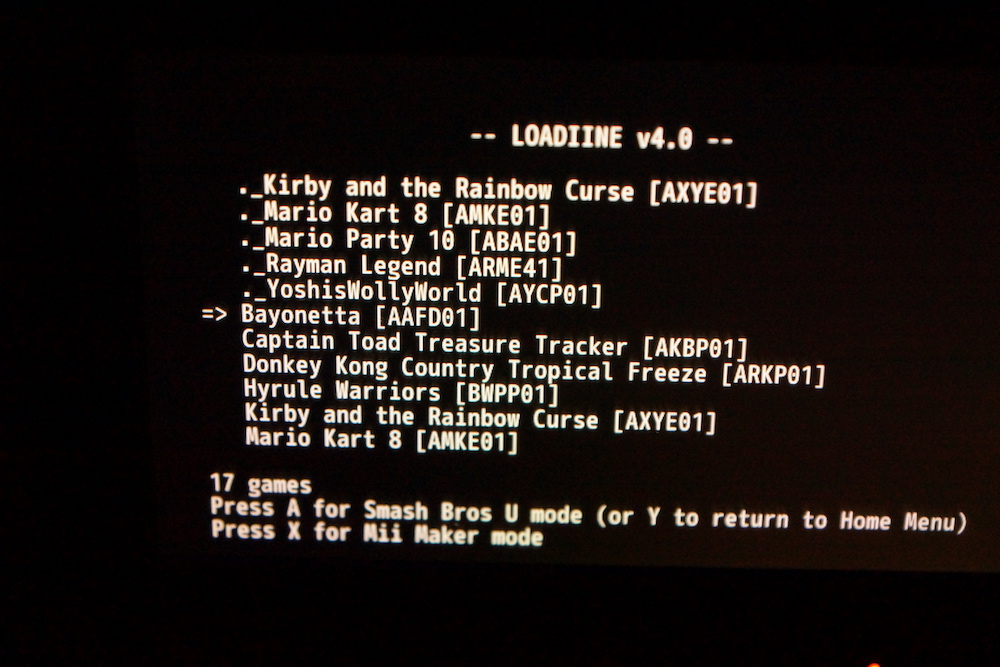
I checked some Video Tuts for Loadiine and in the v4 Loadiine show me all games twice. With normal name and with a "._"-Prefix. could it be that this if from my macbook whil i setup the sdcard? some invisible data which confuse the gx loader?(Check screen)

azvv5s4u.jpg
 

Attachments

  • DSC06225.JPG
    DSC06225.JPG
    177 KB · Views: 328
  • DSC06226.JPG
    DSC06226.JPG
    164 KB · Views: 283
Last edited by Chrisn,

Site & Scene News

Popular threads in this forum