Hacking JGecko U Setup Guide

  • Thread starter Thread starter BullyWiiPlaza
  • Start date Start date
  • Views Views 416,255
  • Replies Replies 1,143
  • Likes Likes 27
I didnt expect to have to ask for help but I get stuck at the most basic stop: I am unable to connect JGecko U to my Wii U IP.

I made sure to use the right IP. I put a static IP so it doesnt risk changing.
I updated Java Dev Kit... Twice.
I used the JGecko U Updater to make sure to get the latest files.
I make sure to Press X when installing TCPgecko
yet it doesnt work.

Here is how I do it:
- Start Wii U, Lauch Haxchi then Mocha CFW
- Lauch Haxchi again, then TCPgecko and press X
- Lauch the game (In this case, BotW) and wait for it to load a save.
- On my PC, lauch JGecko U and type IP Address and connect.
- Get this error message.
krQzoxi.png

Im sure im missing something obvious but not obvious enough because I have no idea whats going on at this point.

If you could help me out, it would be greatly appreciated.
 
I didnt expect to have to ask for help but I get stuck at the most basic stop: I am unable to connect JGecko U to my Wii U IP.

I made sure to use the right IP. I put a static IP so it doesnt risk changing.
I updated Java Dev Kit... Twice.
I used the JGecko U Updater to make sure to get the latest files.
I make sure to Press X when installing TCPgecko
yet it doesnt work.

Here is how I do it:
- Start Wii U, Lauch Haxchi then Mocha CFW
- Lauch Haxchi again, then TCPgecko and press X
- Lauch the game (In this case, BotW) and wait for it to load a save.
- On my PC, lauch JGecko U and type IP Address and connect.
- Get this error message.
krQzoxi.png

Im sure im missing something obvious but not obvious enough because I have no idea whats going on at this point.

If you could help me out, it would be greatly appreciated.
Make sure you're using tcpgecko installer in the top post. It is a modified version of the original. It is mandatory to use JGecko U properly.
 
Make sure you're using tcpgecko installer in the top post. It is a modified version of the original. It is mandatory to use JGecko U properly.

Ok so here's what happened for anyone who cares: I was stupid.

Just to be sure, I downloaded the installer again instead of using the one the updater downloaded automatically. Instead of removing my SD card, I decided to use an FTP server app because im lazy and noticed the IP used to connect to that was different. Then I tried everything again with that IP and... it worked.

So what happened is I put a static IP on for the MAC address of my Wii U BUT I also have a USB to Ethernet adapter... which my Wii U was using as its default connection. So the IP needed was actually different.

Thanks for the help, HackingNewbie!
 
Ok so here's what happened for anyone who cares: I was stupid.

Just to be sure, I downloaded the installer again instead of using the one the updater downloaded automatically. Instead of removing my SD card, I decided to use an FTP server app because im lazy and noticed the IP used to connect to that was different. Then I tried everything again with that IP and... it worked.

So what happened is I put a static IP on for the MAC address of my Wii U BUT I also have a USB to Ethernet adapter... which my Wii U was using as its default connection. So the IP needed was actually different.

Thanks for the help, HackingNewbie!

I had that issue, I made sure I was using the tcpgecko.elf file from the JGeckoU Setup guide, ensured I had CosmoCortney's codehandler.bin file in the same folder, and pressed X when using tcpgecko.elf.

Thats what @Jonna said, I took his advice and it worked. Also download and install Advanced IP Scanner, it will pick up yourt wiiu.
 
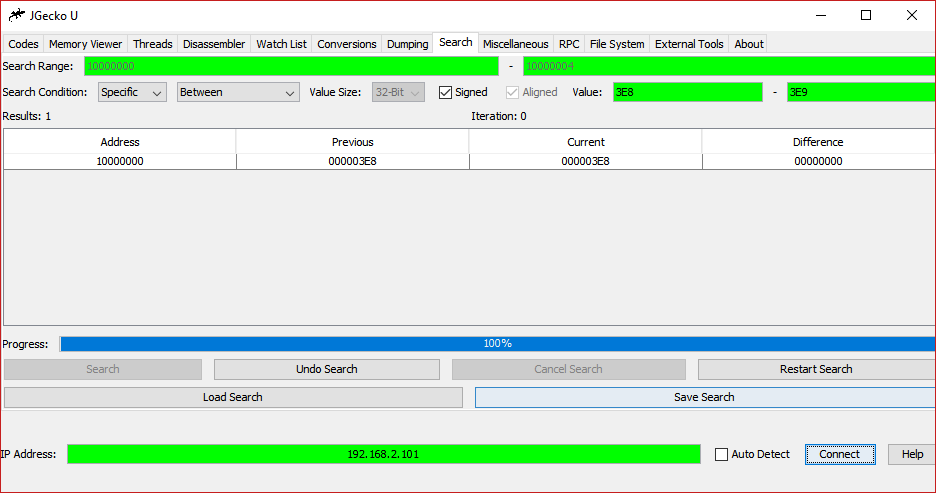
Default memory bounds would be nice. So you don't have to click a few tabs to get it and type it in.
 
Simply awesome! Is it including the lower and higher bound values?
Yes
Also, what is flag set and flag unset?
It is used for binary flags being set such as an individual button press in a button activator. Normally, you cannot search for this unless you do it with flag set/unset search. For instance, if you press A and B at once you can search for the value of A and it will find it when using flag set no matter how many more buttons you're holding even though the value of all buttons are added together. Magic :D

I know it's almost never actually useful but who cares, another possible search is better than not.
Default memory bounds would be nice. So you don't have to click a few tabs to get it and type it in.
But you aren't supposed to search the whole memory bounds anyway and the only range you're supposed to search through pretty much is 0x10000000 to 0x4??????? since this is the game's data section.
 
Last edited by BullyWiiPlaza,
But you aren't supposed to search the whole memory bounds anyway and the only range you're supposed to search through pretty much is 0x10000000 to 0x4??????? since this is the game's data section.
I was talking about game memory bounds
 
@BullyWiiPlaza I would like to thank you for not responding to my posts, whether intentional or not. I'm not being sarcastic. I took it as a sign there was obviously something on my end that I should be able to figure out, and lo and behold, I bloody forgot to change the network SSID back to normal after modifying it, so it wasn't even connected to the Internet. It works just fine now.

tldr; Thanks for existing!
 

Site & Scene News

Popular threads in this forum