Hacking [IMPORTANT] PSA: AutoRCM battery warning

  • Thread starter Thread starter Deleted-442439
  • Start date Start date
  • Views Views 117,355
  • Replies Replies 279
  • Likes Likes 21
D

Deleted-442439

Guest
EDIT: It turns out Tux was wrong, Kate has since clarified the PD controller has a mode for charging the Switch in the event of no power. So the Switch can not be bricked, but you are still unable to charge in RCM.

However this can sometimes fail, if that happens you will need to unplug / replug the battery

--------------------------------------------------------------------------------------------


Since users are reporting battery issues (I have experienced this myself) I thought this thread was necessary:

If you use AutoRCM please be aware that the Switch does not charge while in RCM mode.

For the Switch to charge it needs to be booted into Horizon / CFW. As Hekate does not support sleep mode, it is advised to always charge the Switch to 100% in OFW before using any CFW, and keeping it at a acceptable level before turning it off.

If you completely drain the battery to the point of not being able to even enter RCM (with autoRCM) you will be unable to do anything, requiring you to remove the battery and charge it externally / in a other Switch etc. to be able to boot at all.

The battery also still drains in RCM mode, so always hold down power for 12+ seconds to ensure the system is powered down.

You will know that your Switch is charging if you see the green / red battery icon in the top right corner when you plug in a charger, also note that plugging in a charger while off will boot the Switch into RCM and thus end up draining the battery rather than charging it.

No Autorcm:

Console will boot if a charger is plugged in when powered off.

Autorcm:

With power: Console will default to RCM if a charger is plugged in. (can't charge until Horizon is booted).

No power: Console will not be able to do anything, if the PD controller gets stuck you will need to plug in / unplug the battery.

upload_2018-5-25_3-27-0.png
 
Last edited by ,
I usually boot Hekate and choose the Power Off option while it's unplugged, just to be sure my Switch is turned off.

Yep, but if using autorcm it will not charge if you plug the charger in when you power off from hekate, it will just boot into RCM, so you need to boot into Hekate / Horizon first, and then charge it, and then power it off when you are done charging.
 
If the battery does die while AutoRCM is installed, what's stopping one from plugging in his or her console, loading RCM, and booting into Hekate to charge?
 
@Lacius If the battery is dead, you can't boot into RCM and then can't boot into Horizon. The Switch will not be able to do anything, as it needs to be booted into Horizon to accept a charge through the USB port.
 
Last edited by ,
Since users are reporting battery issues (I have experienced this myself) I thought this thread was necessary:

If you use AutoRCM please be aware that the Switch does not charge while in RCM mode.

For the Switch to charge it needs to be booted into Horizon / CFW. As Hekate does not support sleep mode, it is advised to always charge the Switch to 100% in OFW before using any CFW, and keeping it at a acceptable level before turning it off.

If you completely drain the battery to the point of not being able to even enter RCM (with autoRCM) you will be unable to do anything, requiring you to remove the battery and charge it externally / in a other Switch etc. to be able to boot at all.

The battery also still drains in RCM mode, so always hold down power for 12+ seconds to ensure the system is powered down.

You will know that your Switch is charging if you see the green / red battery icon in the top right corner when you plug in a charger, also note that plugging in a charger while off will boot the Switch into RCM and thus end up draining the battery rather than charging it.

View attachment 125069

I was lucky enough because was able to uninstall AutoRCM while battery was around 1 to 2% (didn't know this could've happened), after I uninstalled it and went to try Horizon, battery was completely dead, had to plug the console in for around 20 to 30 minutes for it to turn back on.

Thank you for the warning.
 
I wonder if this issue affects Xecuter payload ? Most likely since RCM doesn't charge...
 
I wonder if this issue affects Xecuter payload ? Most likely since RCM doesn't charge...

It will, since autorcm means the Switch will default to RCM the issue can't be mitigated. Hopefully TX will include a warning about this....
 
This basically renders autoRCM completely useless then, at least on a CFW that would allow sleep : people didn't like to mess with pins to enter RCM every time they ran out of battery...

...But now when they run out of battery, they can't even boot it at all !
 
  • Like
Reactions: TAUSENN
@jjbredesen If a Switch that doesn't have AutoRCM installed completely dies, it's able to charge while powered off until it can boot into Horizon. If a Switch that does have AutoRCM installed completely dies, why won't it charge while powered off until it can boot into RCM and start draining the battery again?
 
@jjbredesen If a Switch that doesn't have AutoRCM installed completely dies, it's able to charge while powered off until it can boot into Horizon. If a Switch that does have AutoRCM installed completely dies, why won't it charge while powered off until it can boot into RCM and start draining the battery again?

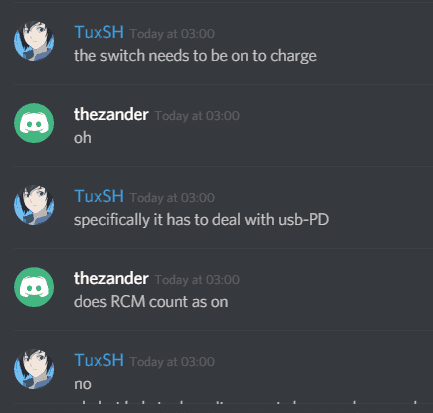
As Tux pointed out in the Discord image: The Switch needs to deal with USB-PD, to accept a charge from the USB C port. If autorcm is installed it can't access that, because the bootloader will fail to validate the cert thus not reading anything, defaulting to RCM a mode that does not include any USB charging functionality.
 
@jjbredesen If a Switch that doesn't have AutoRCM installed completely dies, it's able to charge while powered off until it can boot into Horizon. If a Switch that does have AutoRCM installed completely dies, why won't it charge while powered off until it can boot into RCM and start draining the battery again?
well it cannot because it can only boots to rcm, so no charging, in reality is a problem, with tx you will be in rcm less time but you must be careful of your battery if it dies during play, you are SOL :P if you install rcm
 
As Tux pointed out in the Discord image: The Switch needs to deal with USB-PD, to accept a charge from the USB C port. If autorcm is installed it can't access that, because the bootloader will fail to validate the cert thus not reading anything, defaulting to RCM a mode that does not include any USB charging functionality.

So that means no charge while off with AutoRCM on? Thats kinda a big deal.
 
So that means no charge while off with AutoRCM on? Thats kinda a big deal.

Yep, if autorcm is on, the console will only charge when you are fully booted into Horizon, that does not include the Hekate menu , you need to actually be passed the Nintendo / Switch logo for it to charge.
 
  • Like
Reactions: alexj9626
ive... never had this issue. i've had mine in AutoRCM for awhile now and it charges fine. I've used the dock, the regular cable, and a USB to USB C cable and they all work fine.
 
ive... never had this issue. i've had mine in AutoRCM for awhile now and it charges fine. I've used the dock, the regular cable, and a USB to USB C cable and they all work fine.

But did you do it while off? If the console is on then it would charge with no problem, it seems.
 
well it cannot because it can only boots to rcm, so no charging, in reality is a problem, with tx you will be in rcm less time but you must be careful of your battery if it dies during play, you are SOL :P if you install rcm
That wasn't quite my question, since I was inquiring about getting a dead Switch to boot into RCM so one can load Hekate and charge it. jjbredesen already answered my question though.
 

Site & Scene News

Popular threads in this forum