

Emulation Hardware How to set up Bluetooth passthrough Dolphin linux

  • Thread starter Thread starter elezzar
  • Start date Start date
  • Views Views 4,893
  • Replies Replies 5

elezzar

Well-Known Member
Newcomer
Joined
Apr 6, 2023
Messages
46
Reaction score
16
Trophies
0
XP
248
Country
United States
I get this error when trying to use bluetooth passthrough to connect real wiimote on linux
i tried the steps from this guide --> https://wiki.dolphin-emu.org/index.php?title=Bluetooth_Passthrough
however "/etc/udev/rules.d/52-dolphin.rules" doesn't exist (its an empty folder)


any help would be greatly appreciated!
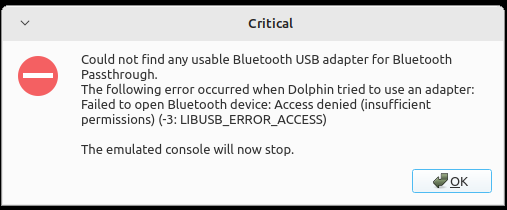
1709711134276.png
 
If the folder doesn't exist... what's stopping you from creating it?

OR

Use Windows.
 
going about the former method...
is this correct?
Definitely not correct.

You need to find your bluetooth adapter's vendor and product ID.

Example command:
https://stackoverflow.com/questions...or-and-product-info-programmatically-on-linux

It should return something like this, for example.
Code:
Bus 001 Device 003: ID 8086:8c1c 8 Series/C220 Series Chipset Family PCI Express Root Port #7
8086 is the VENDOR ID.
8c1c is the PRODUCT ID.

Then you need to make a new udev rule in sudo mode since you're modifying a system directory.
sudo nano /etc/udev/rules.d/52-dolphin.rules
This uses the nano editor in terminal, but you can use whatever you like. Just make sure you're in sudo mode.

And plug those values in the template Dolphin provides, REPLACING YOURVID and YOURPID with whatever your wireless adapters VID and PID is (from the command in the previous step).
EXAMPLE:
Code:
SUBSYSTEM=="usb", ATTRS{idVendor}=="8086", ATTRS{idProduct}=="8C1C", TAG+="uaccess"
 
Definitely not correct.

You need to find your bluetooth adapter's vendor and product ID.

Example command:
https://stackoverflow.com/questions...or-and-product-info-programmatically-on-linux

It should return something like this, for example.
Code:
Bus 001 Device 003: ID 8086:8c1c 8 Series/C220 Series Chipset Family PCI Express Root Port #7
8086 is the VENDOR ID.
8c1c is the PRODUCT ID.

Then you need to make a new udev rule in sudo mode since you're modifying a system directory.
sudo nano /etc/udev/rules.d/52-dolphin.rules
This uses the nano editor in terminal, but you can use whatever you like. Just make sure you're in sudo mode.

And plug those values in the template Dolphin provides, REPLACING YOURVID and YOURPID with whatever your wireless adapters VID and PID is (from the command in the previous step).
EXAMPLE:
Code:
SUBSYSTEM=="usb", ATTRS{idVendor}=="8086", ATTRS{idProduct}=="8C1C", TAG+="uaccess"
Thank you very much, this worked.

is there also a way to use my builtin bluetooth adapter? the one thats on my laptops wifi module
 
  • Like
Reactions: lordelan
Thank you very much, this worked.

is there also a way to use my builtin bluetooth adapter? the one thats on my laptops wifi module
You'd need to find the PID and VID of your device, then change it in the udev rule file.

If it's not detected as a USB device, you'll need to change SUBSYSTEM to whatever your device uses.
 

Site & Scene News

Popular threads in this forum

