
Hacking help with some XCI games that don't work

  • Thread starter Thread starter hussain2456
  • Start date Start date
  • Views Views 4,726
  • Replies Replies 14

hussain2456

Member
Newcomer
Joined
Aug 19, 2018
Messages
6
Reaction score
0
Trophies
0
Age
36
XP
86
Country
Azerbaijan
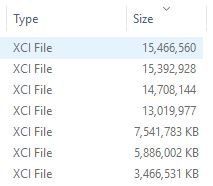
So I downloaded a few games recently and put them onto my sd card but when I tried to load them after booting into CFW i get the error saying game cartridge cannot be read. I took everything off and reformatted the sd card, put one game on and that seems to work fine. Now I tried to put another one on, DOOM and Zelda but both gave me the cartridge cannot be read error, then I realised that these files actually show up differently under the file size in windows. I'm using a 256GB micro sd and Im pretty sure its legit, in the process of trying a few more games but im wondering if anyone has a clue why the file size for some of the games dont show the KB along with the numbers ( see picture)

kb.JPG
.

Maybe bad download or something?
 
Also check if you have a fake SD. For example, some fakes will say 128gb but in reality are much smaller. You wont get an error when you copy the files because it's set up to "trick" windows. The file will copy but it just overwrites the data that is already on there and doesn't tell you.
 
Also check if you have a fake SD. For example, some fakes will say 128gb but in reality are much smaller. You wont get an error when you copy the files because it's set up to "trick" windows. The file will copy but it just overwrites the data that is already on there and doesn't tell you.

Is there any easy way to check this? I've tried a few programs but theyre too slow (and confusing) takes a while to move more than 32 gb or something on to the sd aswell...
 
H2testw


Takes it time tho but it will tell you wether or not its fake....

But besides this what are you using to boot the xci ??

Not exactly sure what you mean here, im using an xecuter os x?

looks like ill have to give h2test a try
 
Last edited by Canna,
So using h2test on a 256 takes about 24 hours, opted to not go for that.

realised that its almost 100% a bad SD since I copied about 100gb of video files over and majority of them ended up not working

Thanks for the help all
 
So using h2test on a 256 takes about 24 hours, opted to not go for that.

realised that its almost 100% a bad SD since I copied about 100gb of video files over and majority of them ended up not working

Thanks for the help all

24hrs damn you must have a crap potato

Mine only takes a couple of hours. but hey thought it may be a bad sd and glad you figured it out,,
If its too cheap to buy for what it is. then its prob fake,
Have a nice day
 
I don't really like or trust these SD test programs. Personally, when I want to test a new microSD card, I just fill it up completely with a big scene release, repeatedly. Recently, I did that with a 200GB Sandisk. So I copied the folder of The.Elder.Scrolls.V.Skyrim.NSW-BigBlueBox (14.5GB) repeatedly on the microSD, renaming it 01, 02, 03, etc after every copy. It fitted about 12 or 13 times. At USB 3 speed, it doesn't take too long, usually. Then I just run an SFV checker on the whole thing. (my Sandisk card is genuine)
 
24hrs damn you must have a crap potato

Mine only takes a couple of hours. but hey thought it may be a bad sd and glad you figured it out,,
If its too cheap to buy for what it is. then its prob fake,
Have a nice day

Well yeah I guess the bad sd and using a 5+ year old micro sd reader is the cause of the slow speeds... funnily enough it was actually faster to redownload the game straight onto the card than copy it over lol
 
Well yeah I guess the bad sd and using a 5+ year old micro sd reader is the cause of the slow speeds... funnily enough it was actually faster to redownload the game straight onto the card than copy it over lol

Is your Switch cart slot empty? Xci cannot be read if there’s a physical cart inserted...
 
I have had this before , just let the software run it will take time, for me it proved that it was a fake and was able to use the readout to get my money back from the eBay seller.

My best advice after I have be done over more than once, is only buy a SD card from a shop you can walk into. That is only way you will get a genuine SD card. Other wise you are running the gauntlet
 

Site & Scene News

Popular threads in this forum





