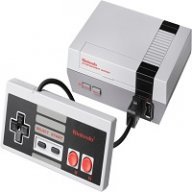
Official hakchi2 - NES Mini very simple pimp tool

  • Thread starter Thread starter Cluster
  • Start date Start date
  • Views Views 4,409,533
  • Replies Replies 18,558
  • Likes Likes 138
The core doesn't need to be in hmod format. You need to go where you download retroarch and download source file zip. Then unzip it and click into retroclover folder then move the retroarchhmod FOLDER into usermods in hakchi then that folder gives you the access you need to change the core :)

Thanks for the reply! Ok, so put the entire "retroarch-clover-0.3" folder into the hakchi: user_mods ... then add/copy/edit the bin files/cores?

 
Both of them like you wrote? And no need to download anything els?

Yes, without the '', thus:

--retroarch --core nestopia

Edit: So the above line at the end of the existing commandline input.
 
Last edited by ZaMaster,
oops sorry, post error. ^^'
Man, about the 32X. I think no bios is necessary (I build the picodrive.hmod with picodrive) but only I installed module Picodrive (I put the necessary BIOS on \retroarch.hmod\etc\libretro\system) But I forget to install Retroarch module (So the BIOS are in my PC not in mini)
I tried Stellar Assault and Virtua Fighters and works like a charm. So I understand that without BIOS must work ok. If continued with problems I check the pcm picodrive (maybe it's the core) or maybe you mistake something. Let me do more tests.

Rgs.
 
Bro the file you have is the file you need. Don't need to convert it to "hmod" I don't get where people are getting that from.
There is a new release at GitHub today... it's confusing because I upgraded too but most people haven't (using yesterday's source code zip to edit cores)... the cores are now in .hmod formats and are installed through Hackchi's modules tab...
 
Man, about the 32X. I think no bios is necessary (I build the picodrive.hmod with picodrive) but only I installed module Picodrive (I put the necessary BIOS on \retroarch.hmod\etc\libretro\system) But I forget to install Retroarch module (So the BIOS are in my PC not in mini)
I tried Stellar Assault and Virtua Fighters and works like a charm. So I understand that without BIOS must work ok. If continued with problems I check the pcm picodrive (maybe it's the core) or maybe you mistake something. Let me do more tests.

Rgs.
Thanks for your answer nesito.
edit: That's right, it seems that the latest version of the picodrive core already includes bios!
So, I really don't know why this core doesn't want to work... Will you be able to send me your files if necessary?
 
Last edited by VirgileVILE,
  • Like
Reactions: nesito
Le fichier est dans le fichier .hmod de retroarch, qui est une sorte d'archive que tu peux décompresser (cela marche aussi). Le fichier "nes" (sans extension) se trouve dans le répertoire bin de celui-ci.

Merci :)

--------------------- MERGED ---------------------------

Don't know for Beauty and the Beast, but I don't have any issue with my Asterix rom on nestopia.

@Maurobr76
To run Asterix with Nestopia (with default retroarch module on Cluster's page /!\ can be different with pcm720's last version).
It's in French and in my english, but my english is not very good... ^^'


Bravo pour cette jolie video ! :) pas facile de faire un truc en anglais ...
Le " --retroarch" c'est pas en début de ligne qu'il faut l'ajouter dans la commande ?
Tu a testé nestopia avec le filtre crt ? (enfin avec les scanlines rajoutés avec le mode retroarch) car avec fceumm ça rame complet et en plus c'est moche !
 
  • Like
Reactions: VirgileVILE
Yes, without the '', thus:

--retroarch --core nestopia

Edit: So the above line at the end of the existing commandline input.

I tried this now on Asterix, Batman rotj, Mr gimmick and last ninja.

The colors are Much better now then before but still glitches on Asterix and on Mr. Gimmick there are some glitches in the bottom.

But atleast the other games looks better :) so i guess the Asterix is a bad Rom them
 
Merci :)

--------------------- MERGED ---------------------------


Bravo pour cette jolie video ! :) pas facile de faire un truc en anglais ...
Le " --retroarch" c'est pas en début de ligne qu'il faut l'ajouter dans la commande ?
Tu a testé nestopia avec le filtre crt ? (enfin avec les scanlines rajoutés avec le mode retroarch) car avec fceumm ça rame complet et en plus c'est moche !
Le retroarch, je pense que tu peux le mettre n'importe où, en fait il faut juste ne pas oublier de séparer chacune des commandes par un espace, tout simplement.
Je n'ai jamais testé les filtres (car je n'en utilise jamais), mais je jetterai un œil.
 
I tried this now on Asterix, Batman rotj, Mr gimmick and last ninja.

The colors are Much better now then before but still glitches on Asterix and on Mr. Gimmick there are some glitches in the bottom.

But atleast the other games looks better :) so i guess the Asterix is a bad Rom them

Ok, good to know. Then it's probably the rom. Use google and search for roms with [!] or nointro.
 
  • Like
Reactions: Maurobr76
I have one issue,
Sega Genesis Roms Wont start and the same is with NeoGeo Roms.
I used the hmod from pcm720 (Version 0.3)

Can anybody help me out?
 
Ok, good to know. Then it's probably the rom. Use google and search for roms with [!] or nointro.

Found a ! so trying that :)
Thanks :)

So i guess that nestopia is the better one out of the two that are in hakchi. Atleast for these games and the color.
 
Is there anybody with some core and hmod skills willing to give neogeo pocket color or atari lynx a try? These both have favorable control schemes for the nes classic and both have relatively small game libraries...time for a test video @nesito !

--------------------- MERGED ---------------------------

I was also wondering if there was a fix for game gear yet? I loaded the latest retroarch and modules and game gear still has to be manually pointed to the emulator in the command parameters part, and this has to be done for every single game . I don't have this problem with any other consoles, even the newer ones like turbo grafx 16....
 
Last edited by NESCLASSIC,
  • Like
Reactions: nesito
Folks, about neogeo games, do I need to go into the hakchi folder/games folder and find the game and add neogeo.zip BIOS to each game folder with a neogeo game ???
 
I just completed testing snes9x2005 and can confirm it works near flawless on every game I tested. With Snes9x2010, I experience sound/video stuttering on Yoshi's Island, final fantasy 3 and super Mario rpg. All issues were resolved using the 2005 core. For those needing help installing, follow these simple steps

1) navigate here https://buildbot.libretro.com/nightly/linux/armhf/latest/
2) download the snes9x2005 core
3)unzip in your user_mods/etc/cores folder
4) navigate back two folders and open the /bin folder
5) copy 'snes' and save a copy as something else (I.e., 'newsnes')
6) edit newsnes in notepad. Change the ' snes9x2010' to 'snes9x2005'
7) uninstall /reinstall retroarch
8) for every snes game in Hackchi2, change the command line /snes part to /newsnes
9) re-upload your games
10) enjoy!
I don't have the etc, cores or bin folders. Is that an issue or can I just create them myself?
 
You can. You just need to add the roms to the folders then continue with the synch.
Not trying to sound snarky but I'm well aware on how to add roms. They simply don't show up when I sync the NESC unless each group of games is in a folder. When I add subfolders with titles in it IE A-M and N-Z in an SNES folder it just doesn't take. If I put them in the folder titles SNES without any subfolders it works just fine.
 
Not trying to sound snarky but I'm well aware on how to add roms. They simply don't show up when I sync the NESC unless each group of games is in a folder. When I add subfolders with titles in it IE A-M and N-Z in an SNES folder it just doesn't take. If I put them in the folder titles SNES without any subfolders it works just fine.

I had the same problem just synch again ! that fixed it for me
 
  • Like
Reactions: Ghostwise
[QUOTE = "Maurobr76, poste: 7117273, membre: 414700"] Hmm essayé le! Version, mais toujours le même problème ...

Quelqu'un at obtenir Astérix pour nes à travailler "sans faille"? [/ QUOTE]
I have the same problem than you ! Perhaps some settings in retroarch ? Rgs.
 
  • Like
Reactions: Maurobr76

Site & Scene News

Popular threads in this forum