Official hakchi2 - NES Mini very simple pimp tool

  • Thread starter Thread starter Cluster
  • Start date Start date
  • Views Views 4,409,110
  • Replies Replies 18,558
  • Likes Likes 138
That SD card looks huge compared with the Famicom mini. I remember a while ago there was some talk about the possibility to use an OTG cable (http://www.hdcabling.co.za/images/Female_USB_otg_host_cable_to_male_usb.jpg) in combination with a USB drive on the NES mini in order to get more space. If I remember correctly that was also Honeylab testing this out. I might be mistaken here but I think he said that the possibility was there but the kernel had to be re-compiled. I suppose to add drivers or something (too technical for me to explain this correctly). So there is still hope for a clean solution. Hopefully.

found this about OTG
Why Nintendo Classic Mini does not recognize Flash Drive or USB GamePad ?
 
  • Like
Reactions: jelmer
hello im new here and im stuck on the step where you have to dump your kernel when i click install driver i get an error message
"the system cannot find the file specified"
im stuck and been trying all day to fix this after hours of research google has led me to this website can someone please help!!

thank you
 
hello im new here and im stuck on the step where you have to dump your kernel when i click install driver i get an error message
"the system cannot find the file specified"
im stuck and been trying all day to fix this after hours of research google has led me to this website can someone please help!!

thank you
How about Youtube?
 
I have modded a few systems now and so far, the only time I ran into a problem was when flashing the custom kernal didn't work right. (I had left the computer on after dumping the original kernal and my computer reset while I was gone and it never tried to flash the custom kernal.

Have you tried to create a new hakchi2 folder maybe even name it "hakchi2 test" unzip the hakchi2.zip file into that folder. Then add the games you want to add. Click on the synchronize button and follow the prompts to boot the nes, then dump the original kernal (do you get an error at this step saying it doesn't match the checksum?) then let it flash the custom kernal and then upload.

Hope that helps, as I said, was the only time I couldn't make it work...

Thanks for the response. How is your suggestion different from the other instructions that I said didn't work?
 
Thanks for the response. How is your suggestion different from the other instructions that I said didn't work?
Because the first time you run a clean install of Hakchi2 it'll ask to dump the original kernel and install the custom one, it won't ask again. If you're modifying multiple NES Classics and it's not working I'd bet money on you having forgotten to flash the custom kernel before adding your games. Without the custom Kernel it won't work.

No NES Classics are impossible to mod.
 
Last edited by CalamityRaven,
Because the first time you run a clean install of Hakchi2 it'll ask to dump the original kernel and install the custom one, it won't ask again. If you're modifying multiple NES Classics and it's not working I'd bet money on you having forgotten to flash the custom kernel before adding your games. Without the custom Kernel it won't work.

No NES Classics are impossible to mod.

But the instructions I was following call for a clean install, so it's dumping the original and flash custom in the prompts like the first time
 
The other set had you copy over the dump folder from a previous install. Don't copy anything over, just a clean install of Hakchi2.

Since it's already worked from that PC before apparently you don't need to reinstall the USB driver, but you still need to dump the original kernel and flash the custom one. If you don't do that it won't synchronise. After that, add a few games and try it out. But if it doesn't work there are no super secret special instructions, just re-read them and try it again. It will work.
 
Ok I finally got hackchi2 to work and I uploaded 200+ games only. They work fine. Problem is I think I forgot to save the orginal kernel :(
If I ever want to go back to factory 30 games will a factory reset work or an I screwed?
 
Ok I finally got hackchi2 to work and I uploaded 200+ games only. They work fine. Problem is I think I forgot to save the orginal kernel :(
If I ever want to go back to factory 30 games will a factory reset work or an I screwed?
You should have a folder name \dump with a file called kernel.img inside your hakchi2 folder. Can you check this please?

Rgs.
--------------------------------------------------------------------------------------------------------------------------
I make a GFX Plugin comparison between Glide64(is the one I used to the N64 videos) and Rice. In general we have a performance boost, but lost in Quality. In other cases freezes the game when pass some time playing it. But in case like PilotWings 64 the game that didn't work, start to work.


Please, enjoy!

Rgs.
 
  • Like
Reactions: omega man
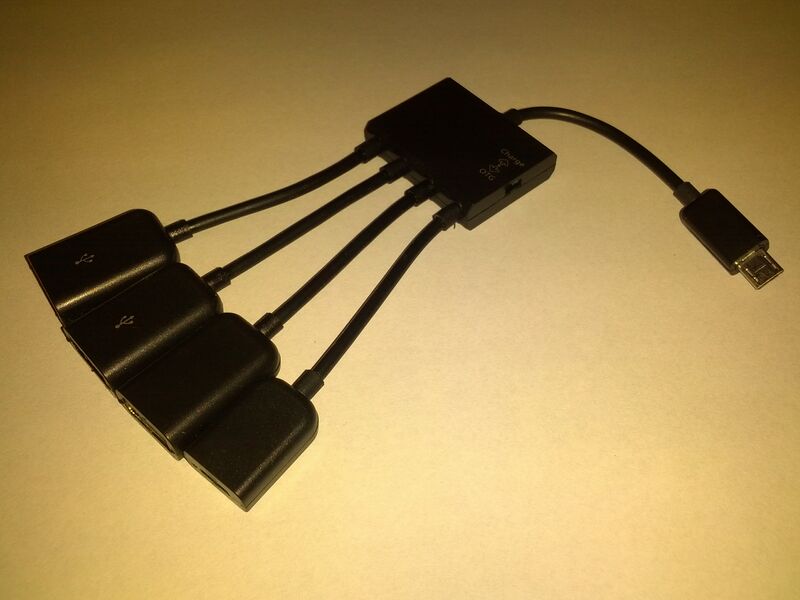
I think that the japanese guy involved in supporting USB peripherals to NES Mini modified the kernel according to those infos. So this is the cable you will probably need to get contemporaneous power supply + flash drive support for your NES Mini console (notice the switch on the right of the "central box"):
800px-4_Port_Micro_Usb_Power_Charging_Otg_Hub.jpg
 
The other set had you copy over the dump folder from a previous install. Don't copy anything over, just a clean install of Hakchi2.

Since it's already worked from that PC before apparently you don't need to reinstall the USB driver, but you still need to dump the original kernel and flash the custom one. If you don't do that it won't synchronise. After that, add a few games and try it out. But if it doesn't work there are no super secret special instructions, just re-read them and try it again. It will work.

I was comparing Trumiserys new instructions to Trumisery's first list. They seemed the same, they both suggest to make a new install with a new folder. I know Nesito originally suggested that I copy files from my original folder into a new folder. I have tried both methods. I have been trying a fresh install every time someone has a new idea just in case, very meticulously following instructions. Nothing has been working for this one NESC.
 
@Cluster I know you are busy working on the next release and may not even get a chance to read this but is it possible to do an in-game soft reset? For example, when you are in a game, you can reset back to the start menu of the game and not to the GUI of the mini.
 
@Cluster I know you are busy working on the next release and may not even get a chance to read this but is it possible to do an in-game soft reset? For example, when you are in a game, you can reset back to the start menu of the game and not to the GUI of the mini.
That function allready exist... can you read the original post please? And check all the functions?? If you press down+select you have the soft reset... -.-'
 
  • Like
Reactions: DbD

Site & Scene News

Popular threads in this forum