Hacking Guide: WD Passport Spindown Fix

  • Thread starter Thread starter SonyUSA
  • Start date Start date
  • Views Views 74,884
  • Replies Replies 176
Simmy said:
i just tested my WD My Passport Elite WD3200ML model... well... don't have any sleep problem, the hdd did go to sleep. as in it did spin down after 10 mins or so... but i let it rest for aroudn 30 mins, on the last lap of mario kart, then drive through the finish line, and all it did was freeze for like half a second, and it went on to spin up and everything loaded properly again, i thnik you guys should be getting the my passport elite(silver colour), that's your best bet.

How is that your best bet when the seagate doesn't spin down at all and comes with a 5 yr warranty vs. a 3 year with the WD?
 
well, no need to be so harsh, i'm just saying if you absolutely want a WD, best bet is my passport elite
smile.gif
and weird thing is. WD elite comes with 5 years warranty too
smile.gif
i bought this HDD in 2008, warranty ends in 2013 according to the WD warranty check
biggrin.gif
 
Simmy said:
well, no need to be so harsh, i'm just saying if you absolutely want a WD, best bet is my passport elite
smile.gif
and weird thing is. WD elite comes with 5 years warranty too
smile.gif
i bought this HDD in 2008, warranty ends in 2013 according to the WD warranty check
biggrin.gif

Why would anyone absolutely want a WD or any brand for that matter? The drive does spin down; it may not crash Mario Kart, but it could cause problems in other cases.

Here's an image directly from the WDC site that shows the warranty period printed on the box:

wdfmypassportessential.jpg


If you are lucky enough to squeeze 5 years out of them, good for you. They only guarantee three.

51629635.jpg


See? Five years, guaranteed.
 
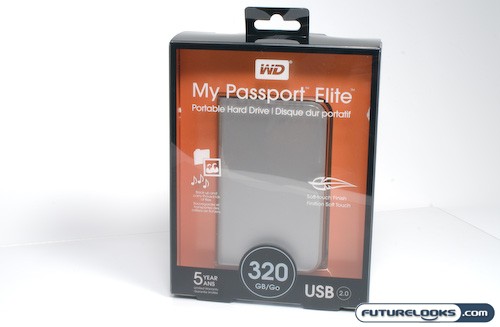
just incase you can't read that i'm using a passport elite. here is the picture to satisfy your doubts

wd_mypassport320gbelite-1.jpg


it says 5 years as well
smile.gif
 
This doesn't seem to work on my 1TB MyBook Essential. It's one of the newer models in which the enclosure snaps apart (no screws like in the instructions in post 1 of this thread: http://gbatemp.net/index.php?showtopic=153134). It's a SATA drive, but I think the standby is governed by the USB controller attached to it. Once connected to the PC by SATA, I was able to find the drive no problem, and also able to set the spindown to 251 (hdparm -S251 hdb), but the keep command wouldn't work (hdparm -K 1 hdb). I got the input/output error, which the instructions on the 1st page say it's okay to ignore. Unfortunately, after 20 minutes, my drive spins down every time w/ the Mario Kart test. The drive has no trouble spinning back up, but I've found a few games that won't allow the time it takes to do so, and just freeze instead. MPlayer also has issues with the drive... all my videos will stop playing at the 20 minute mark.

So, although I've recommended it in the past, I was wrong. If you want a totally reliable drive for your Wii, the WD MyBook is apparently not the way to go.

Any other suggestions? I'm about to try 'hdparm -S0 hdb', on the off-chance that my drive will keep that setting after power off, unlike the 251 setting. Wish me luck...

ps: I feel fortunate that I bought the drive for the computer before USB Loader was out... I don't feel like I've wasted any money. If the -S0 setting doesn't work, then I'll buy a Seagate FreeAgent Go in the next couple weeks, and have my whole TB back for my PC. Still, what a pain-in-the-ass process just to end up in failure.
 
Rev13 seems to have the spin down fix at least from my testing. I haven't experienced any more spin down problems and can see the HD being accessed during the Mario Kart test which used to only happen with Hermes' cIOS.

Try it out before you decide to buy a new HD.
 
Simmy said:
just incase you can't read that i'm using a passport elite. here is the picture to satisfy your doubts

wd_mypassport320gbelite-1.jpg


it says 5 years as well
smile.gif

Congratulations. You spent more than you needed on a "premium" drive for your Wii. You sure are smart.
 
hdhacker said:
Simmy said:
just incase you can't read that i'm using a passport elite. here is the picture to satisfy your doubts

wd_mypassport320gbelite-1.jpg


it says 5 years as well
smile.gif

Congratulations. You spent more than you needed on a "premium" drive for your Wii. You sure are smart.

Don't act like a child. Some people have different priorities then you and can afford to spend more for a premium product then the cheapest way possible. Its why Mercedes, BMW, Lexus are still in business. Just because you do everything at the lowest way possible, doesn't mean that if someone else doesn't, then they're idiots.

For reference, i use a old 400 gig IDE hard drive i found in my closet and a 5 dollar IDE->USB enclosure for my USB loading means. Just because my setup is low end, doesn't give me the right to tell other people how to spend their money.
 
Rev13 on my PAL 3.2E doesn't seem to have that spindownfix or the drive is defective but it works flawless on Windows.
I'll buy a new drive and must see it as an invest for the future.
I'm using (S)ATA to USB converter cables while waiting for my low end enclosure to arrive =)
 
neutronium said:
Rev13 seems to have the spin down fix at least from my testing. I haven't experienced any more spin down problems and can see the HD being accessed during the Mario Kart test which used to only happen with Hermes' cIOS.

Try it out before you decide to buy a new HD.

Thanks for this info! I'll go ahead and give rev 13 a go now, then. Much appreciated. I didn't think the fix was included, but then, Waninkoko's changelogs aren't always incredibly informative.

UPDATE: Worked like a charm! I can pause Mario Kart for hours, and the drive never spins down w/ rev13. The drive is being accessed almost constantly, actually. I can tell because there's a blue LED attached to the drive. When it flashes, the drive is being accessed; when it's solid, it's not. Then after exactly 20 minutes of solid blue, the light goes off and I can feel that the drive has stopped spinning (as it's removed from the enclosure). With rev13, the light keeps blinking while the game's paused, and it never spins down. Just left it for a solid hour and 30 minutes to go for a hike, and it was still running upon my return, and no 2 second freeze in Mario. Now I just need to test with a few other games (I'll try Wii Fit next, but I doubt that 10 minute test will work since my drive is locked at 20 minute spindown... is there a 20 minute workout?). I know that the new Vanillaware game (can't remember the name... it's in Japanese) locked up on me consistently though, as the levels are very long, with no hd loading for up to a solid 30 minutes, so I'll give that a go too. Thanks very much for the info neutronium.

UPDATE2: It seems that the drive is always being accessed whenever anything running off IOS249 is being run. I get the same behavior as Mario Kart while running USB Loader GX. I leave the Wii on the GX menu constantly, and the drive always spins down... until rev13. Now the light blinks all the time (YAY!). Unfortunately, that means my problem with MPlayer won't be fixed though, as it uses IOS202 for USB support. Hmmm... lemme give it a go. I'll give an update in a few moments.

UDPATE3: As I suspected, rev13 doesn't fix my MPlayer problems. It loads IOS202 when I select file/USB, and if the drive isn't being directly accessed for something, it just sits solid. I would think that the drive would be accessed fairly frequently when watching a video, but for whatever reason, it still goes into standby. Ah well.... at least I won't have spindown issues with games anymore! Good enough for me... I've got several dvd players that run xvids anyway (including one with USB), and 2 pcs, so it's not like I really need to use the Wii for videos anyway. Saved myself $100 for the time being
smile.gif
 
quepaso said:
Don't act like a child. Some people have different priorities then you and can afford to spend more for a premium product then the cheapest way possible. Its why Mercedes, BMW, Lexus are still in business. Just because you do everything at the lowest way possible, doesn't mean that if someone else doesn't, then they're idiots.

He's an idiot for recommending a drive with a KNOWN problem to other people. If he wants to waste his own money, that's his own business. If he tries to suggest that you ought to do the same, then that crosses the line.
 
I have a WD My Passport Essential 500 GB 2.5" (Model WD5000MES-00 4309A / R/N: B8B) I bought 1 year ago (May 2009). It was working flawlessly with 180 ISOs on it. At that time I had system menu 3.2U + USB Loader GX + Waninkoko cIOS (rev 10 or 13 I would say). Then the WBFS partition got messed up and I had to re-formatted it and load the ISOs back... again, all continue ok.

Then I've upgraded my sys menu to 4.2U + cIOS rev 17 and most of the ISOs stopped working. They start to load, and then get locked or black screen... Some ISOs still work, as for example Crash 2008, Speed Racer. But all the Lego ones stopped working (and those are the ones kids like most)

So in order to eliminate some variables, I got a SanDisk 16GB (cruzer mini) pen drive and loaded some ISOs on it:

* Lego Batman, Lego Star Wars and Lego Indiana Jones 2, My Syms - NTSC-U
* Go West - PAL

To my surprise, all games loaded fine with no errors. Game play was smooth and continues without any lock/black screen.

Then I've reformated my WD drive, created the WBFS partition and loaded the same ISOs I had on the pen drive. The results were:

* Lego Batman - Could see the initial screens before the main menu (warning/caution screen, advertisment screen). But before see the main menu, got the black screen of death.
* Go West - Could see the warning/caution screen, main menu and then locked. Another time I could reach the main menu and started playing, but then it locked.
* Lego Star Wars - Couldn't see the main menu screen at all.
* Lego Indiana Jones: The Original Adventures - I could reach the main menu, but when trying to load/create a game it locked.

So I was thinking if that could be spin down issues... it happens before 2, 3 minutes. And why did it worked fine almost 1 year ago? Are you aware of any change on sys menu 4.2, cIOS, USB Loader that could affect this? I don't think so.

I've done some tests already on the HDD like chkdsk, GParted check on linux and they didn't report any errors. Now I'm running HDDScan (freeware). Initial read test was fine with no error, and I'm doing what they call a butterfly read and it's still running. The HDD seams healhty (no weird sounds, clicks, etc) and I'm almost sure it doesn't have physycal issues.

Pen drive continues working fine with NO ERROR still. No locking, black screen, etc... for PAL, NTSC, all fine.

Could you guys recommend anything? About crack opening it and hook it to a SATA mobo straight I think I can't do that cause of my hardware revision (B8B) right? I think this one has the USB controller tied to the HDD in a way we can't remove it.

I'm looking forward any feedback... (my kidos too)

 
gpborges said:
I have a WD My Passport Essential 500 GB 2.5" (Model WD5000MES-00 4309A / R/N: B8B) I bought 1 year ago (May 2009). It was working flawlessly with 180 ISOs on it. At that time I had system menu 3.2U + USB Loader GX + Waninkoko cIOS (rev 10 or 13 I would say). Then the WBFS partition got messed up and I had to re-formatted it and load the ISOs back... again, all continue ok.

Then I've upgraded my sys menu to 4.2U + cIOS rev 17 and most of the ISOs stopped working. They start to load, and then get locked or black screen... Some ISOs still work, as for example Crash 2008, Speed Racer. But all the Lego ones stopped working (and those are the ones kids like most)

So in order to eliminate some variables, I got a SanDisk 16GB (cruzer mini) pen drive and loaded some ISOs on it:

* Lego Batman, Lego Star Wars and Lego Indiana Jones 2, My Syms - NTSC-U
* Go West - PAL

To my surprise, all games loaded fine with no errors. Game play was smooth and continues without any lock/black screen.

Then I've reformated my WD drive, created the WBFS partition and loaded the same ISOs I had on the pen drive. The results were:

* Lego Batman - Could see the initial screens before the main menu (warning/caution screen, advertisment screen). But before see the main menu, got the black screen of death.
* Go West - Could see the warning/caution screen, main menu and then locked. Another time I could reach the main menu and started playing, but then it locked.
* Lego Star Wars - Couldn't see the main menu screen at all.
* Lego Indiana Jones: The Original Adventures - I could reach the main menu, but when trying to load/create a game it locked.

So I was thinking if that could be spin down issues... it happens before 2, 3 minutes. And why did it worked fine almost 1 year ago? Are you aware of any change on sys menu 4.2, cIOS, USB Loader that could affect this? I don't think so.

I've done some tests already on the HDD like chkdsk, GParted check on linux and they didn't report any errors. Now I'm running HDDScan (freeware). Initial read test was fine with no error, and I'm doing what they call a butterfly read and it's still running. The HDD seams healhty (no weird sounds, clicks, etc) and I'm almost sure it doesn't have physycal issues.

Pen drive continues working fine with NO ERROR still. No locking, black screen, etc... for PAL, NTSC, all fine.

Could you guys recommend anything? About crack opening it and hook it to a SATA mobo straight I think I can't do that cause of my hardware revision (B8B) right? I think this one has the USB controller tied to the HDD in a way we can't remove it.

I'm looking forward any feedback... (my kidos too)

I have a WD My Passport Essential 500 GB 2.5 on fat32 wii menu 4.1, cfg loader ciosx rev19 and it runs all my games fine
 
Do you have it as FAT32 or formatted it as FAT32 and then excluded the partition and created the WBFS one? Would you think if I downgrade to 4.1 would be a chance to get the HDD back working as it was before on 3.2U? As I've mentioned, I had it working for 1 year on 3.2U and when I've upgraded to 4.2U I've started seeing these errors...I'm really pissed off with those...

Thx for your reply. ;-)
 
What loader are you using? What rev? You may want to try wiping out the loader's config files and let it start from the defaults.
 
I'm using USB Loader GX, cIOS rev 17. I've tried that already to clean up the config files but I will give it another try... And would you guys recommend to go to the latest rev19? My really concerns is because that HDD was working for 1 year with 180 ISOs on it when I had 3.2U. Then when upgraded to 4.2U, I've started seeing all these...
 

Site & Scene News

Popular threads in this forum