Hardware GBA Backlight! (AGB-001)

  • Thread starter Thread starter zazilu
  • Start date Start date
  • Views Views 684,446
  • Replies Replies 1,367
Welp, think I smoked this GBA board. Got things hooked up, had the washed-out screen. Connected those three points, got white screen. Fumbled and connected batteries backwards for a moment, can't get any life out of it. I am an idiot.


What is this "L+Select" Feature you speak of ?
b
 
I just noticed that gbaguan sells front lit screen. I think i'll wait Zerey Zhang or Rose colored gaming restock.
 
Its me again. I have a problem, my screen is like too wide(?). I have original AGS-101 screen from broken GBA SP and I have some kind of a rubber around the LCD display. Should I remove this? Or this thing (screen below) on the shell - I noticed that it makes contact with the screen but I'm not sure if removing it will help.

CAM00179.jpg
 
Its me again. I have a problem, my screen is like too wide(?). I have original AGS-101 screen from broken GBA SP and I have some kind of a rubber around the LCD display. Should I remove this? Or this thing (screen below) on the shell - I noticed that it makes contact with the screen but I'm not sure if removing it will help.

View attachment 9163
Yes, you must remove extra plastic border from shell. I've never done this, but I've seen several tutorials removing a plastic border in the bottom of the case. I can search a video for you later
 
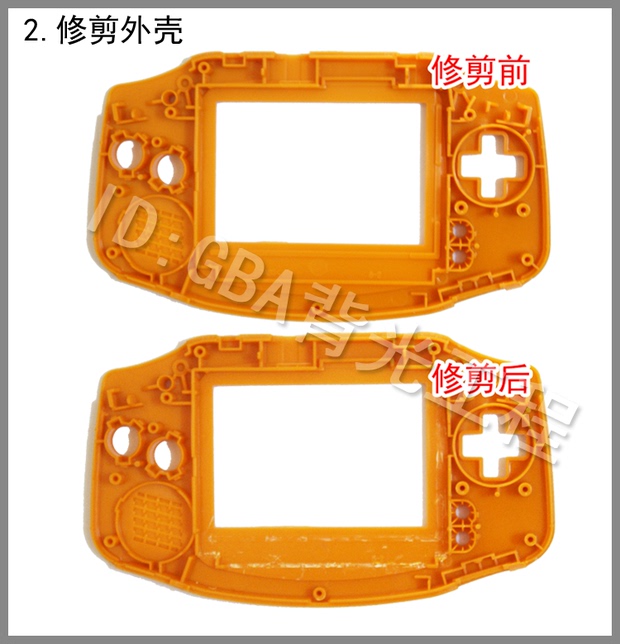
I removed both things and still something was not good. I made the hole on the left (on my screen 2 posts higher) a bit bigger so 2 soldered dots on the back of LCD screen wont be a problem now :)
 
I removed both things and still something was not good. I made the hole on the left (on my screen 2 posts higher) a bit bigger so 2 soldered dots on the back of LCD screen wont be a problem now :)
Here´s a before/after image:
T2UcIbXXXaXXXXXXXX_!!1639692061.png_620x10000.jpg
 
I know about this. I sent a picture of the second part of GBA shell. Anyway thanks for your effort. :)
 
Okay! Got another 40-pin GBA, wired the ground from the P1 on the cable. Still getting washed-out colors, but that's not a surprise.

Before I continue, could I get some confirmation as to where I'm sticking a wire to connect the REVC? Is it seriously the super-tiny hole in the square here? I may have to get some tinier wire if so.
https://dl.dropboxusercontent.com/u/9079966/2014-07-24 19.17.45.jpg
 
Okay! Got another 40-pin GBA, wired the ground from the P1 on the cable. Still getting washed-out colors, but that's not a surprise.

Before I continue, could I get some confirmation as to where I'm sticking a wire to connect the REVC? Is it seriously the super-tiny hole in the square here? I may have to get some tinier wire if so.
https://dl.dropboxusercontent.com/u/9079966/2014-07-24 19.17.45.jpg
Bahustard, I belive that this is the correct REVC test point (marked in yellow):
correct REVC.jpg
 
Its me again. I have a problem, my screen is like too wide(?). I have original AGS-101 screen from broken GBA SP and I have some kind of a rubber around the LCD display. Should I remove this? Or this thing (screen below) on the shell - I noticed that it makes contact with the screen but I'm not sure if removing it will help.


I've never seen a tutorial telling you to remove ANY plastic from the back of the case as ker suggested. Try removing all the rubber strips, install and position the display properly in the front case. Then it shouldn't interfere with the back of the case. In mine it makes no contact at all, as seen through the transparent plastic:
20140727_024434[1].jpg

It was centered well after installing the display pushed against these two edges
20140713_123629.jpg
 
Bahustard, I belive that this is the correct REVC test point (marked in yellow):
You are 100% correct, good sir. And I might also add that wiring that to ground does in fact solve my conundrum! Needed to doof with the potentiometer, but that's nothing. Things are in fact looking super great now, and the GBA has been assembled. Beyond my works, ye mighty, and despair, etc.
Camera's completely murdering any attempts to get a clean image, but you'll have to take my word for it that it's looking perfect when assembled. :D
2014-07-27 00.39.33.png
 
  • Like
Reactions: Simi
Hey guys, do you know where I can find a Crystal screen replacement?

I don't know if they are made of crystal, I just know I read they are better than the original.

If you have experience buying one can you provide me a link?
 
I've never seen a tutorial telling you to remove ANY plastic from the back of the case as ker suggested. Try removing all the rubber strips, install and position the display properly in the front case. Then it shouldn't interfere with the back of the case. In mine it makes no contact at all, as seen through the transparent plastic:View attachment 9263
It was centered well after installing the display pushed against these two edgesView attachment 9264
I was talking about front cover, not back. Surely my english is not good enough... sorry :-(
 
EpicPal try aliexpress and glass lenses available there 5pcs/lot 10USD/lot. Good quality, not overpriced.
If the picture in the auction says advance only don't worry, they photoshop logos out. Check previous pages for photos.
 
I'm willing to buy a screen kit from rosecoloredgaming when they'll restock. Is the soldering necessary? I'm not really good at it. Also, is there an alternative website where I can find backlit screen kits without the need of soldering a wire?
 
Think I may have a new problem here. while the display is bright and crisp and all that, it is having some weird ghosting issues. If, say, I am sitting on a menu screen for a while, then go to a dark screen, I see some afterimages. Was most notable when playing Final Fantasy V, where I stayed on the party menu for a few minutes while I took care of osmething, then hit B and the screen was in a dark cave; I could still see some status stuff at the bottom where it was black. It's super minor as an actual problem (in the case of FFV, it clears when I go into battle, as the screen flashes white), but do I need to fiddle with the potentiometer or jump another wire?

 
Hey everyone, im new here, first of all sry for my poor english, i just did the mod and i will show how it looks like.
140728084909736070.jpg


As you can see the screen is too bright and the colors are too white, i want more contrast.
Should i try the potentiometer? to fix this i have to move the potentiometer to the right or left? (clockwise or counterclockwise).
 

Site & Scene News

Popular threads in this forum