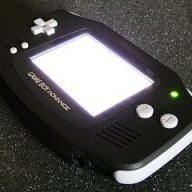
Hardware GBA Backlight! (AGB-001)

  • Thread starter Thread starter zazilu
  • Start date Start date
  • Views Views 684,699
  • Replies Replies 1,367
They also sell AGS-101 screens, and bundles of screens and cables, as well as some other bits and bobs, but I'm mostly interested in their cables.

Where did you see that he also sells AGS 101 screens? do you have a link please ?
 
I was just about to ask about one of their other listings (which showed a picture of a fully modded GBA) and ask if anyone knew whether that was indeed for a fully modded system, but that's disappeared as well.
 
Wanted to share my experiences with this mod! Sorry my thoughts are a little disorganized so I'll just stick to bullet points.

I feel it was worth it, I didn't want to use the knock off screens so I came upon a deal on a disgusting AGS-101 and a equally disgusting AGS-001 locally. I also bought replacement SP shell for the pair to re-sell on ebay.

I purchased this kit on eBay based on a post I saw on reddit: http://www.ebay.com/itm/181422667490?_trksid=p2059210.m2749.l2649&ssPageName=STRK:MEBIDX:IT

The seller was pretty responsive to my messages. Items also arrived much faster than I anticipated. I think it was something like a full week versus 2+ like I was thinking.

The kit seems pretty well thought out but there were no instructions or links to any instructions. I opted for the glacier shell, you can tell he cut up a knock off shell to comprise the kit. The screen adapter cable also seems of slightly lower quality, the power wire is 1 conductor and insulated. I just followed rosecoloredgaming's PDF and got real frustrated with the 3 part youtube video someone posted previously (sorry guy!).

Don't bother with the included tools. If you can find something locally or online that's higher quality do that right away. Breaking your only driver or stripping your screws is not worth the hassle.

Gutting the AGS-101 screen I couldn't really tell the authentic screen apart from the knock of screen in my hands other than a pad adhered to the back of the legit screen and undersized protective film on the knock off.

The authentic screen went in just fine, I kept the GBASP adhesive and rear pad intact. Be sure to line up visually so that you don't get a crooked screen.

Slightly OT but with the knock off 101 screen in the replacement SP shell I could definitely tell was lower quality control, very minor imperfection on the top right corner of the LCD and the display glass was scratched right out the box. I would caution buying a SP refurb and/or these third party shells; quality control is not the best. Worst part is when I re-sold both units I had to disclose the imperfections I saw; I don't see anyone else doing this. The prices I got for the refurbs was pretty paltry IE probably wasn't worth it in the end vs selling them disgusting as I got them.

Back to the GBA mod, I soldered the power cable in a serviceable way but will be going back to re-do my joints - I wasn't happy with my work and had just had a ton of caffeine. It's a lot harder to solder this than I anticipated. I use a middle of the road Hakko iron (ie not crap).

Also saw someone routed under the board rather than over and I think that's a better method to try when I re-do the joints. Taping my wire to the motherboard felt cheesy and doesn't inspire confidence.

When I buttoned everything up the fitment is very very tight; with the stock SP pad behind the LCD and the GBA foam which I also retained, I think it may flex the board a little. Any recommendation here would be helpful.

I adjusted the pot quite a bit but it looks way better after adjusting. I just eyeballed it until I didn't notice scanlines too far in either direction.

The supplied buttons don't feel right to me, I ended up swapping back in the original GBA buttons and contact pads and now it is much better.

The GBA kit came with two new protective screens, the glass one looks weird and the plastic one is garbage; bubble in it straight out of the box and got microswirls from wiping it just once. I ended up buying an equally crappy screen from a local shop for $5 and slapping a screen protector on that. It looks better but the shop admitted they scratch way easier than authentic screens.

At any rate, sorry for the long post and lack of pictures. Hope it helps someone!!

TL:DR - I am pretty happy with the result, I recommend try to use as many authentic parts as you can including the 101 screen. I wish I could get a pristine authentic glacier shell myself. The pictures make the soldering look easier than it really is IMO!

 
  • Like
Reactions: pelago
I have the same cable and i think my screen could be little brighter for playing outside. Could you link the post with solution how to that? I will make some switch or pot for adjusting brightness.
 
I have turn the pot to maximum. Before, the screen was a little dark.
But I did not do anything else.
After, I think some persons will prefer to have a screen brighter
But I'm not a fan of the screen too bright, as the dsi for example.

i prefer the screen of Ds lite for play the Ds game : )
 
I have a problem. I failed soldiering a bit and this little piece just came off... Do I need a new motherboard?

Bez tytułu.png


#edit
Also I have a 2nd motherboard that also doesn't have a little piece. R12 thing (above soldiering) came off in the 2nd motherboard.
 
I have turn the pot to maximum. Before, the screen was a little dark
Wow, hope it won't get you any problem with that much power circulating!
I have a problem. I failed soldiering a bit and this little piece just came off... Do I need a new motherboard?
View attachment 9617

#edit
Also I have a 2nd motherboard that also doesn't have a little piece. R12 thing (above soldiering) came off in the 2nd motherboard.
Short answer: it's higly probable. Long answer: I still don't know much about electronics and I don't know wether the gba can survive without a condenser or without a resistor, but I think you should buy a new one. Maybe if you're really really good at soldering you can repair them, but I would be sure and buy a new one if I were you
 
Can someone confirm this what Pagio94 said? I want to be 100% sure that those motherboards are garbage without resistor/condenser.
 
Can someone confirm this what Pagio94 said? I want to be 100% sure that those motherboards are garbage without resistor/condenser.

If you still have the capacitor, then solder it back.

Start with melting the solder on one side first, attach the cap to that end. The capacitor will probably be in an angle.

Next step is, put some light pressure from above with a tool (otherwise you'll burn your self) while quickly heating up both ends so that the cap is flat to the surface.
Just don't keep it hot for too long.
 
Unfortunately I don't have it anymore. :/

Hi, try using the C35 or C36 cap from the other motherboard (soldering skills required, use lots of flux - it's not conductive so you may even leave it after on the board, use needlenose pliers - these are quite indispensable). These two caps are propably same specs. It's usually the case in the circuit, especially when mounted near on the mo-bo. I couldn't find a circuit diagram to check. I think it's worth trying instead of buying new board right away. Good luck
 
Wow, hope it won't get you any problem with that much power circulating!

Short answer: it's higly probable. Long answer: I still don't know much about electronics and I don't know wether the gba can survive without a condenser or without a resistor, but I think you should buy a new one. Maybe if you're really really good at soldering you can repair them, but I would be sure and buy a new one if I were you

I never knew it could be dangerous: /
you think I should return it to its original position?
 
So, he took the screen from an AGS-101 backlit SP, and put it in an original GBA??? What a waste.


Waste? As someone who much prefers the look and feel in my hands of the original GBA over the GBA SP, I think this is amazing. I really wish they would have created an official backlit original GBA model.
 
Waste? As someone who much prefers the look and feel in my hands of the original GBA over the GBA SP, I think this is amazing. I really wish they would have created an official backlit original GBA model.


You're not the first to quote that post I made over 2 years ago and say that you prefer the original design. I personally favor the GBA-SP, but even so my problem with it at the time was the destruction of an original, working console just to improve another. It's not necessary to do that anymore, you can buy a kit with screen and it's easier than scavenging a screen from an AGS-101, so it's pretty much moot at this point.
 
Hmm. I have a ribbon cables (shown on picture below). On the left is a 32 pin ribbon cable with cable soldered. On the right I have a ribbon cable that is 32 pin into 40 pin from GBA. I connected this 2 cables (didn't soldier the cable to motherboard), screen and motherboard (1 with missing resistor and 1 with missing condenser). Screen didn't worked good in this combination. When I moved/touched/whatever I did, the screen was inverted, really fuzzy etc... Missing parts in motherboards can be the cause?

Click to enlarge.
CAM00209.jpg
 

Site & Scene News

Popular threads in this forum