Firefox 4 Beta launches

  • Thread starter Thread starter Thoob
  • Start date Start date
  • Views Views 18,922
  • Replies Replies 198
sorry, I couldn't find anything related to the layout in the about:config on the website's wiki (maybe it's possible, but not listed yet, though I doubt because the wiki is updated regularly)
check here for the about:config Wiki


on another note, I found this picture :
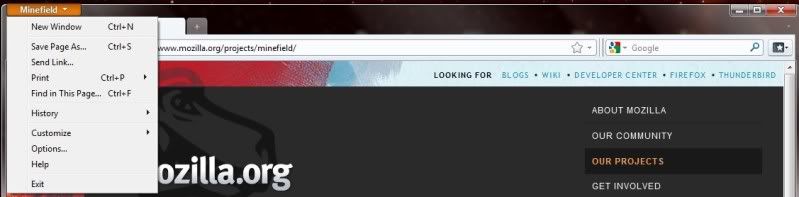
minefieldmenu.jpg


It's from Minefield (Firefox 3.7aXpre codename, which will become 4.0).
The title bar with the buttons seems to be present on an aero style.
So, it's maybe only a bug on the 4.0.beta1

The site says that the menu bar can appear temporarily by pressing ALT. did you try it to see if it made the minimize/max/close appear too ?

Did you try the 4.0.beta2 ? (I gave the link on the previous page) maybe that's why there was a new beta so quickly.
 
no problem, and sorry I couldn't help you more.
I hope this will be corrected for vista/7 users (if it's a bug, it will be corrected, but maybe it's not a bug)
 
Livin in a box said:
I've installed it, but whenever I open the shortcut from anywhere it opens normal Firefox (3.6.6)...How can I stop it?
Maybe there's another Firefox session running in the background, and running a new firefox open a new window from the current process.
- Check there's really no other firefox process first.

- Verify your link's path to the .exe

- Try running the exe from the real installation folder (not a link from the desktop)

- don't know if it can help, it's used to run another session of Firefox (for example a second profile) while one is already open. It prevent opening a window with the current firefox process and create a new one.
create a .bat in your FF installation folder
paste this :
Code:
set MOZ_NO_REMOTE=1
start firefox.exe

and run the .bat

If you have multi profile, you can run another one without closing the used one :
CODEset MOZ_NO_REMOTE=1
start firefox.exe -P profile_name_here
 
No I want this new one because it's noticeably faster, I'll mess around with my theme later and try and get it to work. F11 makes the screen smaller and then I can move it to make it maximise, but the buttons aren't there.
 
Livin in a box said:
No I want this new one because it's noticeably faster, I'll mess around with my theme later and try and get it to work. F11 makes the screen smaller and then I can move it to make it maximise, but the buttons aren't there.

I have that exact same issue
 
ifish said:
Livin in a box said:
No I want this new one because it's noticeably faster, I'll mess around with my theme later and try and get it to work. F11 makes the screen smaller and then I can move it to make it maximise, but the buttons aren't there.

I have that exact same issue

Uh...you do know that F11 is full screen mode, right? In full screen mode, by the way, the _ [] and X are to the right of the google search (on the same level).
 
I'm running the 64 bit version, is there anyway to get Java or Flash to work on it?
 
Vidboy10 said:
Mozilla loves ripping off other browsers now don't they?
You could really say that about any software company in existence, as they all utilize functionality or design that exist in other predated software.
 
Vidboy10 said:
Mozilla loves ripping off other browsers now don't they?

Everyone is freaking out about the new design saying it's such a huge chrome rip off. Who the fuck cares? It's the DEFAULT skin, you can (unlike chrome
tongue.gif
) install a new skin that looks completely unique.

QUOTE(D34DL1N3R @ Jun 30 2010, 08:33 PM) Opera 10.60 is faster than any version of Firefox or Chrome.

No offense but I don't think anyone cares about Opera in the least bit. Why? Because everyone who uses Opera are completely stuck up and think they're from the future. You eventually just put Opera on your "Don't give a shit" list.
 

Site & Scene News

Popular threads in this forum