EZ-FLASH IV

logo.png
A beginners guide on how to set up the EZ4
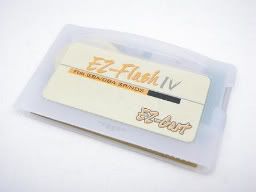
eziv_card.jpg

INTRODUCTION
The EZ-Flash IV is the last GBA flash cat that are still in production, but lucky for us it's also one of the best.
When I got mine a few months ago I could not find a tutorial anywhere, I had to search and email a few O.G. for help.
Many links to tutorial and/or guides was broken or are very old, so I hope a few people will find this guide helpful.


What you need:
  • EZ Flash IV
  • mini SD memory card
  • GBA/SP/MICRO

The EZ4 can only display about 78 roms per directory, but you can have multiple directory if you have a lot of roms. (Thanks FAST6191)
A 1GB mini SD can hold a good amount of roms, and is usually enough for most people.
I know some of you want to use a micro SD to mini SD adapter, but many people have had random detection issues which leads to crashes and other problems. So an adapter is not recommended


SET UP

1. Insert your mini SD to your computer

2. Download the latest kernel here, http://filetrip.net/f4753-EZ4-Client-2009-04-03.html
It will come with everything you need except the skinning tool

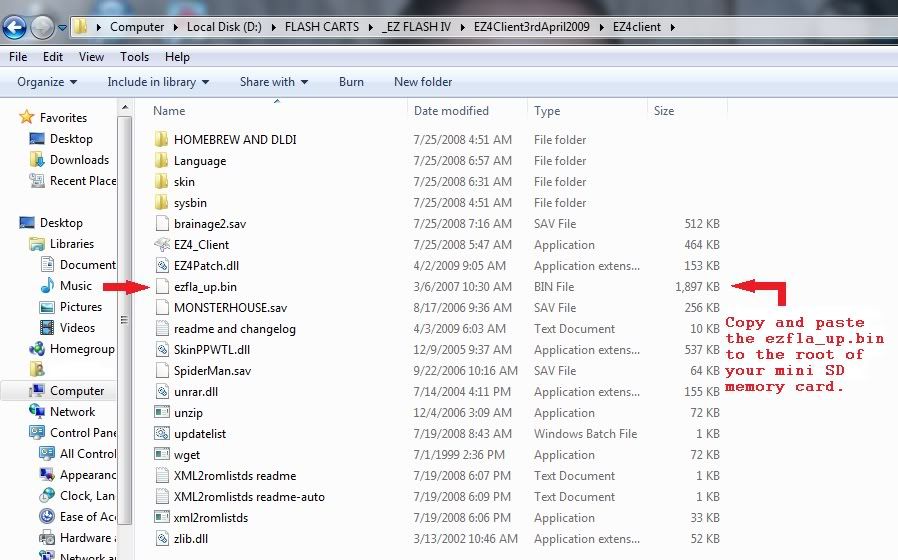
3. Extract the kernel to your computer. After it’s extracted or unzipped, open it and look for this file ezfla_up.bin. Once you find it copy and paste it into root of your mini SD.
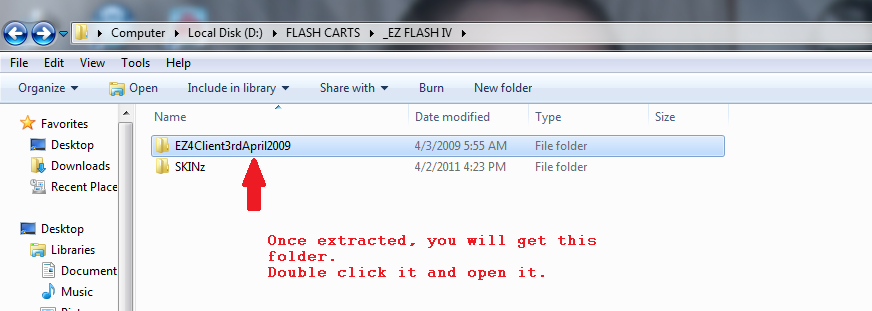
1.png


2.jpg


4. Now remove your mini SD and put it in the EZ4, than insert the EZ4 in your GBA.

5. Hold the [R] shoulder button and turn on your GBA.
DO NOT LET GO OF THE [R] BUTTON UNTIL THE UPDATE PROCESS HAS BEGUN. DO NOT TURN OFF YOUR GBA UNTIL THE UPDATE PROCESS REACHES 100%.
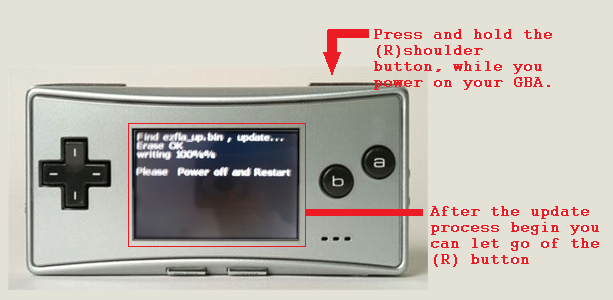
01.png


When it’s done turn off your GBA and remove your mini SD and reinsert it into your computer, go ahead and delete the ezfla_up.bin file from your mini SD memory card.

6. Go back to your kernel folder and look for the EZ Client. Double click it and the EZ Client will open.
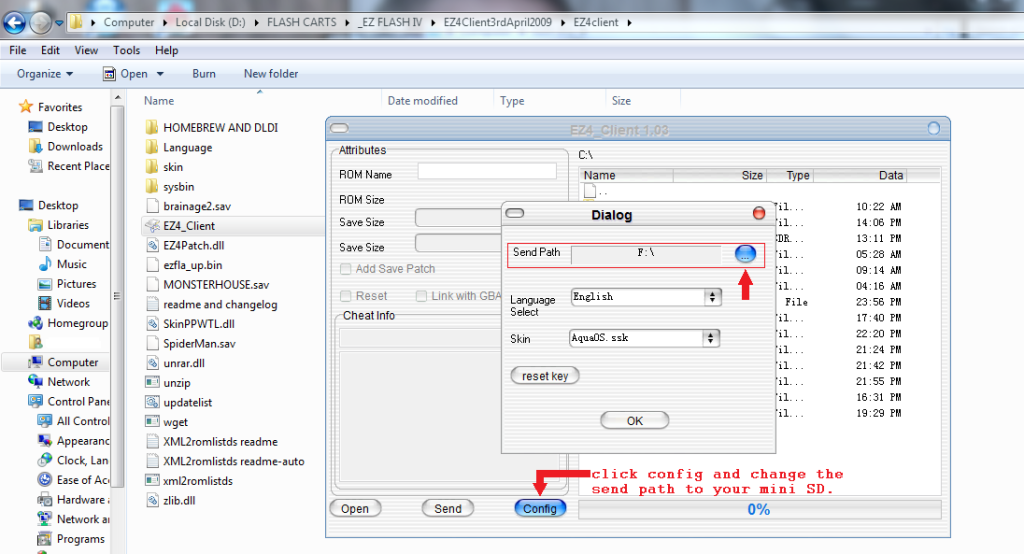
Next click 'Config', and change the "send path" to where your mini SD card is, for me it’s F: Drive.
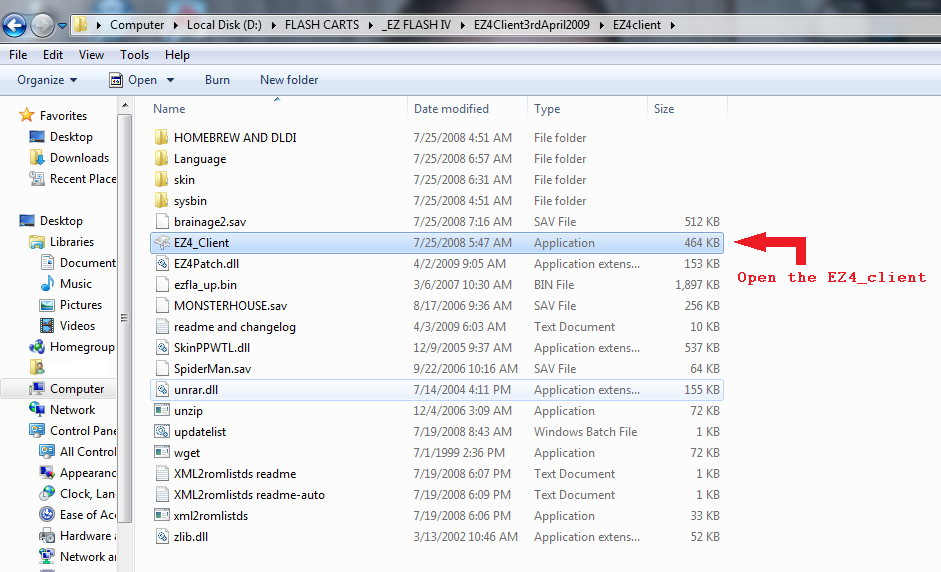
3.png


4.png


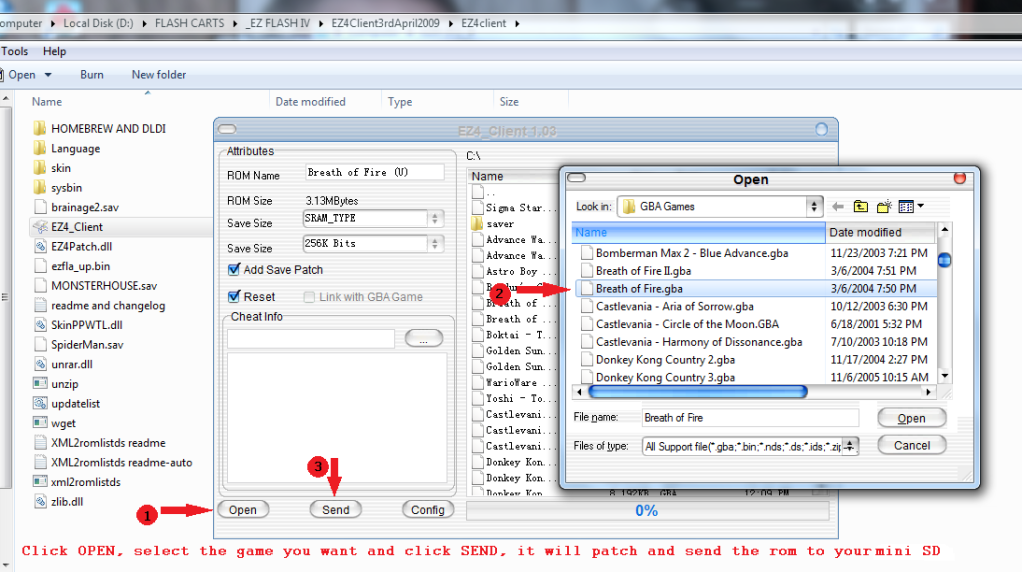
7. Each game needs to be patched before you can use it in the EZ4, to do this just click “open” and find your GBA roms. Select the rom you want, than press send. It will send the rom to your mini SD along with a “saver” folder.
Do not drag and drop, your game will not work properly if you do.

The EZ Client can patch more than one rom at a time, this way you don’t have to patch them one at a time.
5.png


8. Remove the mini SD card from your PC and insert it into your EZ4, insert the EZ4 into your GBA.
Power on the GBA. It will boot to the EZ4 menu. Select the game you want to play and enjoy.

[title:Playing NDS roms using the EZ4]
Yes the EZ4 can play DS rom, but the compatibility is horrible since this method of running DS rom is no longer used.
But if you have a passme laying around it's kinda fun to try it and have a little bit of fun with it.


Helpful tips

  • If everything is in Chinese you can change the language to English.
    To change to English just press down, down, down, than (A), (A), than down, than (A).

  • Some games are too big, when you select them you will get one of these message,
    “PSRAM is not enough”. In order to play these games you will need to load them to NOR memory.
    These games are 32MB (256mbit) in size. To play them just press select, than press (A) for yes and let it write to NOR.


  • If you hate the Darth Vader skin like I do, you can change it, the process is the same as when you first flashed the EZ4, just put the ezfla_up.bin in root and update it.
    No you do not need to erase anything, just put it in root, update and enjoy your new skin.
    Yes you can delete the ezfla_up.bin file after you’re done.
    Go here for some GBA skin http://www.sosuke.com/ezflash/viewforum.ph...75488d720cb643d

  • GBA Tool Advance (GBATA), this is a great little program every EZ4 user should have.
    GBATA is a gba rom tool with the functions below.
    1. Header Viewer
    2. Intro Remover
    3. Overdump Fixer
    4. fix header
    5. Intro Drawer
    6. IPS Patcher
    7. SRAM Patcher
    8. Rom Trimmer
    9. Reboot/Sleep mode
    10. Clock fix for Pokemon sapphire & ruby.

    Get it here: http://filetrip.net/file.php?id=223
If there is anything I missed or needs to be corrected please PM me.

Special thank to PharaohsVizier for his help and FAST6191, I forgot I PM you more than a few times about the EZ4.​
 
I ordered an EZFlash IV for my Game Boy Micro, eager to receive it!

You say it can see around 78 files per folder, are saves in the roms' folder or in their own separate folder? If they have their folder does this mean it can only access 78 saves at a time? Thanks I'm sorry if im not clear enough.

EDIT: Another question, say I flash a game in my NOR memory, can I boot it directly like on my EZFlash 3-in-1 or must I still boot the menu to access it?
 
FAST6191 said:
I do not query the times on a real cart as I have no knowledge there (although thinking about it there probably was a reason you set a real clock at the start of the game) but the patched games appeared quite different when I tested them out many years ago.
The time on the patched rom is different because the patched rom runs the clock alongside playtime while on the retail cart it runs in real-time.
 
Thanks for the answer, does this mean you can't have more than 78 saves because the system won't see the other ones (the same thing that happens when you have >78 games in the same folder)?

It's a bummer you can't boot to NOR with a keypress
frown.gif
(like say holding A+B when booting)
 
No it does not, however you can play GB\GBC games on your micro with Goomba Color:
http://www.dwedit.org/gba/goombacolor.php

basically it's a GB\GBC emulator for the GBA, you must pack roms in it though, you can't access a folder on your MiniSD. From experience with my EZFlash 3-in-1 on my DSL I can say it works quite well!
 
Olivil said:
Thanks for the answer, does this mean you can't have more than 78 saves because the system won't see the other ones (the same thing that happens when you have >78 games in the same folder)?

like I said all my save is in one folder, and I have about 100 game saves.
this is kinda weird, but I think it's a display problem only.
the last save my EZ4 displayed is wario, I can't see my yoshi save but yoshi work and save just fine.

EDIT:
I made a "saver" folder in each of my game folder, moved the saves into them, and it works. Plays and saves like normal.
So I guess you can have a saver folder in each of the game folder you have.
After more testing it didn't work, so that means all your saves has to be in one folder, the main saver folder.


QUOTE(Terminator02 @ May 17 2011, 08:05 PM) cool, thnx, and i lied, one more question

since emerald can't be patched for it's RTC, is it playable in any way?

as far as I know it should play just fine, you'll just miss out on some pokemon and/or items
 
Olivil said:
No it does not, however you can play GB\GBC games on your micro with Goomba Color:
http://www.dwedit.org/gba/goombacolor.php

basically it's a GB\GBC emulator for the GBA, you must pack roms in it though, you can't access a folder on your MiniSD. From experience with my EZFlash 3-in-1 on my DSL I can say it works quite well!
It's not as good as playing retail carts, though.
(I gotta ask: What's the point of using Goomba Color on the 3in1 when you can just use Lameboy?)
 
FAST6191 said:
I do not query the times on a real cart as I have no knowledge there (although thinking about it there probably was a reason you set a real clock at the start of the game) but the patched games appeared quite different when I tested them out many years ago.

well, it IS called a Real Time Clock
 
Pingouin7 said:
FAST6191 said:
I do not query the times on a real cart as I have no knowledge there (although thinking about it there probably was a reason you set a real clock at the start of the game) but the patched games appeared quite different when I tested them out many years ago.
The time on the patched rom is different because the patched rom runs the clock alongside playtime while on the retail cart it runs in real-time.

I was aware of this one but even then it seemed as though the RTC patchers had added in a time multiplier as it were.
 
FAST6191 said:
Pingouin7 said:
FAST6191 said:
I do not query the times on a real cart as I have no knowledge there (although thinking about it there probably was a reason you set a real clock at the start of the game) but the patched games appeared quite different when I tested them out many years ago.
The time on the patched rom is different because the patched rom runs the clock alongside playtime while on the retail cart it runs in real-time.

I was aware of this one but even then it seemed as though the RTC patchers had added in a time multiplier as it were.
It is possible they might do that to make up for the fact it only ran when the game was on.
 
Hey there, was wondering if you'd happen to know how to (step by step) play save files from Visual Boy Advance on the Ez-Flash iv? I can get the roms working fine but can't transfer my saves from VBA over. if you'd happen to know how it would be much appreciated. cheers.
 
Hello.
I have one question. Is there possilble to play games from Ez flash IV on Advance game port on Gamecube? I read somewhere that in nor memory, game is loading like from origanlly cardige. I put some game in nor but in advance game port there is black screen. Maybe have i change something in settings? Do i something wrong. Any guess.?
I tested advance gameport with orginally games and works fine.
Thanks and sorry for my bad english .
 
I recently got my ez flash iv and it's a great card.I have some questions though:

1)Can you change games without switching off GBA every time you want to quit a game and play another?
2)If you press select and then A to play a game in NOR,it says "erasing" and starts counting.Will that erase any of my games or my saved games?
3)Any good games with zombies?

Thank you!
 
1) Yeah it is called soft reset- EZ4client supposedly has the ability to add it and there are other programs like GBATA and BOMA but I do not use it and others have had issues in the past. I see why some people do not like switching their DS lite on an off a lot but the slide switches on the GBA and SP (not sure about GBM) are pretty robust.

2) I believe select deletes the last rom from the list (it has to be the last one because of the way NOR memory works). The savegame should remain though as long as it has been written back to the SD card.

3) For the GBA..... none that I can think of (I assume we are thinking the likes of zombies ate my neighbours (a megadrive/genesis game which now has several hacks to add/change levels) rather than castlevania having zombies within it) but that means very little and there could well be many I am not thinking of.
 
Hi. I just got my EZ4 and I have one issue. I can't change the language to english. What icon is it? The first post issue doesn't work for me.

EDIT: Okay I got it... there needs to be one more A press...
 
Hi RoMee, you seem to know the most about all of this out of everything ive seen so I have a question that I hope you dont mind answering. I followed your guide and I have patched and sent 2 hacked versions of Megaman Zero 3 to my SD card. Now I dont know if this is happening to the other game but one of them is having this issue. When im playing the game, after a certain amount of time has passed, my game will stop and a popup from the ezflash menu will say that it is creating a save file in the SAVER folder for this game. It keeps doing this and I dont know how to fix this. Any help is appreciated.
 

Site & Scene News

Popular threads in this forum