
"Dump Joi-Con BT" problem when installing Android

  • Thread starter Thread starter talicni67
  • Start date Start date
  • Views Views 11,080
  • Replies Replies 20

talicni67

Active Member
Newcomer
Joined
Aug 24, 2018
Messages
30
Reaction score
3
Trophies
0
Age
58
XP
202
Country
Serbia, Republic of
I wanted to install Android on my Switch but ran into a problem. Following the tutorial I got from @ChanseyIsTheBest, I need to dump the Joy-Con BT pairing information at the very beginning. However, when I click the "Dump Joy-Con BT" button in Hekate, I get this message:
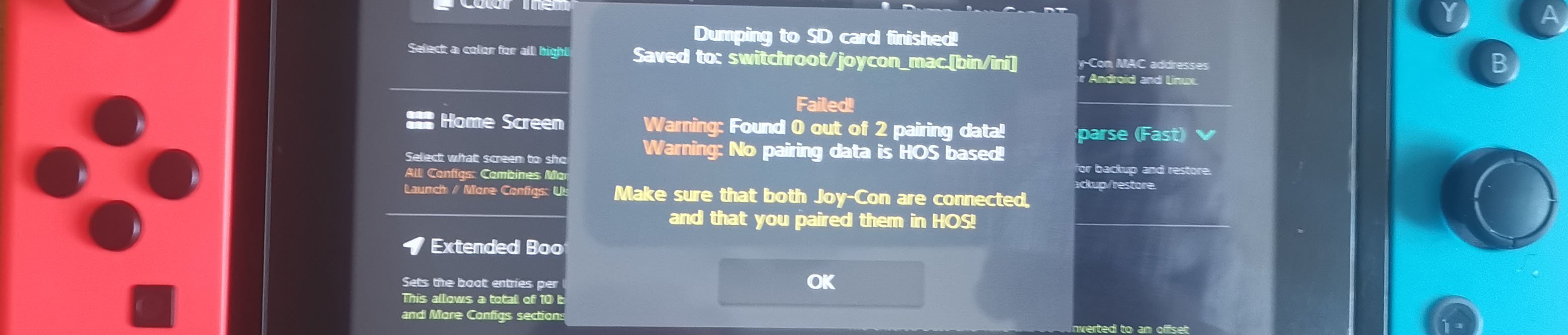
IMG_20240130_144703.jpg


Both joycons work normally when I use them while gaming. Can someone help me how to pair the joycons so I can install Android?
 
According to what I read in the article you sent me, the serial number on the console and in the console settings are the same. Also, the serial numbers of both joy con are the same. The left joy con is red and the right is light blue, as stated in the text. It looks like I won't be able to install Android on the console because I can't pair the joy cons. Thank you for your help.
 
According to what I read in the article you sent me, the serial number on the console and in the console settings are the same. Also, the serial numbers of both joy con are the same. The left joy con is red and the right is light blue, as stated in the text. It looks like I won't be able to install Android on the console because I can't pair the joy cons. Thank you for your help.
Skip the dumping Joycon setup, many times it works. Give it a shot
 
You can boot OFW select the corresponding option on hekate if you use it, or disable EmuNAND if you only use Atmosphère
I have Hekate 6.0.7 installed. I really thank you for your help, not only to you, but to everyone who helped, but I have no idea how to disable emuNAND. In Hekate I see Stock SysNAND, should I run it from there as you wrote in one of your post? I think I'm using Atmosphere, since there is a folder with that name in the root of the memory card. I have posted pictures of all the options in Hekate, so please guide me on what to do.

Let me add this, it can be useful. I bought a hacked console with a chip built into the console. That's what the man I bought from told me. It has Tinfoil installed.


IMG_20240131_160354.jpg


IMG_20240131_160420.jpg


IMG_20240131_160453.jpg


IMG_20240131_160511.jpg
 
Last edited by talicni67,
First you need to run stock, pair your Joy-cons and the use the hekate's NYX option to dump the database. And then installl Android

I booted Stock SysNAND, went to Controllers>Change Grip and Order>held the SYNC button on the red controller for a few seconds until the "Paired" message appeared. I did the same with the blue controller. I went to Hekate>Nyx Settings>Dump Joy-Con BT and again I get the message seen in the first image I posted :(

I also tried Controllers>Pair New Controllers, slide the right joy con, then the left and clicked Done. Repeated everything with Nyx settings and same message again.
 
Last edited by talicni67,
Disconnect your joycons to avoid confusion. If they work wirelessly while on stock firmware, nyx shouldn't have any issues with dumping the pairing. Yes, you can pair them within Android. I don't know if the pairing remains permanent that way, though...
 
  • Like
Reactions: impeeza
Probably yes. I installed Android and didn't dump the joy cons at all.
the "dump" of the joycons is about do not have to sync the joycons on Android and then on HOS and then again on Android and so on, because each time you sync on a OS the joycons forgot about the other, so if bot OSs share the sync database the joycons do not need to sync again.

something similar is implemented on Atmosphère whit a "virtual" database on files on the SD so all EmuNANDs and the SysNAND share the same Bluetooth database.
 
soo..no solution to this? I'm using Ubuntu noble and facing the same problem..and I don't want to re-pair my cons after jumping back to atmos.
 

Site & Scene News

Popular threads in this forum