Hacking Dump/extract MTCard Emunand?

  • Thread starter Thread starter DSoryu
  • Start date Start date
  • Views Views 1,830
  • Replies Replies 6

DSoryu

GBA/NDS Maniac
Member
Joined
May 5, 2010
Messages
2,522
Reaction score
3,285
Trophies
2
Location
In my house
XP
5,846
Country
Mexico
I need to extract the emuNAND partition in order to decrypt it and extract my title.db to restore my eShop content on the sysnand, but the emuNAND tool doesn't recognize my card.

It is on 9.4 BTW, and my sysnand is on 4.2, I already have my NAND xorpad.

 
*ticket.db
or, maybe both.
maybe renaming your sd card to GATEWAYNAND will work. that windows tool is not perfect at detecting the sd card
 

Attachments

  • error.png
    error.png
    58.8 KB · Views: 263
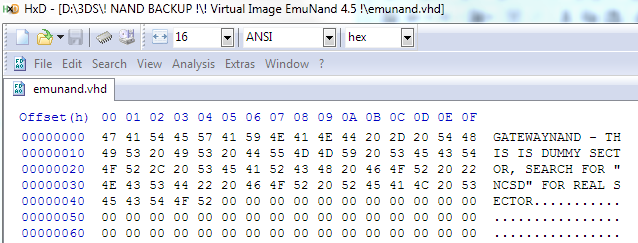
The only workaround i can see, is to use winimage creating vhd from sd card.

vhd2nzvl.png


emuNAND starts @ Offset 3BA00000
 
you can use emuNAND tool and follow these steps to be able to read it​
You need HXD for this...
Step 1: Insert SD
Step 2: Open HxD as Administrator
Step 3: In the Extras tab on the top click open disk.
Step 4: Uncheck the read-only checkmark and select Removable disc # (DO NOT SELECT THE NAMED SD CARD UNDER LOGICAL DISCS!!)
Step 5: on the right of hxd the text should say MTCARD_NAND
Step 6: put your writing cursor in front of that and type "GATEWAY"

IT SHOULD NOW SAY GATEWAYNAND

Step 7: SAVE
Step 8: exit HxD and use emunand tool for whatever you wanted it for


once you're done you should undo what you use hxd again and rename the "GATEWAYNAND" to "MTCARD_NAND" and save that​
 
  • Like
Reactions: DSoryu and liomajor
you can use emuNAND tool and follow these steps to be able to read it​
You need HXD for this...​
Step 1: Insert SD​
Step 2: Open HxD as Administrator​
Step 3: In the Extras tab on the top click open disk.​
Step 4: Uncheck the read-only checkmark and select Removable disc # (DO NOT SELECT THE NAMED SD CARD UNDER LOGICAL DISCS!!)​
Step 5: on the right of hxd the text should say MTCARD_NAND​
Step 6: put your writing cursor in front of that and type "GATEWAY"​
IT SHOULD NOW SAY GATEWAYNAND​
Step 7: SAVE​
Step 8: exit HxD and use emunand tool for whatever you wanted it for​
once you're done you should undo what you use hxd again and rename the "GATEWAYNAND" to "MTCARD_NAND" and save that​

munand =).png


You're the boss, thankyou so much!!! :yaynds:
 

Site & Scene News

Popular threads in this forum