ROM Hack Dragon Quest IX - Save Editor

  • Thread starter Thread starter Chaotik
  • Start date Start date
  • Views Views 343,001
  • Replies Replies 467
  • Likes Likes 4
Ok well I got a couple things figured you but not much.
Yes it works fine with U saves, I've JUST finished tweaking mine so I'd be happily less lame looking.
Now keep in mind I don't know any Japanese. I was just playing the guessing game and figured a bit out.
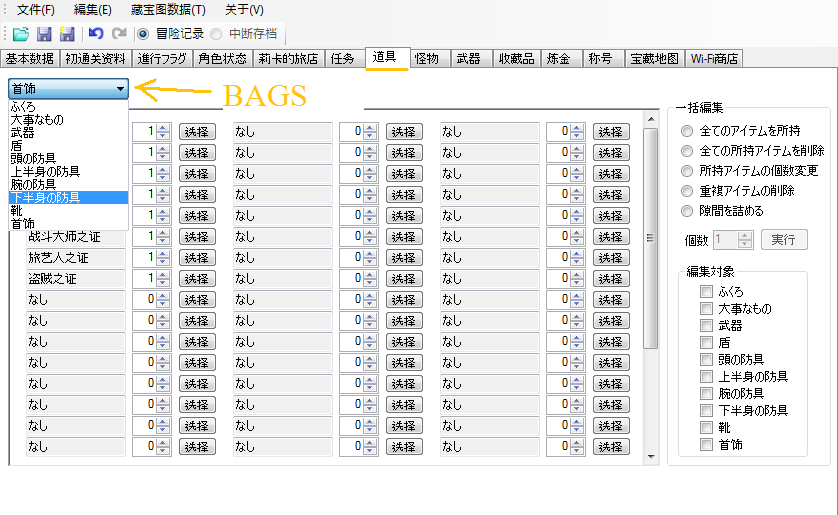
bags.png

More details as to what tabs are what. I don't know what the 2nd one is still though.
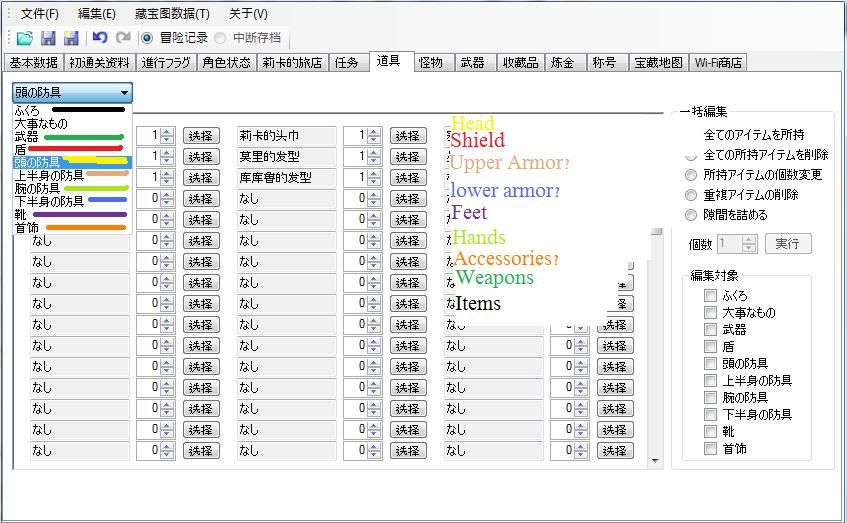
bagsnames.jpg
The bags for different are all on different slots of the box I have extended, I can tell you that much. I assume it also goes in order, but as I can't read.......
Also it goes left to right, when you are adding items, not down like I did. I realized after I loaded up.
Be careful with the items you generate. I got a few debug items, and I edited them out in case I messed something up.
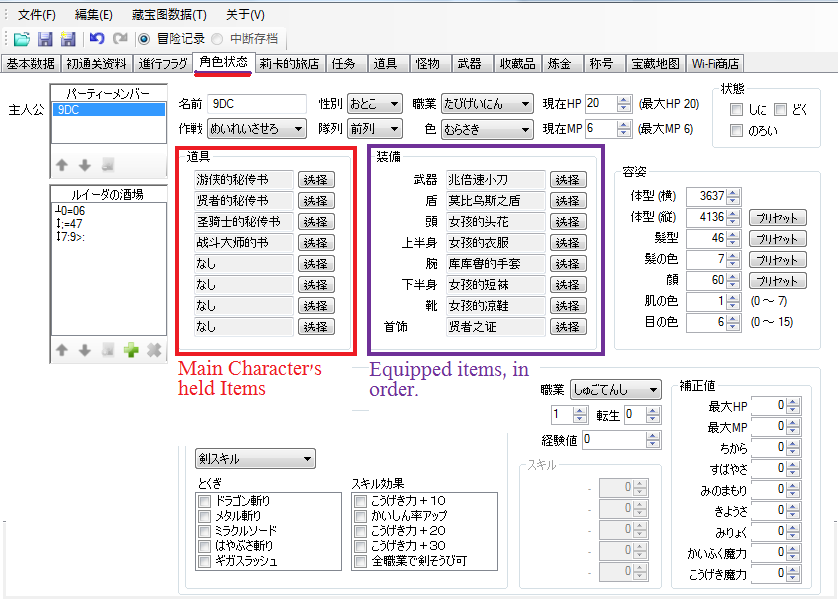
equippedstuff.png

These are the currently equipped armors/weapons/accessories and currently held items, like I'm assuming the ones you can use in battle and stuff.

That's all I got for now, all I know is that I got myself some decent looking armor that I'll use for a little bit and sell when I get a bit farther in the game.
I just wanted to not have the icky noob clothes.
OH!
And you can cross dress with this. If you use the editor to equip a female item(on males) or a weapon/armor you aren't allowed to equip because skill level or job you can use it just fine, as far as I can tell. (I accidentally put on a hooker dress)

EDIT-I came back and proofread, as well as I posted a shot of what the tabs in that box actually are.

Also, if you want to know what items are go the the site xmedia posted. the ID's are in the 3rd column. So if you want something you can use the kanji in the 3rd column and just copy paste it. The item boxes have a convenient search bar. I can confirm that method for working. I used it to finish getting a black/purple outfit with that site.

 
Onyxflamegod said:
ok well i got a couple things figured you but not much.
and yes it works fine with U saves, i've JUST finished tweaking mine so i'd be happily less lame looking. (aquila armor ftw, i think it was last on the list if anyone cares. somewhere toward teh bottom)
now keep in mind i dont know any japanese. i was just playing the guessing game and figured a bit out.

bags.png

the bags for different are all on different slots of the box i have extended, i can tell you that much. i assume it also goes in order, but as i can't read.......
also it goes left to right, when you are adding items, not down like i did. i realized after i loaded up.
careful with the items you use. i got a few debug items, and i edited them out in case i messed something up.

equippedstuff.png

these are the currently equipped armors/weapons/accessories and currently held items, like i'm assuming the ones you can use in battle and stuff.

that's all i got for now, all i know is that i got myself some decent looking armor that i'll use for a little bit and sell when i get a bit farther in the game.
i just wanted to not have the icky noob clothes.
OH!
and you can crossdress with this. if you use the editor to equip a female item(on males) or a weapon you arent allowed to equip yet for skill level or whatever you can use it just fine, as far as i can tell. (i accidentally put on a hooker dress)

yes i know i butchered my english/punctuation, etc. but i havent slept in a few days and i dont care right now. i may come back and proofread it later.......
Any clue on which field is used for gold?
 
Meh, I didn't play the game and don't have the sav file.... Anyone give me one please. I want to check the tabs. I don't understand Japanese seriously but this version seems to be modified before for more Chinese words lol. I'm Chinese so I understand them but some still Japanese so maybe not understand.. Anyway, sav file please
frown.gif
 
9se2.jpg


I understand a bit of the text from knowing Chinese, and the screen shows what I managed to decipher for the Inn.

To use, you need to click on the green + sign. Enter a name, pick a class from the dropdown menu, and pick a level. Edit other fields if you want. I find editing the appearance/equipment fields to be helpful if you don't want a series of clones in the inn. You need 30 people to rank the inn up to 6, which is when the basement spring becomes open. I've no idea about the treasure map fields, hopefully someone can clarify. Typing in English in the name field will net you strange characters for the visitor names in the game itself, but that doesn't seem to affect anything other than looks, so that shouldn't be a problem. Also, you need to set up a profile and canvass at least once before Erinn recognizes that you've gotten visitors, I think.
 
@dan30815 Its the one on the first tab, just play the game and look at how much money you have then open the program and find the value.
 
CookiesMilk
For posting your images, try this:

Code:
[spoiler][img]http://img189.imageshack.us/i/7122010101438am.jpg[/img][/spoiler]
[spoiler][img]http://img571.imageshack.us/i/7122010102340am.jpg[/img][/spoiler]
 
Is there any way to change your characters names cause I gave all my characters horrible names
 
If I knew how to disassemble the program to fiddle and translate it, I gladly would. Does anyone have any guides or resources where I can learn how to go about it? I've been hex editing the save file, and I've found pretty much everything, but the the checksum has me absolutely baffled. So I'm resorting to this editor, and I'm willing to dedicate time to translate.
 
Samboskull said:
If I knew how to disassemble the program to fiddle and translate it, I gladly would. Does anyone have any guides or resources where I can learn how to go about it? I've been hex editing the save file, and I've found pretty much everything, but the the checksum has me absolutely baffled. So I'm resorting to this editor, and I'm willing to dedicate time to translate.
You can find most of the information you need to 'translate' the app in the fullsize version of my first screenshot here (You just need to 'read' it):
( Click here for image )
Open it up in a HEX editor that supports UTF8** encoding (I use 010 Editor) and switch to UTF8 if needed.
Type/Paste the Chinese/Japanese text you're looking for into the Find box (typically ctrl+F).
Edit as needed, keeping in mind that after every character you'll need a '00'.

** Normally I think you'd want to use Unicode encoding for this, but the info wasn't displaying properly for me with Unicode.


There's just one problem... Unless you know how to PROPERLY edit an application in this way (which I don't), you'll end up with some lines/words that are squished to fit like one of the lines should say 'Remove Intermission', but there's only enough room for 'RmvItrmsn'.
( Click here for image )
While working on another app 'translation', I found a little trick where you can remove spaces (20 00) that are left on some short lines and add them to other lines.
Unfortunately, it doesn't seem to work with this app.
 
twiztidsinz said:
Samboskull said:
If I knew how to disassemble the program to fiddle and translate it, I gladly would. Does anyone have any guides or resources where I can learn how to go about it? I've been hex editing the save file, and I've found pretty much everything, but the the checksum has me absolutely baffled. So I'm resorting to this editor, and I'm willing to dedicate time to translate.
You can find most of the information you need to 'translate' the app in the fullsize version of my first screenshot here (You just need to 'read' it):
( Click here for image )
Open it up in a HEX editor that supports UTF8** encoding (I use 010 Editor) and switch to UTF8 if needed.
Type/Paste the Chinese/Japanese text you're looking for into the Find box (typically ctrl+F).
Edit as needed, keeping in mind that after every character you'll need a '00'.

** Normally I think you'd want to use Unicode encoding for this, but the info wasn't displaying properly for me with Unicode.


There's just one problem... Unless you know how to PROPERLY edit an application in this way (which I don't), you'll end up with some lines/words that are squished to fit like one of the lines should say 'Remove Intermission', but there's only enough room for 'RmvItrmsn'.
( Click here for image )
While working on another app 'translation', I found a little trick where you can remove spaces (20 00) that are left on some short lines and add them to other lines.
Unfortunately, it doesn't seem to work with this app.

While editing the executable with a HEX editor would work, it would be 10x easier to work with the source code. I for one would be up for editing the source code if someone would do the translation for me. Sadly, I doubt we would be able to get our hands on the source code, so I guess HEX editing is all we got.

Random: Is PokeSav translated using HEX editing? If so that explains why it takes so long for translated releases to come out.
 
thank you twiztidsinz

I got this far in an hour

93741117.jpg


I would like to know how to put a space between two words like save as?


im gonna work on it more later
 
moonmike said:
thank you twiztidsinz

I got this far in an hour

http://img534.imageshack.us/img534/7708/93741117.jpg

I would like to know how to put a space between two words like save as?


im gonna work on it more later
Nice job... but you're running into the problems that I had as well. And I have no clue how to over come them
frown.gif


For the "save as" thing, are you talking about in the file menu?
If so, just using a space should work... the hex values for that is "20 00" (20 being the space character, 00 for the 'terminator' character when using ASCII characters in Unicode).
so "Save As" would be "53 00 61 00 76 00 65 00 20 00 41 00 73 00"


Also, for the birthdate:
?- Year
?- Month
?- Day
That's about all the Japanese I can read
tongue.gif


QUOTE(sired22 @ Jul 13 2010, 04:27 PM) or seeing as reflector for .net opens it you could just you know edit the source
That's not always a good idea...
People tend to get mad when you reverse-engineer their work, especially without asking for permission.
 
sired22 said:
or seeing as reflector for .net opens it you could just you know edit the source

I believe we would be doing that if we had access to the source code. We do not, so people are doing their best with the tools available.
 
twiztidsinz said:
sired22 said:
or seeing as reflector for .net opens it you could just you know edit the source
That's not always a good idea...
People tend to get mad when you reverse-engineer their work, especially without asking for permission.

Huh i thought that was called learning... you know you look at how they did it so you can do it yourself in a different or better way.
 
sired22 said:
twiztidsinz said:
sired22 said:
or seeing as reflector for .net opens it you could just you know edit the source
That's not always a good idea...
People tend to get mad when you reverse-engineer their work, especially without asking for permission.

Huh i thought that was called learning... you know you look at how they did it so you can do it yourself in a different or better way.
... Are you new to being a programmer? Heck, this has nothing to do with being a programmer. Its about respect. When it comes to homebrew/indie development, it is disrespectful to rip apart someone's code without permission. They put a lot of work into that app and, while you might think its innocent, they can take it as stealing their work.
 
sired22 said:
twiztidsinz said:
sired22 said:
or seeing as reflector for .net opens it you could just you know edit the source
That's not always a good idea...
People tend to get mad when you reverse-engineer their work, especially without asking for permission.

Huh i thought that was called learning... you know you look at how they did it so you can do it yourself in a different or better way.
No... that's called STEALING.
 

Site & Scene News

Popular threads in this forum