Hacking Dios Mios Lite

  • Thread starter Thread starter G0dLiKe
  • Start date Start date
  • Views Views 937,259
  • Replies Replies 4,287
  • Likes Likes 18
Status
Not open for further replies.
I understand completely, and I see the potential of dml.
But for people that have multidisc lying around allready, the option to be able to play them through dml is a big plus imho, just like retail disc support is.
This way dml "adds" something to the whole gc game loading spectrum, instead of being something completely else.
When DIOS MIOS is released, i will not be looking back on DML nor discs anymore either, do you see where I'm standing here?
By the way, I'm using both metods to load my Gamecube "fix". I have some on my sd card, and when i want to play something else I'll pop in a multigamedisc, instead of ripping converting them. Anyway I have 100+ GC retail games (yes...I know ) so I've had my share of gamecube in the past. Still dml feels like a treat!

I don't reject your logic. Everyone has different setups that they like so having options, whenever possible, is always a good thing.


Don't forget one can have more than one 32GB SD card, so you can always switch cards as if you're switching disks, without needing a multi disk option!
True enough. I don't have enough additional games that I care to have that handy, but that is definitely a great option. I would hold off on buying any additional SD cards, since USB loading is on the horizon.
 
https://code.google..../downloads/list

1.4 (2012-05-07):
  • Fixed a bug which broke loader patching (fixes games that load .dols. Zelda:CE, ...)
  • When neither a boot.bin nor a config is found in RAM, DML now boots the inserted disc instead
  • Fixed a bug which would ignore the set config in RAM (fixes that loaders couldn't overwrite the default config)
 
  • Like
Reactions: 2 people
Thanks! Keep the good job!
In future, can we use the ".iso" without convert? It will be possible?

32GB is a limitation of Wii hardware?
 
can anyone with a incompatible sd card can check if the new version work with it ?

theres a new revision btw so thats 2 updates in one day

i tried the new version with my sd card its a no go but i have loading apploader now before it was just a blank screen with gcloader on screen
 
I think I'll donate for having classic controller support to DM(L).Because crediar isn't interested to it yet.
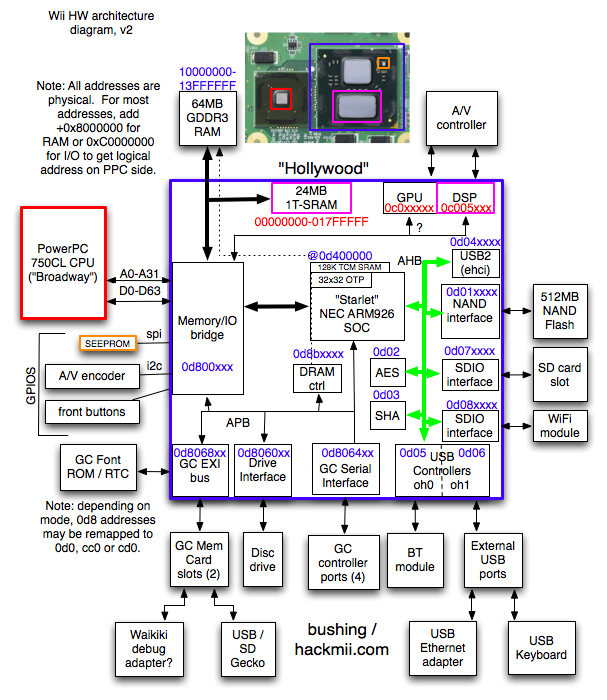
Here's an overview of the Wii hardware architecture:

wii_hw_diagram_v2.png
What keeps me hopeful is that Bluetooth (the BT module in the diagram) is connected to USB so having USB working makes it a little bit more possible. I'm sure it will still come down to space issues if it can be fit in, too, but I'm hopeful.
Thanks! Keep the good job!
In future, can we use the ".iso" without convert? It will be possible?
I've heard that works. I've never heard officially how to go about it, though. Maybe try just renaming it and putting it in the right folder (/games/GameID/game.iso).
32GB is a limitation of Wii hardware?
I know 32gb is where they stop being SDHC cards and start being SDXC cards. I have the suspicion that the only real difference is that SDXC cards are TRADITIONALLY formatted with exFAT instead of FAT32. If that's true it would just be a matter of reformatting them in FAT32. The only problem is no one on these forums seems to have one of those cards and is willing to do the test.
The test would be pretty simple, though. Just format it in FAT32, stick it in the Wii. If it see's it, BINGO, it works and then (the most important step) report back to GBATemp what the results are!!!
 
can anyone with a incompatible sd card can check if the new version work with it ?

theres a new revision btw so thats 2 updates in one day

i tried the new version with my sd card its a no go but i have loading apploader now before it was just a blank screen with gcloader on screen


I just tired out 1.4

It works fine with my sandisk ultra class 10 32GB shdc card.

It does not work with my old transcent class 6 8gb micro sd card. * This card stopped working with DML 1.0 It works perfect with R59
Anything above R59 and it just hangs on the GC loader screen or it boots the game and then it gives an error message " please turn off device and refer to gamecube manual "
9 times out of 10 though it hangs on the loader screen

EDIT : Just noticed that there is now a diosmioslitesv1.4b.wad out now on the official google page. I will try that one later with my old card as well and see what happens.
 
Just some clarifying side notes, things that I came across while catch-up reading on the thread:

Multi-disk games (e.g. 1 game, 2 disks).
Swiss tackles this by naming the two disks something like gamename-disk1.iso and gamename-disk2.iso. If you have a disk in the drive you just eject it and put it back in and it starts reading from the second game image instead. I have noticed that with the multi-disk games I have have, the GameID for disk 2 is the same as disk 1 with an extra, seventh digit added on. Maybe something could be done with that.

Mult-iso disks (e.g. one disk, several games)
Since at the time there wasn't an easier option, when I started out with DML I ripped, separated and individually compressed all my multi-iso disks to put them on my SD card. Now, fortunately for those who haven't wasted all that time already, a lot of loader will do that themselves. You just put the disk in and install it and it separates it into several separate DML entries on the SD or USB drive already correctly formatted for use with DML.

32gb SD cards
I, personally, am going to still go buy myself a 32gb SD card for my Wii. The extra space is always useful and some loaders can show all your games on all your storage (be it multiple USB partitions or and SD card, SD gecko, etc.) on the screen at the same time. I'm running out of space on my hard drive by all means and a bigger one to REPLACE it (since I haven't had too much success plugging multiple HD's into the Wii at the same time.) ends up costing me more.

https://code.google..../downloads/list
1.4 (2012-05-07):
  • Fixed a bug which broke loader patching (fixes games that load .dols. Zelda:CE, ...)
  • When neither a boot.bin nor a config is found in RAM, DML now boots the inserted disc instead
  • Fixed a bug which would ignore the set config in RAM (fixes that loaders couldn't overwrite the default config)
This sounds promising as something that will actually let me load from the disk channel again.
 
EDIT : Just noticed that there is now a diosmioslitesv1.4b.wad out now on the official google page. I will try that one later with my old card as well and see what happens.
Wait, there were no new changelog entries between when I downloaded 1.4 to when I got 1.4b. What exactly's the difference?

Never mind. I was looking at the wrong change log.
 
Thanks! Keep the good job!
In future, can we use the ".iso" without convert? It will be possible?

32GB is a limitation of Wii hardware?

32GB is a Windows limitation (and possibly a Wii software limit). The only reason SDXC exists is because Windows XP and higher refuse to format partitions larger than 32GB as FAT32 so they came out with SDXC which uses exFAT (FAT64). In theory, if you use a third party tool like fat32format/guiformat to format a 64GB SDXC card as FAT32 it will work. That being said, some devices have an artificial 32GB limit coded in them which means you might need to patch the Wii system menu and IOSes for it to work. As an example, quite a few Android phones work fine with a 64GB micro-sdxc card as long as you format it correctly.
 
As an example, quite a few Android phones work fine with a 64GB micro-sdxc card as long as you format it correctly.
NICE.
If the artificial 32gb limit were accidentally included in DML, that could easily be removed (I would assume it wouldn't even have it) that would just leave it to the Wii hardware but since it originally didn't even know what to do with anything over 2gb and that wasn't hardwired into it I would assume there wouldn't be any problem.

. . . MUST . . . GET . . . SOMEONE . . . TO . . . CONFIIIIRRMMM . . .
 
EDIT : Just noticed that there is now a diosmioslitesv1.4b.wad out now on the official google page. I will try that one later with my old card as well and see what happens.
Wait, there were no new changelog entries between when I downloaded 1.4 to when I got 1.4b. What exactly's the difference?
Have a another look, it's been updated...
Changelog:

1.4b (2012-05-07):
Fixed a bug that GCLoader wouldn't flush the
changes to SRAM
 
i will check the new version with my 32 gb sd card as sson as windows finishes repairing the system file error (was playing super mario strikers and all of a sudden cfg loader refuses to load and windows is saying that theres corrupted file thank god all my gc game are also on my usb hdd)
 
My SD Kingston Class 4 suffers from instant corruption after trying to force a game in NeoGamma. The same would occur with a HDD? I don't want to lose my 88 Wii games, my 86 GC games and information.
 
My SD Kingston Class 4 suffers from instant corruption after trying to force a game in NeoGamma. The same would occur with a HDD? I don't want to lose my 88 Wii games, my 86 GC games and information.

that happened to me but with cfg usb loader mod after playing super mario strikers nearly every file on my card were corrupted
 
i have been testing disc channel launching with dml 1.4 and i got 2 results
Smash Melee boot just like booting from a loader
Killer 7 looks like booting but then i got a "no signal" from my tv, however i can reset the console with the key combo on the gc controller
if i boot Killer 7 with a loader everything goes fine and even can force 480p with loader gx

i'm gonna test 1.4b now

edit: same result on Killer 7 with 1.4b
 
i have been testing disc channel launching with dml 1.4 and i got 2 results
Smash Melee boot just like booting from a loader
Killer 7 looks like booting but then i got a "no signal" from my tv, however i can reset the console with the key combo on the gc controller
if i boot Killer 7 with a loader everything goes fine and even can force 480p with loader gx

i'm gonna test 1.4b now

edit: same result on Killer 7 with 1.4b
For me the disk channel has never been very good about imported games (PAL on a NTSC system in my case) if the games asks to go to PAL, the wii just cuts off the signal. In my case that's a black screen, (so black, in fact, that you couldn't tell the TV's on unless you change the channel or turn the volume up or down and see the letters at the bottom of the screen.) Either of those games from another region?
 
Status
Not open for further replies.

Site & Scene News

Popular threads in this forum