Homebrew Custom Theme Thread

This is nice! good job!:yaynds:

Thanks! I'm really happy about how it turned out :)

Can somone link me a guide to how to install those magnificent themes? :D

Here is a quick guide:
I use Ninjhax 2.0 homebrew launcher (I recommend taking the starter kit) and Custom Home Menu Manager homebrew application.

Extract the CHMM's rar file's content to the "3ds" folder in the root of your SD Card (it should look like this "Your SD Card/3DS/CHMM/").
Place the CHMM's "Themes"-folder in the root of your SD Card and place the downloaded theme's files within that in its own folder (for example "Your SD Card/Themes/MyThemeNumber1/").

Once you have done this, launch Ninjhax 2.0, select the CHMM and install the "MyThemeNumber1" from the list by pressing A on top of it. After the install is complete, press start to shut down CHMM and then start again to shut down the Ninjhax.

You should be fine if you follow the instructions in the links I provided.
 
Can someone do a theme with Godot and Dark Coffe theme please :)
Alright so here it is! I kind of did this the lazy way. It's essentially the original Ace Attorney theme that's been godot-ified!
I replaced the top image (Godot of course), The background music (Essence of Dark Coffee), and the app launch sound (Godot's Objection)
tjGesW2.png

Get it Here! (changed the link to one with better sfx)

Also Available on 3DS Themes http://www.3dsthemes.com/Search/Godot
 
Last edited by olshrimpeyes,
Thanks! I'm really happy about how it turned out :)


Here is a quick guide:
I use Ninjhax 2.0 homebrew launcher (I recommend taking the starter kit) and Custom Home Menu Manager homebrew application.

Extract the CHMM's rar file's content to the "3ds" folder in the root of your SD Card (it should look like this "Your SD Card/3DS/CHMM/").
Place the CHMM's "Themes"-folder in the root of your SD Card and place the downloaded theme's files within that in its own folder (for example "Your SD Card/Themes/MyThemeNumber1/").

Once you have done this, launch Ninjhax 2.0, select the CHMM and install the "MyThemeNumber1" from the list by pressing A on top of it. After the install is complete, press start to shut down CHMM and then start again to shut down the Ninjhax.

You should be fine if you follow the instructions in the links I provided.
Thank you very much.
 
The tools I use are these:
  • Yata+ v1.1: for working on the themes overall
  • Audacity: for creating wavs from mp3s and editing the song overall (perfect loops, etc)
  • BRSTM Converter 3.4.1: for converting wavs to brstm
  • BRSTM2BCSTM: for converting brstrm to bcstm
  • Photoshop: for working on the pictures overall
  • Paint: for the very simple picture jobs
  • Tool from the leaked Nintendo SDK: for converting sound effect wavs to cwavs.
All of these are free except for Photoshop. I'll try out the tool that CrystalForce posted, but I haven't had any problems with the background songs with the tools I listed.
 
Last edited by Mauste,
The tools I use are these:
  • Audacity: for creating wavs from mp3s and editing the song overall (perfect loops, etc)
  • Paint: for the very simple picture jobs
All of these are free except for Photoshop. I'll try out the tool that CrystalForce posted, but I haven't had any problems with the background songs with the tools I listed.
Same here, except I use acid pro for bgm/sfx, gimp for images, and I convert sfx to cwav with a converting tool from the sdk.
 
Same here, except I use acid pro for bgm/sfx, gimp for images, and I convert sfx to cwav with a converting tool from the sdk.

Yeah I use that tool for sound effects as well (doesn't seem to be any other way to convert wavs to cwav than that). I added it to my list as well.
 
The tools I use are these:

- Yata+ v1.1: for working on the themes overall
- Audacity: for creating wavs from mp3s and editing the song overall (perfect loops, etc)
- BRSTM Converter 3.4.1: for converting wavs to brstm
- BRSTM2BCSTM: for converting brstrm to bcstm
- Photoshop: for working on the pictures overall
- Paint: for simple picture jobs

All of these are free except for Photoshop. I'll try out the tool that CrystalForce posted, but I haven't had any problems with the background songs with the tools I listed.
While it's not quite photoshop, gimp is free and really good for more advanced picture edits with out having to muck around with photoshop. Also the application crystalforce posted will do the same thing as BRSTM Converter 3.4.1 & BRSTM2BCSTM so you only need one tool.

--------------------- MERGED ---------------------------

I would like to get the entire sdk but can't seem to find it anywhere
search for 3ds ctr_sdk_4_2_8
 
Last edited by olshrimpeyes,

Are you taking requests? Could you help me out with making one?

Top and Bottom background: (The idea is to have the same image, half on top screen and half on bottom, but keep the top matching the size of the bottom screen so they look like one single image (no-stretch-top))
http://i1341.photobucket.com/albums/o758/PecrowCR/GameBoy-3ds_zps9tb6fni1.png

Folder Icon:
http://i1341.photobucket.com/albums/o758/PecrowCR/nintendo controller_zpswr0x6oem.png

Border Icon: If possible to keep the curve on the bottom right, if not then it is okay :) ==edit== actually w/ curve it might not look that good
http://i1341.photobucket.com/albums/o758/PecrowCR/border final_zps5c2rf29x.png

Sound:(no loop, just on start):
http://themushroomkingdom.net/sounds/wav/smas_1up.wav
 
Last edited by Pecrow,
Are you taking requests? Could you help me out with making one?

Top and Bottom background: (The idea is to have the same image, half on top screen and half on bottom, but keep the top matching the size of the bottom screen so they look like one single image (no-stretch-top))
http://i1341.photobucket.com/albums/o758/PecrowCR/GameBoy-3ds_zps9tb6fni1.png

Folder Icon:
http://i1341.photobucket.com/albums/o758/PecrowCR/nintendo controller_zpswr0x6oem.png

Border Icon: If possible to keep the curve on the bottom right, if not then it is okay :) ==edit== actually w/ curve it might not look that good
http://i1341.photobucket.com/albums/o758/PecrowCR/border final_zps5c2rf29x.png

Sound:(no loop, just on start):
http://themushroomkingdom.net/sounds/wav/smas_1up.wav
Did you make the folder icon?
 
Are you taking requests? Could you help me out with making one?

Top and Bottom background: (The idea is to have the same image, half on top screen and half on bottom, but keep the top matching the size of the bottom screen so they look like one single image (no-stretch-top))
http://i1341.photobucket.com/albums/o758/PecrowCR/GameBoy-3ds_zps9tb6fni1.png

Folder Icon:
http://i1341.photobucket.com/albums/o758/PecrowCR/nintendo controller_zpswr0x6oem.png

Border Icon: If possible to keep the curve on the bottom right, if not then it is okay :) ==edit== actually w/ curve it might not look that good
http://i1341.photobucket.com/albums/o758/PecrowCR/border final_zps5c2rf29x.png

Sound:(no loop, just on start):
http://themushroomkingdom.net/sounds/wav/smas_1up.wav

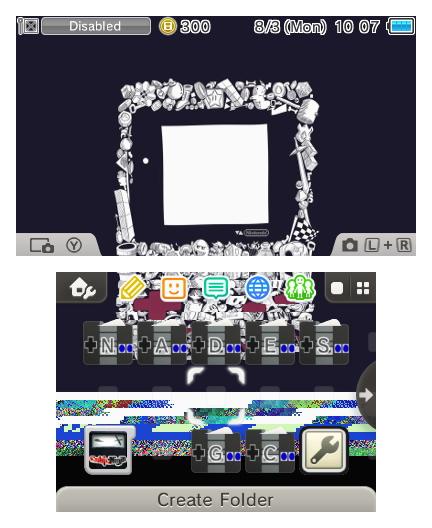
So far i'm getting this:

CLf_dcLUkAA2VhY.jpg

The change in button color may have to do with one of the color settings in the theme(?) IDK
Not sure why the bottom image flipped out. -_-

Edit: NEVERMIND! Had flipbook checked for bottom screen..
Edit(Again): Fixed bottom screen:
CLgB4GQUwAAGblZ.jpg
 
Last edited by usernametaken,
So far i'm getting this:

CLf_dcLUkAA2VhY.jpg

The change in button color may have to do with one of the color settings in the theme(?) IDK
Not sure why the bottom image flipped out. -_-

Edit: NEVERMIND! Had flipbook checked for bottom screen..

Its looking good thank you, hmm wonder why the bottons are blue (on folder icon)
 

Site & Scene News

Popular threads in this forum